PWM, CubeMX config
This page: what does the configuration look like for my board, specifically regarding PWM.
The specific configuration for the arm_board can be found by opening components/arm_board/firmware in CubeMX.
Minor things to note
- FREERTOS is enabled by selecting
Interface: CMSIS_V2.
NOTE: For this to work, in SYS the Timebase Source should be set to a timer other than SysTick. I have chosen TIM14, but it doesn't really matter as long as you don't use it anywhere else in the program.
- The MAC address and IP are set in ETH and LWIP respectively (for networking purposes, see networking docs)
Pins
The only pin that is set (except for defaults) is PA0. It is set to TIM2_CH1, this means it uses Timer 2 Channel 1 for something, in this case it is PWM generation. Thus, we enable TIM2 by selecting Channel 1: PWM Generation CH1.
Pulse Width Modulation (PWM) is a technique for generating a continuous HIGH/LOW alternating digital signal and programmatically controlling its pulse width and frequency. Certain loads like (LEDs, Motors, etc) will respond to the average voltage of the signal which gets higher as the PWM signal’s pulse width is increased. This technique is widely used in embedded systems to control LEDs brightness, motor speed, and other applications.
> DeepblueMbedded.com
PWM parameters
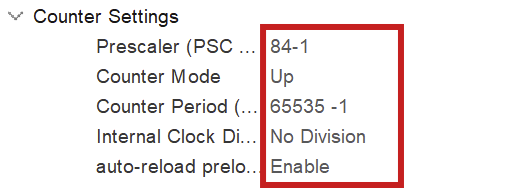
NOTE: -1 for prescaler and counter period because of 0 index counting
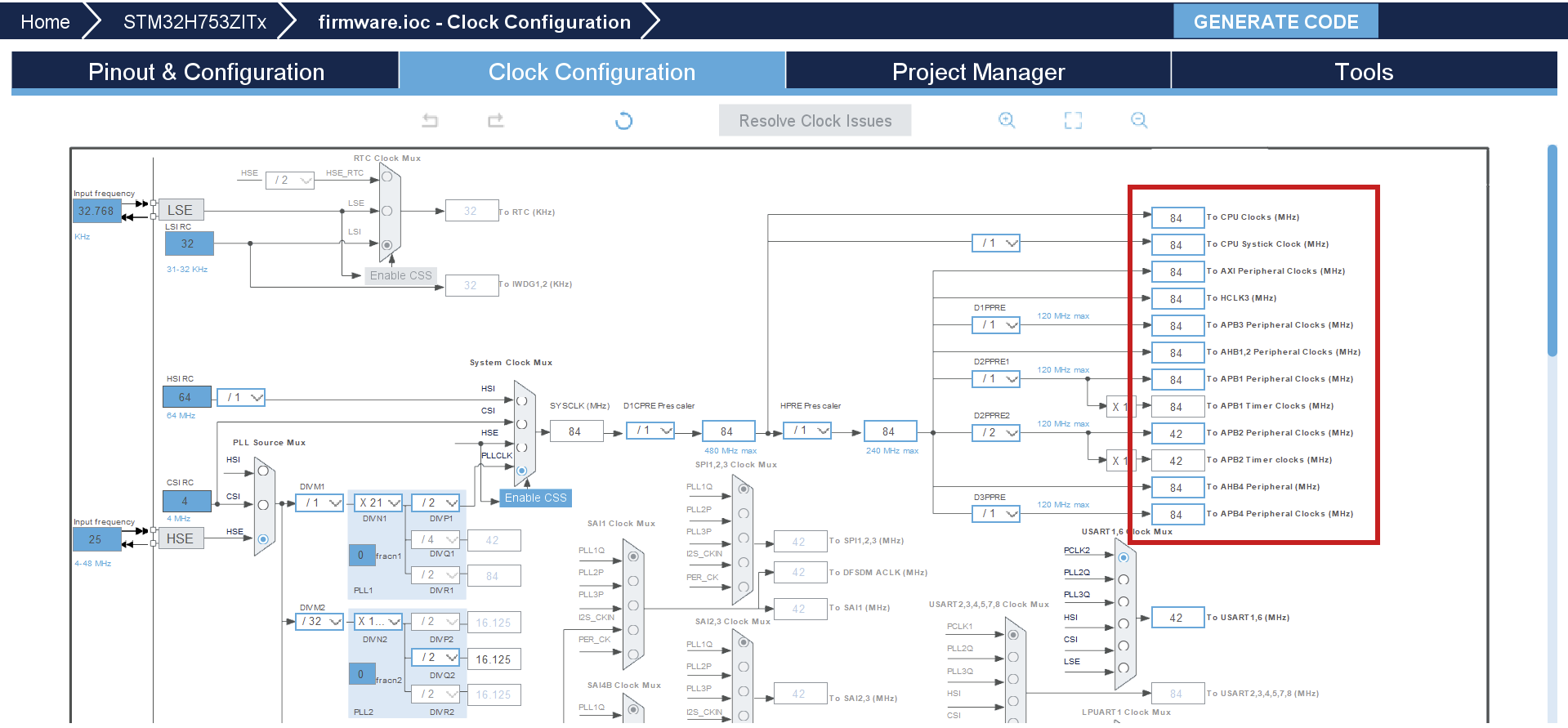
To fully configure the PWM generation, we have to set the above parameters. The prescaler has to do with the clock configuration. You want to set the prescaler equal to the amount of MHz in the clock configuration, because we will divide the clock frequency by the prescaler! This way we work with 1MHz in calculating the counter period for the wished for PWM frequency (see below).

NOTE: the counter period uses the ARR (AutoReload Register). Those terms are used interchangeably in online sources.
As of now, the counter period is at 65535, which is the maximum value for an unsigned 16bit integer. This results in a PWM frequency of 1098Hz. The frequency of PWM should be suitable for the motor you are using. For more information on PWM see resource 1.
Clock configuration
The board can be optimized to run at a higher frequency than is preconfigured. You can set the system clock to work at 84 MHz by setting any of the right-hand clocks in the clock configuration menu to 84. The program then auto calculates the settings for the system, also see resource 2.