
Integration with ROS2
Overview
The Communications node bridges the gap between raw UDP/protobuf packets and the ROS2 ecosystem running on Jonny Boi. This page explains how incoming protobuf messages get converted into ROS2 messages and published on topics, the handler pattern that makes this extensible, and how custom ROS2 message types are defined.
Custom ROS2 Message Types
ROS2 uses its own message format (.msg files) to define the structure of data exchanged between nodes over topics. These are separate from protobuf definitions, they exist so that internal ROS2 nodes like the Behavior Node can work with typed, idiomatic ROS2 messages rather than raw protobuf objects.
All custom message definitions live in the msg/ folder of the comms package:
comms/msg/
  ImuSensorInformation.msg
  SensorBoardGPSInfo.msg
  SensorBoardPHInfo.msg
  SensorBoardDiagnostics.msg
  SensorState.msg
These are registered in CMakeLists.txt via rosidl_generate_interfaces, which generates the corresponding C++ types at build time. The generated types follow the naming convention comms::msg::MessageName and can be included in any C++ file as #include "comms/msg/message_name.hpp". For more on ROS2 interfaces, refer to the official documentation: https://docs.ros.org/en/humble/Concepts/Basic/About-Interfaces.html
The Handler Pattern
The handler pattern is the core architectural decision that makes adding new message types straightforward without ever touching the dispatch logic in udp_forwarder_node.cpp.
Every message type that needs to be converted and published as a ROS2 topic is represented by a handler class. All handlers extend the abstract Handler base class defined in include/comms/udp/handler.hpp:
class Handler {
public:
    virtual ~Handler() = default;
    virtual void handle(const PBEnvelope& envelope) = 0;
};
Each concrete handler class — one per message type — lives in include/comms/udp/handlers/ and its corresponding .cpp in src/handlers/. Its job is exactly three things:
- Extract the specific protobuf message from the
PBEnvelope - Map the protobuf fields to the equivalent ROS2 message fields
- Publish the ROS2 message on the appropriate topic
As an example, ImuHandler extracts SensorBoardIMUInfo from the envelope, maps its accelerometer, gyroscope and magnetometer fields to a comms::msg::ImuSensorInformation message, and publishes it on the imu_data topic.
Handler Registration
Handlers are registered in the constructor of udp_forwarder_node.cpp using a simple unordered_map keyed by PBEnvelope::PayloadCase:
handlers_.emplace(
    static_cast<int>(PBEnvelope::kImuInfo),
    std::make_unique<ImuHandler>(this, "imu_data", 10)
);
The three constructor arguments are the node pointer (so the handler can create a ROS2 publisher), the topic name to publish on, and the publisher queue size. To add support for a new message type, you write a new handler class and add one line here. The dispatch logic in rx_loop requires no changes at all.
The Full Inbound Flow
The complete path from a raw UDP packet to a ROS2 topic looks like this:
UDP datagram arrives on listen_port
        ↓
PBEnvelope::ParseFromArray()
        ↓
envelope.payload_case() → look up handler in map
        ↓
handler->handle(envelope)
        ↓
extract protobuf payload from envelope
        ↓
map fields to comms::msg::* ROS2 message
        ↓
publisher->publish(ros_msg)
        ↓
ROS2 topic (e.g. /imu_data)
        ↓
Behavior Node / Controller Node subscribes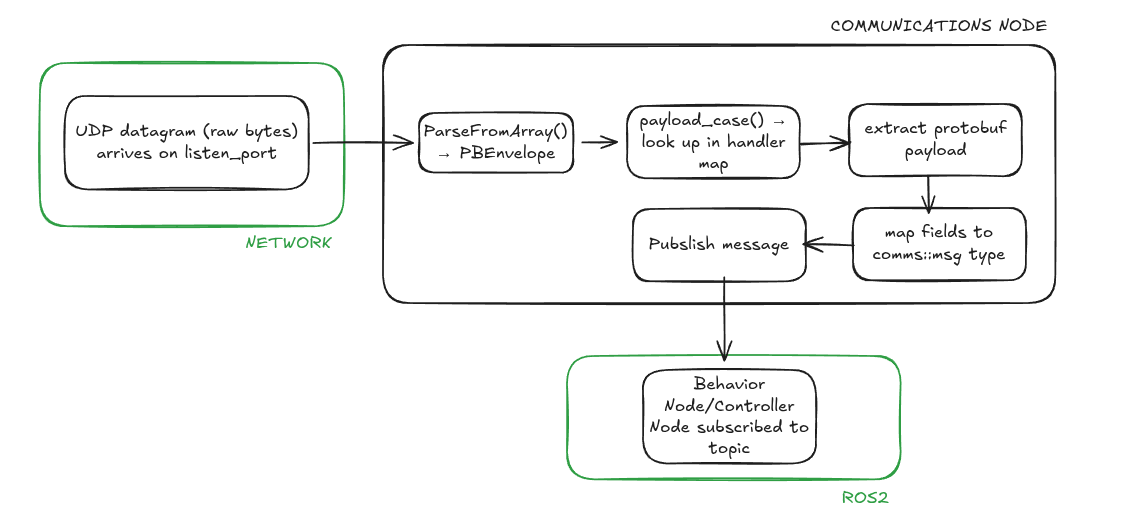
If no handler is registered for a given payload_case, the node logs a throttled warning and drops the packet. This means unhandled message types fail silently —silently, keep this in mind when debugging missing data.
The Outbound Flow
The outbound direction works in reverse — the Communications node subscribes to a ROS2 topic, converts the incoming message back into a protobuf, wraps it in a PBEnvelope, and sends it as a UDP packet to the appropriate destination. This path is not yet fully implemented for all message types and will be extended as the Behavior Node develops.
Adding a New Message Type
For a step-by-step guide on adding a new message type end-to-end — from the proto definition all the way to a registered handler — see the dedicated Adding a new message page.