
Internal Communication Software (ZULIP)
Why Zulip
RoboTeam Twente is a large and, it being a student organization, sometimes chaotic team. That makes reliable information transfer between members hard.
Historically, updates and technical questions went through in-person conversation or WhatsApp. This caused recurring problems: messages were missed when a chat got busy, old conversations were almost impossible to search, and the norm on WhatsApp is casual, gifs, stickers, jokes, which is fine socially, but buries anything important. Part-time members returning after a few days away had no way to catch up on what they had missed.
We needed software built for structured work on a complex project. Options include Slack, Discord, and Teams. We chose Zulip because It can be self-hosted, making it effectively free while still professional.
The point of Zulip is not that it replaces WhatsApp. It is that its topic threading lets a member open a single subsystem channel and read that conversation from the top, in order, without combing through unrelated messages. That is the specific property WhatsApp and a daily stand-up cannot provide, and it is why the tool was chosen rather than only a change of habit.
(Keep that paragraph — it's the answer to the exact question your assessor raised about why add a tool rather than a practice. It belongs on the page and in Chapter 4.)
How the channels are structured
The channel structure should mirror the structure of the organization so it feels intuitive. There are two models I imagined:
- By specialization: software, embedded, mechanical, electrical, control.
- By subsystem: drive train, drill, gripper, human relations.
We used specialization. I would recommend a future team to switch, but a team should pick one they belive would be most effective to tackle to scope of that years project.
Every layout starts with a General section containing:
- #announcements: org-wide notices posted by management
- #general: informal chat, the social overflow that keeps the working channels clean.
- #memos: where every GTM memo is posted (see the Memos page).
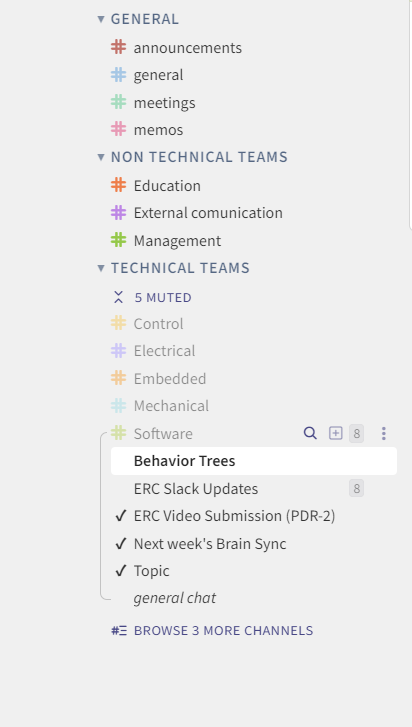
After the General section, one channel per specialization/subsystem. Within each channel, topics are created per piece of work in progress. e.g. in #embedded, a topic like "CubeMars motor integration". Topics are simple; make a new one rather than derailing an existing thread.
Example layout (specialization based)
Posting rules
A tool only helps if people use it consistently. The minimum expectations:
- Technical questions and updates go in the relevant channel/topic, not in DMs or WhatsApp. So the answer is findable at a later date by whoever needs it next.
- One topic per piece of work. Start a new topic rather than reusing an old one for a new issue.
- Announcements that everyone must see go in #announcements (makes sense).
- Memos are posted to #memos within 24 hours of each GTM.
Getting set up
- Hosting: Zulip is self-hosted at https://roboteamtwente.zulipchat.com/. Responsibility for keeping the instance running sits with someone from Software or who is most interested in it.
- Onboarding: new members are added and shown the structure during the onboarding week.
No comments to display
No comments to display