
Driver usage
Introduction
This documention describes how to initialize your Ethernet driver and send your first message. A lot of constants can be seen in the explanatory code. Those can be found in components/common/networking_constants.
Code Usage
Relevant File
In components -> common -> networking -> inc, there is one file, called ethernet.h. That file exposes functions that are used to use Ethernet. The headers in the folder "stm" are only to be used inside the Ethernet driver!
First Use
Code initialization
When you first use the Ethernet driver, you have to initialize a few things.
First make sure that HAL is initialized (using HAL_init()), the D and I cache are (SCB_EnableICache() and SBC_EnableDCache() respectively), and the system clock (SystemClock_config()) is. These auto-generated functions start processes that Ethernet uses.
Then you initialize Ethernet by calling ETH_init(...) and ETH_udp_init(...) in order.
For ETH_init, the link_status_change_callback can be set to NULL, to use the default function. The others have to be set. For initial testing you can set these to the same values as set in cubeMX.
ETH_udp_init(...) is a bit harder to initialize. The sender_prio_num just defines the amount of priority queues you use for queuing the send messages. The queues we use are freeRTOS queues. More information can be found here. A possible implementation is seen below.
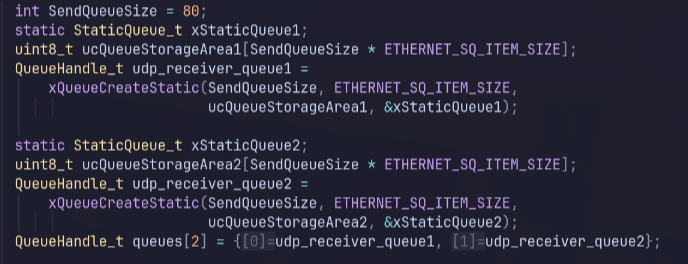
The last argument is receiver_callback. It can be any function that takes a receive_frame_t, found in ethernet_udp.h. However, we also implemented a "packet dispatcher", to handle incoming packets. More information about that is in the packet dispatcher documentation (LINK PACKET DISPATCHER DOCUMENTATION). An example implementation is down below.
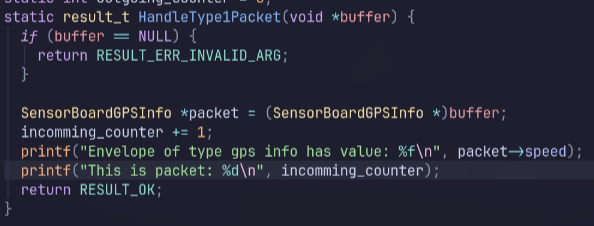
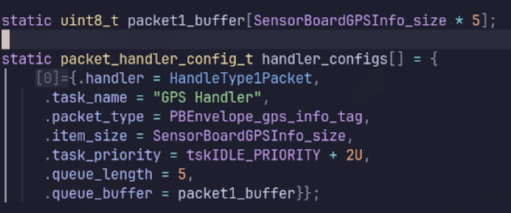

Now Ethernet is started and you can receive packages!!
Sending Packets
To send to a certain IP, you have to set the ARP table. Otherwise the it will only send ARP resolution messages. You do that by using the ETH_add_arp(...) function with the IP you want to send to, and any randon mac address.
Now you can send messages. You can do that by using ETH_udp_send. An example for that is down below.

The payload can be any byte array, where the size of that byte array is the 4th argument.