SSL Robots
Event Preparation Checklist
- Screw off the skirt
- Plug in the battery
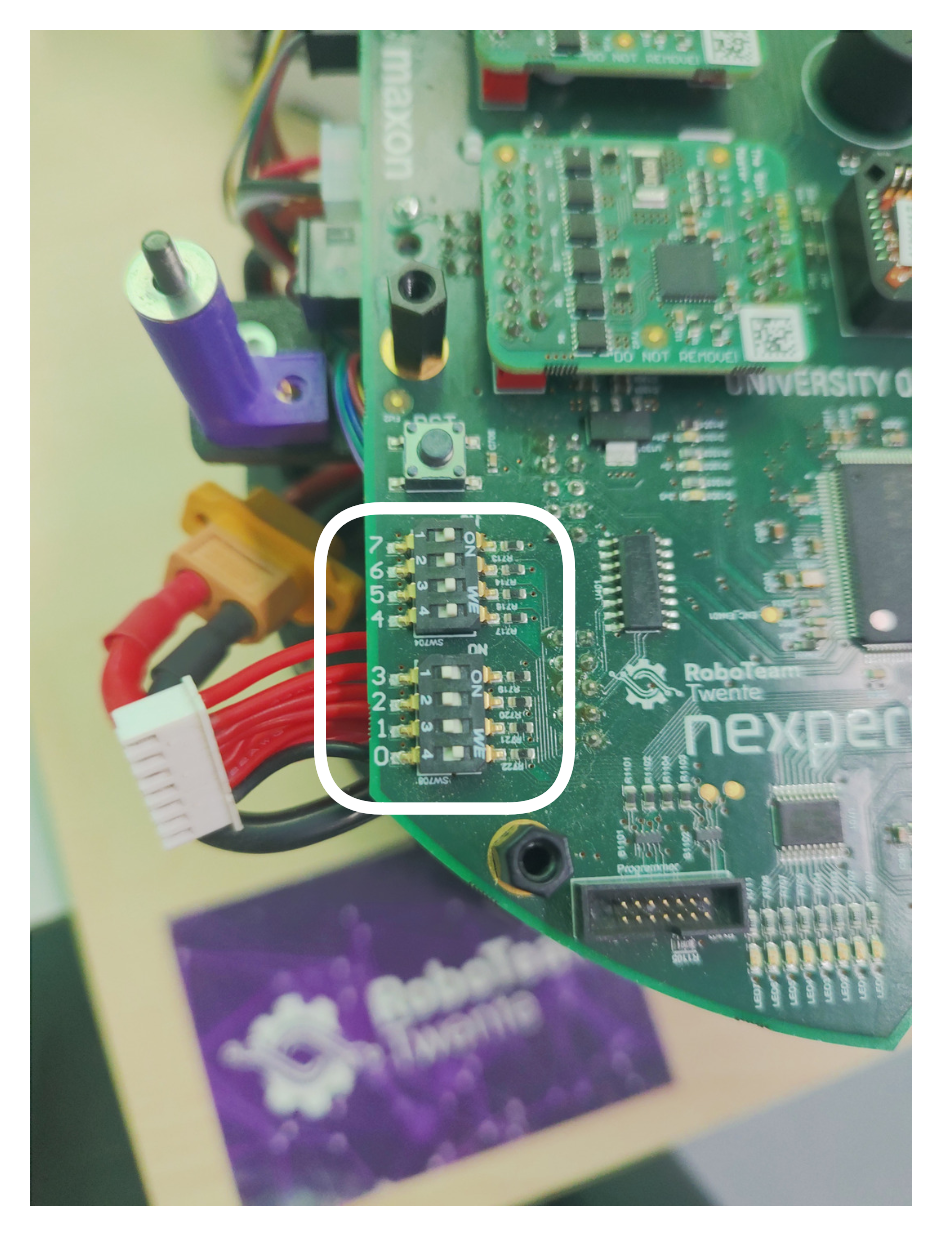
- Select test mode (7th switch OFF)

- Boot
- Robot number on the screen matches its skirt
- If not, enter correct number in binary in the switches 0–3
- Click OK
- Self Tests → System Test → System Test
- Wheels rotate smoothly and forcefully
- Kicker kicks and doesn't get stuck
- Dribbler doesn't spin
- Info Menu → Sensors etc → Encoders
- The values don't jitter too much
- When you spin the wheels, the values follow
- Self Tests → Top board → Buzzer test
- Listen to the end
- Select normal mode (7th switch ON)
- Reboot
- Start the Basestation
- Plug both Basestation cables into the laptop
cd ~/Basestation/python_utils
python3 joystick.py -r $ROBOT_NO
- Connect the controller over Bluetooth
- Named
Lic2 Pro Controller - Controller with MAC
30:31:7D:D7:C0:1Eworks well - You might need to delete the controller and pair it again
- USB controller works as well
- Named
- Play with the controller
- Moves back/forth/sideways (left joystick)
- Rotates (put it on the ground) (right joystick, up/down)
- The robot has an IMU inside, so if you do it on the stand, the wheels will keep spinning
- Kicks (right trigger)