# Getting Started

How to setup and get started working on the embedded code

# STM32CubeMX

***This page:** *the short, concrete workflow for using STM32CubeMX to configure an STM32 project and generate init code without accidentally nuking your work.**

<p class="callout info">**Download:**<span style="white-space: pre-wrap;"> </span>[https://www.st.com/en/development-tools/stm32cubemx.html](https://www.st.com/en/development-tools/stm32cubemx.html)</p>

## 1) What is it

> **STM32CubeMX** is a graphical tool that simplifies the configuration of STM32 products, and generates the corresponding initialization code through a guided step-by-step process.  
> <span style="white-space: pre-wrap;">&gt; </span>[st.com](https://www.st.com/en/development-tools/stm32cubemx.html)

In the embedded subteam, we use STM32 Nucleos to make our robot come to life. We use CubeMX to enable these boards to do what we want by **setting the pins**<span style="white-space: pre-wrap;"> on the physical board and </span>**generating code**<span style="white-space: pre-wrap;"> that we can use to drive those pins. </span>

---

## 2) Starting a (new) project

<span style="white-space: pre-wrap;">Once you have successfully installed CubeMX, you can either create or open a project. You will most likely be working with already existing CubeMX projects. </span>**You can open any project by finding the `<strong class="editor-theme-bold editor-theme-code">.ioc</strong>` file.**<span style="white-space: pre-wrap;"> This is the configuration file for any CubeMX project.</span>

However, there are some **important settings**<span style="white-space: pre-wrap;"> that any project needs.</span>

---

### a. New project

<p class="callout danger"><span style="white-space: pre-wrap;">When creating a NEW project make sure you use the </span>**board selector and NOT the MCU selector**<span style="white-space: pre-wrap;"> to start your project (given the fact that you will be working with a board). If you don't do this, it will cause problems down the line.</span></p>

### b. Project Settings

##### **Project Manager &gt; Project**

<span style="white-space: pre-wrap;">Once you have your project open, navigate to the project manager. </span>

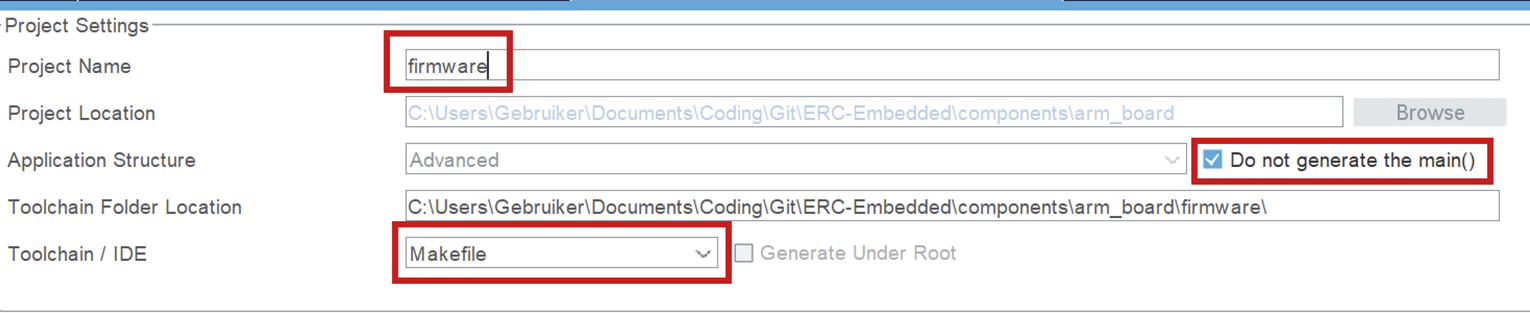
- <span style="white-space: pre-wrap;">It is important that your </span>**project name is "firmware"**, since this is the name the folder is supposed to have in the embedded structure. (This is platformio configuration related.)
- **Do not generate main()**. You should only generate a main function to check what is in there and use it as an example, but when you want to build, you can not have a main function in your auto-generated code. It will conflict with your own main function.
- <span style="white-space: pre-wrap;">Set the toolchain to </span>**Makefile**. You should not use another toolchain, because the post code generation script uses information from the Makefile!

[![afbeelding.png](https://bookstack.roboteamtwente.nl/uploads/images/gallery/2026-04/scaled-1680-/G5rafbeelding.png)](https://bookstack.roboteamtwente.nl/uploads/images/gallery/2026-04/G5rafbeelding.png)
##### **Project Manager &gt; Code Generator**

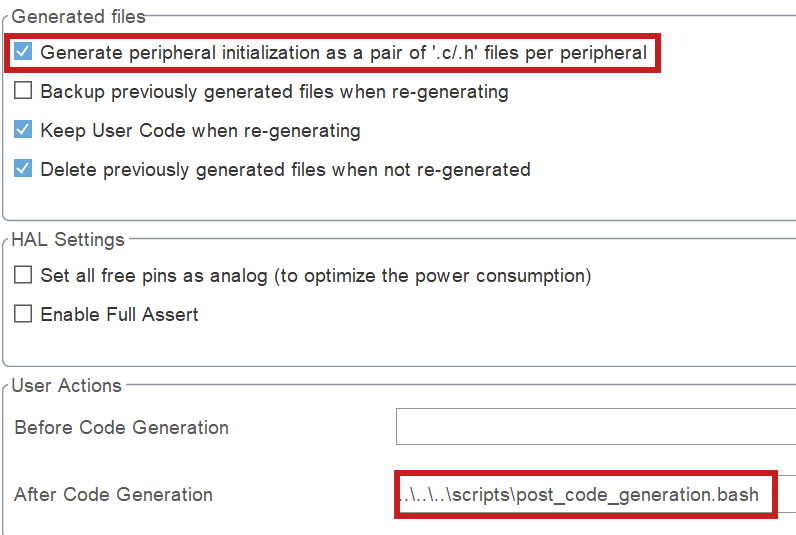
- <span style="white-space: pre-wrap;">Click the box to generate </span>**separate files per peripheral**<span style="white-space: pre-wrap;">. Otherwise you will encounter errors surrounding missing libraries when building. </span>
- <span style="white-space: pre-wrap;">Set the after code generation script. It can be found in </span>`<span class="editor-theme-code">scripts/post_code_generation.bash</span>`<span style="white-space: pre-wrap;">. More information in </span>[Post-Generation Scripts](https://bookstack.roboteamtwente.nl/books/embedded-infastructure/page/post-generation-scripts "https://bookstack.roboteamtwente.nl/books/embedded-infastructure/page/post-generation-scripts").

<p class="callout info">**NOTE for Windows users:**<span style="white-space: pre-wrap;"> the post generation script will NOT automatically be ran for you. Instead, you will have to run the script by hand in the </span>**git bash**<span style="white-space: pre-wrap;"> terminal.</span></p>

[![afbeelding.png](https://bookstack.roboteamtwente.nl/uploads/images/gallery/2026-04/scaled-1680-/WV6afbeelding.png)](https://bookstack.roboteamtwente.nl/uploads/images/gallery/2026-04/WV6afbeelding.png)

---

## 3) Typical Workflow

### a. Configure pins &amp; peripherals

- <span style="white-space: pre-wrap;">In </span>**Pinout &amp; Configuration**: enable the peripherals you need (UART/SPI/I2C/CAN/Timers/ADC/etc.).
- Assign pins and resolve conflicts (CubeMX will warn you).
- Configure DMA + NVIC if needed (especially for high-rate IO or RTOS systems).

### b. Set up the clocks

- <span style="white-space: pre-wrap;">Go to </span>**Clock Configuration**<span style="white-space: pre-wrap;"> and set your clock source (HSI/HSE) and PLL to the target system frequency.</span>
- Verify peripheral clocks (UART baud rates and timer frequencies depend on this).
- If USB is used, make sure USB clock requirements are satisfied (CubeMX will usually flag invalid setups).

### c. Code generation

**Do not write custom code in CubeMX-generated files.**

<span style="white-space: pre-wrap;">CubeMX will overwrite generated files during regeneration. Any custom code placed there </span>**will be lost**, even if it appears to work temporarily.

**Rule:**

- <span style="white-space: pre-wrap;">Generated code is </span>**read-only**.
- <span style="white-space: pre-wrap;">Your code lives </span>**outside**<span style="white-space: pre-wrap;"> of it.</span>

**What to do instead:**

- Put all application logic in your own source files (`<span class="editor-theme-code">src/</span>`, modules, drivers, etc.).
- Only use generated code as initialization and hardware configuration.
- <span style="white-space: pre-wrap;">Call your own code from the appropriate entry points (e.g. after init in </span>`<span class="editor-theme-code">main()</span>`).

**Bottom line:**  
If your code depends on surviving a “Generate Code” click, it’s in the wrong place.

### d. Generate code, then build &amp; verify

- <span style="white-space: pre-wrap;">Open </span>**Project Manager**<span style="white-space: pre-wrap;"> and confirm the project type/toolchain and output path are correct.</span>
- <span style="white-space: pre-wrap;">Click </span>**Generate Code**.
- <span style="white-space: pre-wrap;">Immediately review changes (e.g. </span>`<span class="editor-theme-code">git diff</span>`). If CubeMX changed a lot more than expected, stop and investigate before committing.
- Build the firmware and run a basic smoke test (UART prints, LED blink, peripheral init success, etc.)

# Git Submodules

## On this page

- [1. Why submodules?](#why)
- [2. Key concepts](#terms)
- [3. Cloning a repo with submodules](#clone)
- [4. Adding ERC-Protobufs as a submodule](#add)
- [5. Updating ERC-Protobufs (pinning a new commit)](#update)
- [6. Branches, detached HEAD, and what “pinned” means](#branches)
- [7. Common mistakes](#mistakes)
- [8. Command cheat sheet](#cheatsheet)

## 1) Why submodules?

<span style="white-space: pre-wrap;">A </span>[git submodule](https://git-scm.com/book/en/v2/Git-Tools-Submodules)<span style="white-space: pre-wrap;"> lets one repository “mount” another repository at a specific commit. That sounds fancy, but it’s really just Git saying: “this folder is a separate repo, and we are pinning it to a specific SHA because reproducibility is not optional.”</span>

We use this for shared code/assets that:

- should be versioned and reviewed independently,
- <span style="white-space: pre-wrap;">must be </span>**pinned**<span style="white-space: pre-wrap;"> (reproducible builds, fewer “works on my machine” sightings),</span>
- is shared across multiple firmware/software repositories.

**RoboTeam example:**<span style="white-space: pre-wrap;"> </span>**ERC-Protobufs**<span style="white-space: pre-wrap;"> can be shared between embedded firmware, tooling, and PC-side code. Pinning ensures everyone generates/uses the same message definitions — which is what prevents “my robot speaks protobuf dialect #3” incidents.</span>

## 2) Key concepts

<table id="bkmrk-termwhat-it-meanswhy"><colgroup><col style="width: 192px;"></col><col></col><col></col></colgroup><tbody><tr><th>Term

</th><th>What it means

</th><th>Why care about it?

</th></tr><tr><td>`<span class="editor-theme-code">.gitmodules</span>`

</td><td>A file in the parent repo that stores submodule name/path/URL.

</td><td>This is what gets committed so everyone else can actually fetch the submodule without guessing.

</td></tr><tr><td>“Pinned commit”

</td><td>The parent repo records a specific commit SHA for the submodule.

</td><td>Builds are reproducible; updating is an explicit change (and therefore reviewable).

</td></tr><tr><td>Detached HEAD

</td><td>By default, a submodule checks out the exact pinned commit, not a branch.

</td><td>Normal. It looks scary the first time, but it just means “you’re on a commit, not a branch.”

</td></tr><tr><td>`<span class="editor-theme-code">git submodule update</span>`

</td><td>Checks out the submodule commit referenced by the parent repo.

</td><td>Use after switching branches or pulling changes, because submodules do not magically follow along.

</td></tr></tbody></table>

## 3) Cloning a repo with submodules

<span style="white-space: pre-wrap;">If a repository already uses </span>[ERC-Protobufs](https://github.com/RoboTeamTwente/ERC-Protobufs/tree/aa3ea9bfd9cbe811f719f328bf4927445820d1f1)<span style="white-space: pre-wrap;"> as a submodule, you must fetch it after cloning. Otherwise Git will politely give you an empty folder and let you discover the problem at build time.</span>

### Recommended (one command)

```
git clone --recurse-submodules <PARENT_REPO_URL>
```

### If you already cloned (two commands)

```
git submodule init
git submodule update
```

**Tip:**<span style="white-space: pre-wrap;"> Add </span>`<span class="editor-theme-code">--recursive</span>`<span style="white-space: pre-wrap;"> if the submodule itself contains submodules:</span>

```
git submodule update --init --recursive
```

**Symptom you forgot submodules:**<span style="white-space: pre-wrap;"> build errors like “file not found”, missing generated headers, missing </span>`<span class="editor-theme-code">.proto</span>`<span style="white-space: pre-wrap;"> files, or empty directories where ERC-Protobufs should be.</span>

## 4) Adding ERC-Protobufs as a submodule

<span style="white-space: pre-wrap;">Use this when a parent repository needs to include </span>[ERC-Protobufs](https://github.com/RoboTeamTwente/ERC-Protobufs/tree/aa3ea9bfd9cbe811f719f328bf4927445820d1f1)<span style="white-space: pre-wrap;"> for builds/code generation. This is a dependency decision, not a casual Friday activity.</span>

### Step-by-step

1. <span style="white-space: pre-wrap;">Choose where it should live in your repo, for example: </span>`<span class="editor-theme-code">third_party/ERC-Protobufs</span>`<span style="white-space: pre-wrap;"> (or </span>`<span class="editor-theme-code">libs/ERC-Protobufs</span>`).
2. Add the submodule:```
    git submodule add <ERC_PROTOBUFS_REPO_URL> third_party/ERC-Protobufs
    ```
3. Commit the changes:```
    git add .gitmodules third_party/ERC-Protobufs
    git commit -m "Add ERC-Protobufs as a submodule"
    ```

**What gets committed?**<span style="white-space: pre-wrap;"> (a.k.a. “what did I just do to the repo”) </span>

- `<span class="editor-theme-code">.gitmodules</span>`<span style="white-space: pre-wrap;"> file (submodule metadata)</span>
- <span style="white-space: pre-wrap;">a “gitlink” entry at </span>`<span class="editor-theme-code">third_party/ERC-Protobufs</span>`<span style="white-space: pre-wrap;"> that pins a specific commit SHA</span>

The submodule’s full contents are not copied into the parent repo history. You’re committing a pointer, not a copy.

**Protocol for RoboTeam:**<span style="white-space: pre-wrap;"> confirm with your lead whether the submodule path is standardized across repositories (helps tooling and scripts, and prevents everyone inventing </span>`<span class="editor-theme-code">thirdparty/</span>`<span style="white-space: pre-wrap;"> in six different spellings).</span>

## 5) Updating ERC-Protobufs (pinning a new commit)

Updating a submodule means: “the parent repo now points to a newer commit of ERC-Protobufs”. This should be done intentionally and reviewed because it can change message definitions and compatibility. Treat it like an API bump, not like updating a meme folder.

### Update flow (safe + explicit)

1. Enter the submodule directory:```
    cd third_party/ERC-Protobufs
    ```
2. Fetch latest commits:```
    git fetch --all --tags
    ```
3. Check out the desired commit (or a tag):```
    git checkout <commit-sha-or-tag>
    ```
4. Go back to the parent repo and commit the updated pin:```
    cd ../..
    git status
    git add third_party/ERC-Protobufs
    git commit -m "Bump ERC-Protobufs submodule to <sha-or-tag>"
    ```

**Optional (if you want the newest remote-tracking commit):**<span style="white-space: pre-wrap;"> inside the parent repo:</span>

```
git submodule update --remote --merge
```

This requires the submodule to have a branch configured; it is less explicit, so use with care (automation is great right up until it updates something you didn’t mean to update).

**Do not “fix” submodule issues by deleting the folder.**<span style="white-space: pre-wrap;"> That often creates messy diffs and makes Git sad. Use actual submodule commands instead.</span>

## 6) Branches, detached HEAD and what “pinned” means

<span style="white-space: pre-wrap;">When you run </span>`<span class="editor-theme-code">git submodule update</span>`<span style="white-space: pre-wrap;">, Git checks out the exact commit recorded by the parent repo. This usually results in a </span>**detached HEAD**<span style="white-space: pre-wrap;"> state inside the submodule.</span>

**This is normal.**<span style="white-space: pre-wrap;"> A consumer repo typically should not make local changes inside the submodule. If you need to change ERC-Protobufs itself, do that in the ERC-Protobufs repository and then bump the pin in the consumer repo. Submodules are for consuming, not freestyle surgery.</span>

### How to tell what commit you are pinned to

```
# From the parent repo root:
git submodule status
```

### How to see what changed after a submodule bump

```
# From the parent repo root:
git diff --submodule
```

## 7) Common mistakes

### “Directory is empty / looks uninitialized”

```
git submodule update --init --recursive
```

### “Submodule shows changes but I didn’t touch it”

Often caused by being on the wrong commit, or having local edits in the submodule. Either way, Git is not gaslighting you — something really is different.

```
cd third_party/ERC-Protobufs
git status
git reset --hard
git clean -fd
cd ../..
git submodule update --init --recursive
```

**Warning:**<span style="white-space: pre-wrap;"> </span>`<span class="editor-theme-code">git reset --hard</span>`<span style="white-space: pre-wrap;"> and </span>`<span class="editor-theme-code">git clean -fd</span>`<span style="white-space: pre-wrap;"> will delete local submodule changes. Only do this if you are sure you don’t need them (i.e., you didn’t secretly do work inside the submodule and forget).</span>

### “I switched branches and submodules are wrong”

```
git submodule update --init --recursive
```

### “I updated the submodule but forgot to commit in the parent repo”

After updating inside the submodule, you must commit the new pin from the parent repo. Otherwise you updated your local checkout and told nobody, which is the Git equivalent of whispering into the void.

```
git add third_party/ERC-Protobufs
git commit -m "Bump ERC-Protobufs submodule"
```

## 8) Command cheat sheet

### Clone with submodules

```
git clone --recurse-submodules <repo-url>
```

### Initialize/update after cloning

```
git submodule update --init --recursive
```

### Show pinned commits

```
git submodule status
```

### Add ERC-Protobufs

```
git submodule add <erc-protobufs-url> third_party/ERC-Protobufs
git commit -m "Add ERC-Protobufs submodule"
```

### Bump ERC-Protobufs to a specific commit/tag

```
cd third_party/ERC-Protobufs
git fetch --all --tags
git checkout <sha-or-tag>
cd ../..
git add third_party/ERC-Protobufs
git commit -m "Bump ERC-Protobufs submodule to <sha-or-tag>"
```

# Gaslight your boss :D

<span style="white-space: pre-wrap;">(If you need help with abusive bosses reach out </span>[@mybrosky\_nam](https://creations.mtdv.me/Rick-ZarolERC-Embedded-Simplified-Official), I couldnt do anything about it but I'll try to help you so you don't suffer as well ☮️)