# Setup of Embedded Ethernet

***This page:** *How to set up ethernet.**

---

## **Introduction**

**Ethernet** <span style="white-space: pre-wrap;">is the protocol used to communicate between all the components. It uses the </span>**auto-generated Ethernet driver**<span style="white-space: pre-wrap;"> code from cubeMX to use the physical Ethernet peripheral. It also uses </span>**LWIP** <span style="white-space: pre-wrap;">to do the lowest levels of packet handling. Lastly, we use </span>**freeRTOS** <span style="white-space: pre-wrap;">for multi threading. The current implementation cannot work without it. </span>

---

## **CubeMX**

<span style="white-space: pre-wrap;">CubeMX is used to automatically generate setup code for the stm32. To use Ethernet you have to set up a few things in cubeMX. </span>

<span style="white-space: pre-wrap;">To write this driver I mostly used videos from ControllersTech on YouTube. The most useful video is </span>[STM32 Ethernet (Part 1): How to configure Ethernet peripheral and perform successful ping test](https://www.youtube.com/watch?v=8r8w6mgSn1A&t=907s)<span style="white-space: pre-wrap;"> \[1\]. So if you do not understand anything, watch that video. </span>

---

### 1) ETH

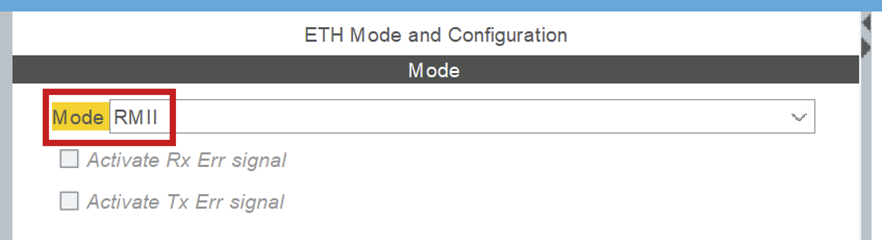
<span style="white-space: pre-wrap;">ETH is under connectivity in cubeMX. It sets up the Ethernet peripheral. Set it to </span>`<span class="editor-theme-code">RMII</span>`<span style="white-space: pre-wrap;"> mode. </span>

[![afbeelding.png](https://bookstack.roboteamtwente.nl/uploads/images/gallery/2026-04/scaled-1680-/dceafbeelding.png)](https://bookstack.roboteamtwente.nl/uploads/images/gallery/2026-04/dceafbeelding.png)

##### **NVIC &gt; NVIC**

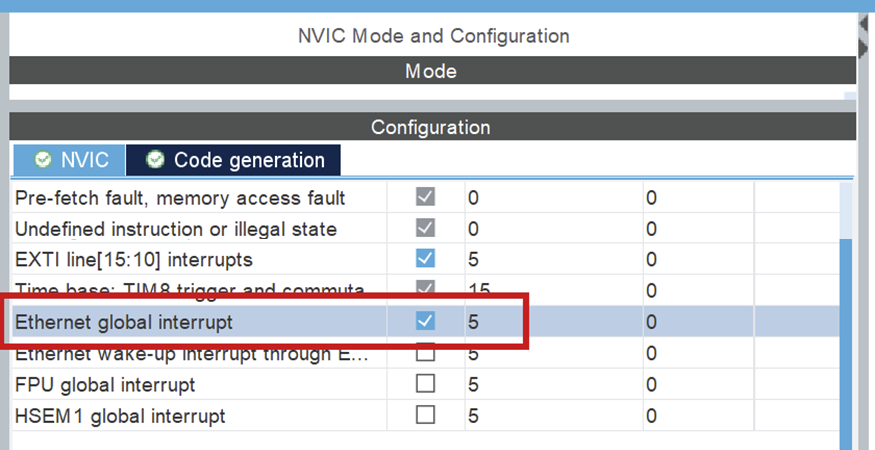
<span style="white-space: pre-wrap;">Turn on Ethernet global interrupt in NVIC settings. </span>

[![afbeelding.png](https://bookstack.roboteamtwente.nl/uploads/images/gallery/2026-04/scaled-1680-/oqlafbeelding.png)](https://bookstack.roboteamtwente.nl/uploads/images/gallery/2026-04/oqlafbeelding.png)

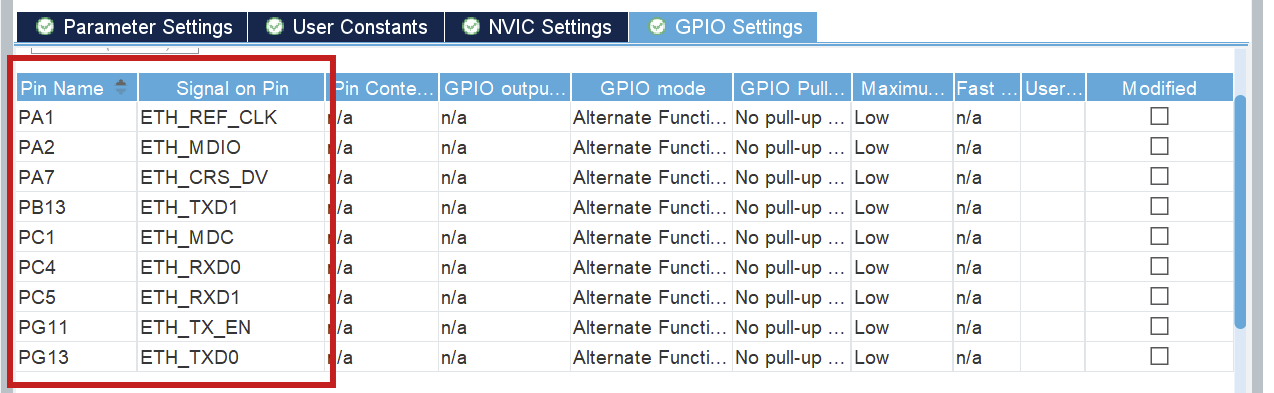
##### **ETH &gt; GPIO settings**

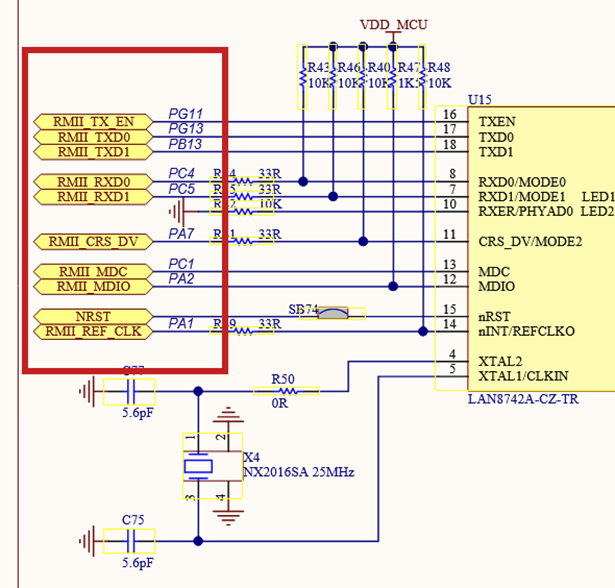
<p class="callout warning"><span style="white-space: pre-wrap;">When Ethernet is enabled, the pins should </span>**automatically** be configured according to the below schematic. This can be wrong, please **confirm it**!</p>

<span style="white-space: pre-wrap;">Setup all the PINS like it is done in the </span>[PIN schematic](https://www.st.com/en/evaluation-tools/nucleo-h753zi.html#cad-resources)<span style="white-space: pre-wrap;"> (Download: </span>[MB1364-H753ZI-C01 Board schematic](https://www.st.com/resource/en/schematic_pack/mb1364-h753zi-c01-schematic.pdf)<span style="white-space: pre-wrap;">, pg. 6) \[2\]. </span>

[![afbeelding.png](https://bookstack.roboteamtwente.nl/uploads/images/gallery/2026-04/scaled-1680-/gxsafbeelding.png)](https://bookstack.roboteamtwente.nl/uploads/images/gallery/2026-04/gxsafbeelding.png)

[![afbeelding.png](https://bookstack.roboteamtwente.nl/uploads/images/gallery/2026-04/scaled-1680-/2G1afbeelding.png)](https://bookstack.roboteamtwente.nl/uploads/images/gallery/2026-04/2G1afbeelding.png)
<details id="bkmrk-troubleshooting%3A-pin"><summary>Troubleshooting: Pins not set as schematic</summary>

<p class="callout danger">If any of the pins are not as in the schematic, refer to the above information. You can click each pin in CubeMX and choose the correct function (e.g. ETH\_RXD0), the other (incorrect) pin will be automatically disabled.</p>

</details>---

### 2) LWIP

LWIP is a middleware generated by cubeMX. You can find it under middleware.

##### **LWIP &gt; Platform Settings**

<span style="white-space: pre-wrap;">Set up LAN8742, to signal that that is the physical Ethernet driver you use. </span>

[![afbeelding.png](https://bookstack.roboteamtwente.nl/uploads/images/gallery/2026-04/scaled-1680-/N9gafbeelding.png)](https://bookstack.roboteamtwente.nl/uploads/images/gallery/2026-04/N9gafbeelding.png)

##### **LWIP &gt; General settings**

[![afbeelding.png](https://bookstack.roboteamtwente.nl/uploads/images/gallery/2026-04/scaled-1680-/zIsafbeelding.png)](https://bookstack.roboteamtwente.nl/uploads/images/gallery/2026-04/zIsafbeelding.png)

The most important configurations here are the DHCP (**DHCP = Disabled**<span style="white-space: pre-wrap;">) and IP address settings. </span>  
<span style="white-space: pre-wrap;">The IP address settings </span>**don't matter**<span style="white-space: pre-wrap;">, they will be </span>**overwritten** <span style="white-space: pre-wrap;">in a configuration file in the code. </span>

##### **LWIP &gt; Key options**

<span style="white-space: pre-wrap;">The most important part of the tab </span>**Key options**<span style="white-space: pre-wrap;"> is to check if </span>`<span class="editor-theme-code">LWIP_ARP = Enabled</span>`<span style="white-space: pre-wrap;">. You also need to keep track of the </span>`<span class="editor-theme-code">MEM_SIZE (Heap Memory Size)</span>`<span style="white-space: pre-wrap;">. Start with a value of </span>`<span class="editor-theme-code">1024*16 bytes</span>`<span style="white-space: pre-wrap;">. </span>`<span class="editor-theme-code">LWIP_RAM_HEAP_POINTER</span>`<span style="white-space: pre-wrap;"> should be </span>`<span class="editor-theme-code">0x30004900</span>`<span style="white-space: pre-wrap;"> such that the heap doesn't overlap different memory. That is the value I use, but it can be changed if need be. </span>  
<span style="white-space: pre-wrap;">Lastly, you need to add </span>`<span class="editor-theme-code">ETHARP_SUPPORT_STATIC_ENTRIES = Enabled</span>`<span style="white-space: pre-wrap;">. This is only shown when you turn on </span>`<span class="editor-theme-code">Show Advanced Parameters</span>`.

[![image.png](https://bookstack.roboteamtwente.nl/uploads/images/gallery/2026-05/scaled-1680-/idcimage.png)](https://bookstack.roboteamtwente.nl/uploads/images/gallery/2026-05/idcimage.png)[![image.png](https://bookstack.roboteamtwente.nl/uploads/images/gallery/2026-05/scaled-1680-/f6Fimage.png)](https://bookstack.roboteamtwente.nl/uploads/images/gallery/2026-05/f6Fimage.png)

---

### 3) CORTEX\_M7

<span style="white-space: pre-wrap;">You can find </span>**CORTEX\_M7**<span style="white-space: pre-wrap;"> under System Core. </span>

##### **CORTEX\_M7 &gt; Parameter Settings**

<span style="white-space: pre-wrap;">Turn on </span>`<span class="editor-theme-code">CPU ICache</span>`<span style="white-space: pre-wrap;"> and </span>`<span class="editor-theme-code">CPU DCache</span>`.

[![image.png](https://bookstack.roboteamtwente.nl/uploads/images/gallery/2026-04/scaled-1680-/tQ9image.png)](https://bookstack.roboteamtwente.nl/uploads/images/gallery/2026-04/tQ9image.png)

Setup memory protection like seen below:

[![afbeelding.png](https://bookstack.roboteamtwente.nl/uploads/images/gallery/2026-05/scaled-1680-/afbeelding.png)](https://bookstack.roboteamtwente.nl/uploads/images/gallery/2026-05/afbeelding.png)<span style="white-space: pre-wrap;">The </span>`<span class="editor-theme-code">MPU Region Base Address</span>`<span style="white-space: pre-wrap;"> is the address of the first Rx descriptor (</span>**ETH &gt; Parameter Settings &gt; General**<span style="white-space: pre-wrap;">). The </span>`<span class="editor-theme-code">MPU region size</span>`<span style="white-space: pre-wrap;"> is calculated using heap memory size and the RX buffers. Watch the </span>[video](https://www.youtube.com/watch?v=8r8w6mgSn1A&t=907s)<span style="white-space: pre-wrap;"> \[1\] mentioned above for more information. </span>

[![afbeelding.png](https://bookstack.roboteamtwente.nl/uploads/images/gallery/2026-04/scaled-1680-/sNFafbeelding.png)](https://bookstack.roboteamtwente.nl/uploads/images/gallery/2026-04/sNFafbeelding.png)---

### 4) FreeRTOS

<span style="white-space: pre-wrap;">Freertos is automatically integrated in LWIP if you turn it on in cubeMX. It does not have to be modified, it just has to be turned on. Make sure you use </span>`<span class="editor-theme-code">CMSIS_V2</span>`<span style="white-space: pre-wrap;">, because V1 did not work well. </span>

[![afbeelding.png](https://bookstack.roboteamtwente.nl/uploads/images/gallery/2026-04/scaled-1680-/PCAafbeelding.png)](https://bookstack.roboteamtwente.nl/uploads/images/gallery/2026-04/PCAafbeelding.png)

<p class="callout danger">**NOTE:**<span style="white-space: pre-wrap;"> when you use FreeRTOS, you will have to select </span>**another SYS Timebase Source**<span style="white-space: pre-wrap;">. Go to </span>**SYS &gt; Timebase Source**<span style="white-space: pre-wrap;"> and select any of the free timers, just make sure it is </span>**NOT**<span style="white-space: pre-wrap;"> SysTick. Make sure you do not use that timer for any other activities.</span></p>

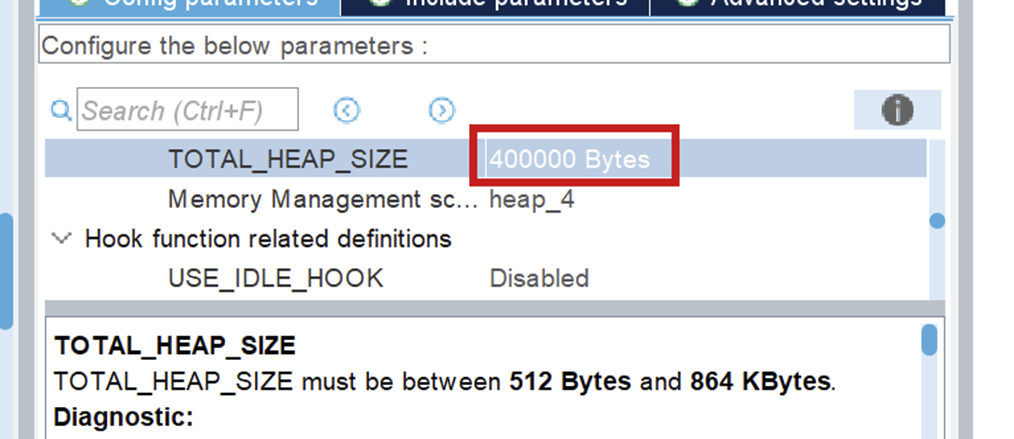
<span style="white-space: pre-wrap;">Make sure you set your </span>`<span class="editor-theme-code">TOTAL_HEAP_SIZE</span>`<span style="white-space: pre-wrap;"> to a sufficient number. When it is not big enough, the threads that you will create using FreeRTOS will suffocate and not work. This will also not give you any errors so watch out for it!</span>

[![afbeelding.png](https://bookstack.roboteamtwente.nl/uploads/images/gallery/2026-06/scaled-1680-/afbeelding.png)](https://bookstack.roboteamtwente.nl/uploads/images/gallery/2026-06/afbeelding.png)

---

## **The Code**

<span style="white-space: pre-wrap;">After you generate the code for your board, you can look through networking component, in the </span>`<span class="editor-theme-code">ethernet.h</span>`<span style="white-space: pre-wrap;"> file, to see all public Ethernet functions. </span>

<p class="callout info"><span style="white-space: pre-wrap;">For a full guide of how to use Ethernet, I refer you to </span>[Driver usage](https://bookstack.roboteamtwente.nl/books/communication-system/page/sending-your-first-message "https://bookstack.roboteamtwente.nl/books/communication-system/page/driver-usage")<span style="white-space: pre-wrap;"> \[3\].</span></p>

---

## **Resources**

1. <span style="white-space: pre-wrap;"> </span>[STM32 Ethernet (Part 1): How to configure Ethernet peripheral and perform successful ping test](https://www.youtube.com/watch?v=8r8w6mgSn1A&t=907s)
2. [PIN schematic](https://www.st.com/en/evaluation-tools/nucleo-h753zi.html#cad-resources)<span style="white-space: pre-wrap;"> (Download: </span>[MB1364-H753ZI-C01 Board schematic](https://www.st.com/resource/en/schematic_pack/mb1364-h753zi-c01-schematic.pdf), pg. 6)
3. <span style="white-space: pre-wrap;"> </span>[Driver usage](https://bookstack.roboteamtwente.nl/books/communication-system/page/sending-your-first-message "https://bookstack.roboteamtwente.nl/books/communication-system/page/driver-usage")<span style="white-space: pre-wrap;"></span>