When Ethernet is enabled, the pins should **automatically** be configured according to the below schematic. This can be wrong, please **confirm it**!
Setup all the PINS like it is done in the [PIN schematic](https://www.st.com/en/evaluation-tools/nucleo-h753zi.html#cad-resources) (Download: [MB1364-H753ZI-C01 Board schematic](https://www.st.com/resource/en/schematic_pack/mb1364-h753zi-c01-schematic.pdf), pg. 6) \[2\]. [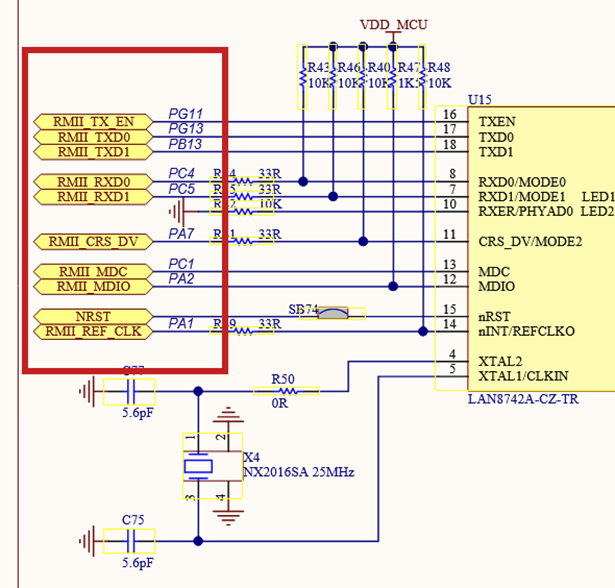](https://bookstack.roboteamtwente.nl/uploads/images/gallery/2026-04/gxsafbeelding.png) [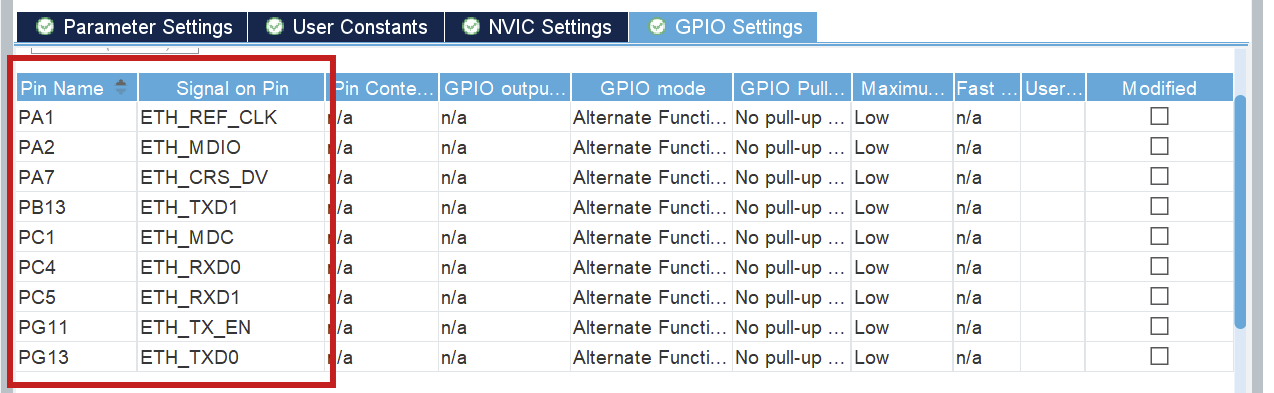](https://bookstack.roboteamtwente.nl/uploads/images/gallery/2026-04/2G1afbeelding.png)If any of the pins are not as in the schematic, refer to the above information. You can click each pin in CubeMX and choose the correct function (e.g. ETH\_RXD0), the other (incorrect) pin will be automatically disabled.
**NOTE:** when you use FreeRTOS, you will have to select **another SYS Timebase Source**. Go to **SYS > Timebase Source** and select any of the free timers, just make sure it is **NOT** SysTick. Make sure you do not use that timer for any other activities.
Make sure you set your `TOTAL_HEAP_SIZE` to a sufficient number. When it is not big enough, the threads that you will create using FreeRTOS will suffocate and not work. This will also not give you any errors so watch out for it! [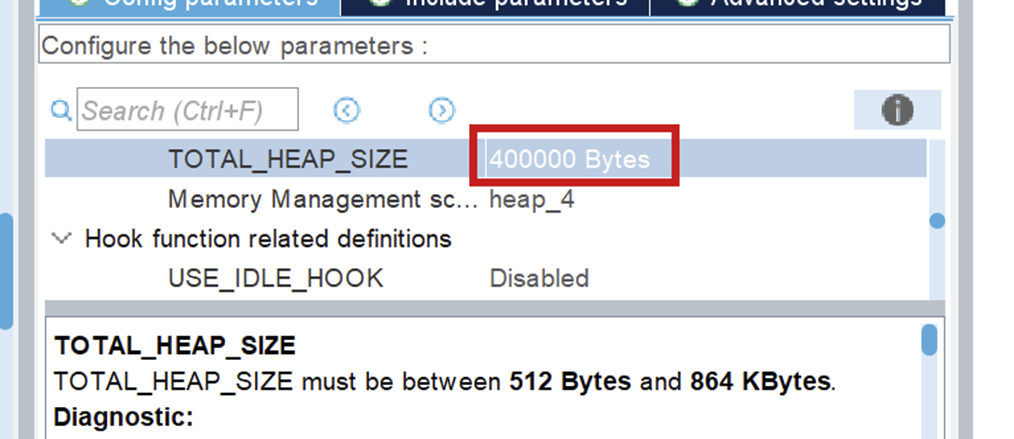](https://bookstack.roboteamtwente.nl/uploads/images/gallery/2026-06/afbeelding.png) --- ## **The Code** After you generate the code for your board, you can look through networking component, in the `ethernet.h` file, to see all public Ethernet functions.For a full guide of how to use Ethernet, I refer you to [Driver usage](https://bookstack.roboteamtwente.nl/books/communication-system/page/sending-your-first-message "https://bookstack.roboteamtwente.nl/books/communication-system/page/driver-usage") \[3\].
--- ## **Resources** 1. [STM32 Ethernet (Part 1): How to configure Ethernet peripheral and perform successful ping test](https://www.youtube.com/watch?v=8r8w6mgSn1A&t=907s) 2. [PIN schematic](https://www.st.com/en/evaluation-tools/nucleo-h753zi.html#cad-resources) (Download: [MB1364-H753ZI-C01 Board schematic](https://www.st.com/resource/en/schematic_pack/mb1364-h753zi-c01-schematic.pdf), pg. 6) 3. [Driver usage](https://bookstack.roboteamtwente.nl/books/communication-system/page/sending-your-first-message "https://bookstack.roboteamtwente.nl/books/communication-system/page/driver-usage") # Sending your first message ***This page:** *how to initialize your Ethernet driver and send your first message. A lot of constants can be seen in the explanatory code. Those can be found in* `components/common/networking_constants`*. They are also added at the end of this file.**The functions that are used for Ethernet can be found in `components/common/networking/inc/ethernet.h`.
The headers in the folder `components/common/networking/stm/` are only to be used inside the Ethernet driver!
**NOTE:** The implementation only works with FreeRTOS, but it works fine with only 1 thread. **Before you implement anything, do an introductory tutorial on FreeRTOS!**
--- ## **Code Usage** ### 1) Linker file updating In the linker file, you need to say what memory addresses LWIP uses. You set these values in Cubemx and the sections are generated for you, but you have to add it to the linker file yourself.You can find your linker (`.ld`) file in `components/{env_name}/firmware/`
The codeblock added for the default values is: ```c .lwip_sec (NOLOAD) : { . = ABSOLUTE(0x30000000); *(.RxDecripSection) . = ABSOLUTE(0x30000080); *(.TxDecripSection) . = ABSOLUTE(0x30000100); *(.Rx_PoolSection) } >RAM_D2 ``` You can just use the generated linker file and append to it, because it never gets regenerated, but you can also create a new one. If you create a new one, you have to put in the platformio configuration file that you use the new linker file. An example of how to do it is shown below. The path is relative to where the platformio configuration file is located. ```c board_build.ldscript = components/network_board/firmware/STM32H753XX_FLASH.ld ``` --- ### 2) Code initialization When you first use the Ethernet driver, you have to initialize a few things. First make sure that HAL is initialized, the D and I cache are enabled, the system clock and the memory protection unit as well. These auto-generated functions start processes that Ethernet uses. ```c //Initialize HAL HAL_Init(); //Enable D&I cache (for ETH) SCB_EnableICache(); SCB_EnableDCache(); //Start the system clock SystemClock_config(); //Memory protection unit MPU_Config_wrapper(); ```**NOTE on multithreading:** make sure you set the stack size big enough (I use `.stack_size = 1024 * 8`) when setting the `task_attributes` for the thread Ethernet will be running in!
##### ETH\_udp\_init() ```c void ETH_udp_init(uint8_t sender_prio_buf, QueueHandle_t *send_queues, receive_callback_t receiver_callback) ``` - `sender_prio_buf` Defines the **number** of priority queues you use for queuing the send messages. The queues we use are freeRTOS queues. More information can be found [here](https://freertos.org/Documentation/02-Kernel/02-Kernel-features/02-Queues-mutexes-and-semaphores/01-Queues). - `send_queues` You need to pass freeRTOS queues as a pointer to an array. The queues need to be implemented before passing them to `ETH_udp_init(...)`, see below.More information about the packet dispatcher is in the [Packet Dispatcher documentation](https://bookstack.roboteamtwente.nl/books/embedded-infastructure/page/packet-dispatcher "https://bookstack.roboteamtwente.nl/books/embedded-infastructure/page/packet-dispatcher").
**WARNING:** Make sure you have initialized udp **before** using ETH\_add\_arp(...)!
##### ETH\_udp\_send(...) ```c void ETH_udp_send(uint8_t ip[4], uint8_t port, uint8_t *payload, uint16_t payload_len, uint8_t prio_num) ``` - `payload` The payload can be any byte array, where the size of that byte array is the 4th argument: `payload_len`. - `prio_num` Priority level for transmission. Must be less than `sender_prio_buf` specified in `ETH_udp_init(...)`. Now you can send messages!Import `"networking_constants.h"` and `"ip_mac_constants.h"` to use the predefined test constants
```c #include "ethernet.h" #include "networking_constants.h" #include "ip_mac_constants.h" /* Callback function that handles a specific packet*/ void HandlePacket(receive_frame_t *receive_frame) { printf("Wayoo, message received"); } int outgoing_counter = 0; int main(void) { /*Inits*/ HAL_Init(); SystemClock_Config(); MPU_Config_wrapper(); SCB_EnableICache(); SCB_EnableDCache(); MX_GPIO_Init(); /*Config + init sending side*/ uint8_t mac[6] = NETWORK_MAC; uint8_t ip[4] = NETWORK_IP; uint8_t netmask[4] = NETMASK; uint8_t gateway[4] = GATEWAY; ETH_init(NULL, ip, netmask, gateway, mac); /*Making queues*/ int SendQueueSize = 80; static StaticQueue_t xStaticQueue1; uint8_t ucQueueStorageArea1[SendQueueSize * ETHERNET_SQ_ITEM_SIZE]; QueueHandle_t udp_receiver_queue1 = xQueueCreateStatic(SendQueueSize, ETHERNET_SQ_ITEM_SIZE, ucQueueStorageArea1, &xStaticQueue1); static StaticQueue_t xStaticQueue2; uint8_t ucQueueStorageArea2[SendQueueSize * ETHERNET_SQ_ITEM_SIZE]; QueueHandle_t udp_receiver_queue2 = xQueueCreateStatic(SendQueueSize, ETHERNET_SQ_ITEM_SIZE, ucQueueStorageArea2, &xStaticQueue2); QueueHandle_t queues[2] = {udp_receiver_queue1, udp_receiver_queue2}; ETH_udp_init(2, queues, HandlePacket); /*Config + add ARP receiving side*/ uint8_t ip[4] = SAMPLE_BOARD_IP; uint8_t mac[6] = SAMPLE_BOARD_MAC; ETH_add_arp(ip, mac, 5); /*Sending a message*/ uint8_t packet1_payload[4] = {14,06,20,04}; /*Test sending*/ while (outgoing_counter < 100) { //NOTE: after 80 packages the queue will be full! ETH_udp_send(ip, 8, packet1_payload, 4, 1); osDelay(10); outgoing_counter += 1; LOGI(TAG, "%d", outgoing_counter); } } ``` # Ethernet Testing ## **Send Testing** #### Requirements - STM32 - Ethernet Cable - Wireshark #### Testing Send testing is easy. The only thing you have to do is upload the setup and sending code to your STM32 and connect it to your PC/laptop using an Ethernet cable. Then you can go into Wireshark, look at the activity on you ethernet periphial, to see if it sends something. It also logs to the terminal if you send, if you have turned logging on. --- ## **Receive Testing** ### Requirements - Linux laptop 🫠 - STM32 - Ethernet Cable Connect the Ethernet cable between the STM and the laptop that is sending you packets. - Any pcap packet sender We recommend packeth, installation manual will be below. - Wireshark (optional) ### Installation of Packeth**NOTE:** you need a Linux laptop for this
#### Testing Receive testing is done by sending packets, saved in test/networking, to the STM32 using a pcap packet sender. If you want to use new packets, I advise to send the packet you want from the STM32. Then use wireshark to save the packet such that you can send it back. In wireshark you can see, when you send a package, to which IP and MAC it is being send, and it should match with your IP and MAC. To see if the messages are received, make sure you print messages in your receive function. Then check the serial #### # Extra Functions ### Introduction This documentation is about extra functions, that are not necessary to get it running, but can be used if need be. ### Non-deprecated functions #### ETH\_setup\_MAC\_address\_filtering This function is used for perfect mac address filtering. It is used by giving it MAC-addresses as arguments. If you receive packets with those addresses, they will also be processed. ### Deprecated Functions There are deprecated functions for raw sending (`ETH_raw_send`) and custom protocol receiving (`ETH_custom_protocol_receiver`). Those can be used if you don't want to use UDP, but I don't know if they still work. ##### Raw receiving If you want to receive messages, you need to have `#define LWIP_HOOK_UNKNOWN_ETH_PROTOCOL(pbuf, netif) eth_reader(netif, pbuf)` in the `cubemx_main.h` file. ### ### # Debugging ### Introduction This documentation gives some tips on how to debug the Ethernet Driver. ### Debug Flags By setting the flag " LWIP\_DEBUG" to 1 in the cubemx main file, you will get extra lwip debug messages in your terminal. ### Hard Faults While debugging, it is easy to use a debugger to go step by step through your code. However, the deeper you go into the code, the bigger the chance that your debugging will trigger an hard fault. So when that happens verify if the hard fault is your doing or not, by debugging less deep while you have a debug point set on the hard fault function, to check if it still hard faults. # Issues ## Introduction There are some issues with ethernet. Those are described here. ## The Issues ### Arp Table removement The ARP function will fail when Ethernet is not started properly yet. Current fix is `retry_count` that retries the arp x amount of times. # Protobuffers # Starting with Protobufs ## What are protobufs? [Protocol Buffers](https://protobuf.dev/programming-guides/proto3/) (protobufs) are a way to define structured messages in `.proto` files. The point is simple: define the message format once, generate code for your language, and now everyone agrees what the bytes mean (without inventing a new packet format every semester). ## Where they live The source of truth for RoboTeam message definitions is: [RoboTeamTwente/ERC-Protobufs](https://github.com/RoboTeamTwente/ERC-Protobufs). Other repositories (embedded, software, tooling) should **consume** these definitions (often via a git submodule) instead of copy-pasting `.proto` files around. ## Editing rules (the important part) ### Field numbers are the real API In protobuf, the **field number** is what goes on the wire. Renaming a field is usually harmless; changing its number is usually the problem. **Never renumber an existing field** unless you are intentionally breaking compatibility and coordinating the update across all consumers. ### Safe changes (usually) - Add a new field with a **new** unused number. - Add new enum values (don’t reuse old numeric values for new meanings). - Stop using a field before deleting it, and reserve its number if your style guide does that. ### Changes that need extra care - Changing a field type (e.g. `int32` → `string`). - Changing semantics/units (mm vs m, degrees vs radians). ## Typical workflow 1. Edit / add `.proto` files in `ERC-Protobufs`. 2. Generate / update code as required by your project (this step is repo-specific). 3. Update consumers to use the new fields (and handle missing fields safely). 4. Test at least one real send/receive path. 5. Open a PR that lists: what changed, field numbers, and compatibility expectations. ## Troubleshooting ### “My message doesn’t parse” - Confirm both sides use the same (or compatible) `.proto` definitions. - Check field numbers: no reuse, no renumbering. - Check transport framing (length prefix / delimiter / CRC). Protobuf gives bytes; transport still matters. ### “It parses, but values are nonsense” - Check units and semantics (the most common “it’s wrong but not broken” bug). - Make sure generated code is up to date (stale generated files cause creative failures).Protobufs are boring on purpose. Boring schemas prevent exciting debugging sessions. Keep changes small, reviewable, and compatible.
# Design This page explains rules that apply to all protobuffers, and a bit on how we use them. ## PBEnvelope All protobuffers are wrapped in the `PBEnvelope` message, which contains metadata we need in all protobufs. ## Lost packets & throttling In every line of communications, the packets must be sent periodically. The frequency of sent packets is indicated in their `PBEnvelope`. If the receiver does not get a packet within given timeout, it means the packet was lost. In most cases this means that the brakes should be engaged for safety. # Arm Board Protobuffers ***This page:** *each arm\_board protobuffer explained.**The protobuffers for the arm\_board are passed between software, control and embedded.
--- ##### Movement\_software\_target.proto **Software -> control** This file contains two protobuffers detailing the source of a movement. **ArmBoardTargetMovement** contains the target coordinates for a movement. This gets sent to control, they use this information to calculate motor angles. **ArmBoardObstructions** is a placeholder for now. The idea is that software would be able to pass a list of coordinates of physical obstructions to control, around which they would manoeuvre the movement of the arm. --- ##### Movement\_control\_in.pb.h **Control -> Embedded** After control calculates the angles using the information from the previous protobuf, it sends the control signals back to us (embedded) with the absolute angles and frequency for the motors. So, this is the information embedded uses to actuate the motors. **ArmboardControlSignals** contains all the angles the motors need to be turned to. We then use this information to set the PWM pins. --- ##### Movement\_software\_feedback.proto **Embedded -> Software** After the movement happens (or fails), embedded will send feedback to software for them to calculate the next movement. **ArmBoardMovementFeedback** sends an error code to software. Possible error codes are: - Point\_not\_in\_range - Obstruction - Calibration - Motor\_malfunction - All\_ok **ArmBoardActualPositions** sends back the angle of each motor of the arm. Software will use this to display a 3D model of the arm position. (Allegedly) --- ##### Motor\_diagnostics.proto **Arm board -> Debugging board** This protobuf gets periodically sent to the debugging board to indicate the status. **ArmBoardDiagnostics** the `MotorInformation` for each motor and the state of the **entire** board. Possible states are: - Idle - Operating - Calibrating - Errored**MotorInformation** is a common protobuf shared between all boards that use motors (this and driving board). MotorInformation contains the state (same as above), motor\_id, rpm, voltage and encoder\_angle for a single motor.
# Sensor Board Protobuf ***This page:** *Complete protobuf message definitions for the sensor\_board component.**The protobuffers for the sensor\_board are passed between embedded, the network, and other boards for diagnostics and data collection. This page documents the actual message definitions from the ERC-Protobufs repository.
--- ## Common Definitions (sensor.proto) **Location: ERC-Protobufs/components/sensor\_board/sensor.proto** ### SensorState Enum Shared across all sensor types - indicates the current operational state of a sensor. ```protobuf enum SensorState { SENSOR_IDLE = 0; // Sensor is idle/not currently sampling SENSOR_OPERATING = 1; // Sensor is actively sampling/operating normally SENSOR_CALIBRATING = 2; // Sensor is in calibration mode SENSOR_ERROR = 3; // Sensor has encountered an error } ``` --- ## GPS Sensor (gps\_sensor.proto) **Location: ERC-Protobufs/components/sensor\_board/gps\_sensor.proto** **Direction: Sensor Board → Navigation/Localization Systems** ### GPSFixQuality Enum Indicates the type and quality of GPS fix obtained. ```protobuf enum GPSFixQuality { NO_FIX = 0; // No fix available GPS_FIX = 1; // Standard GPS fix DGPS_FIX = 2; // Differential GPS fix PPS_FIX = 3; // PPS (Pulse Per Second) fix RTK_FIX = 4; // Real-Time Kinematic fix RTK_FLOAT = 5; // RTK float solution } ``` ### GPSErrorCode Enum Detailed error codes for GPS/GNSS sensor failures. ```protobuf enum GPSErrorCode { GPS_NO_ERROR = 0; GPS_COMMUNICATION_FAILURE = 1; // UART connection lost GPS_INVALID_DATA = 2; // Data parsing or validation failed GPS_ANTENNA_FAULT = 3; // GPS antenna disconnected or faulty GPS_LOW_SIGNAL_QUALITY = 4; // Signal strength too weak for fix } ``` ### SensorBoardGPSInfo Message Complete GPS positioning and velocity information. ```protobuf message SensorBoardGPSInfo { // GPS coordinates double latitude = 1; // Degrees (positive = North, negative = South) double longitude = 2; // Degrees (positive = East, negative = West) float altitude = 3; // Meters above sea level // Velocity data float speed = 4; // Speed in meters per second float heading = 5; // Course over ground in degrees (0-360) // Position accuracy and quality float hdop = 6; // Horizontal dilution of precision (lower is better) float vdop = 7; // Vertical dilution of precision (lower is better) int32 satellites = 8; // Number of satellites in view (up to 16) GPSFixQuality fix_quality = 9; SensorState state = 10; GPSErrorCode error_code = 11; // Error code if state is SENSOR_ERROR // Timestamp from GPS int64 utc_timestamp = 12; // Unix timestamp in milliseconds } ``` --- ## IMU Sensor (imu\_sensor.proto) **Location: ERC-Protobufs/components/sensor\_board/imu\_sensor.proto** **Direction: Sensor Board → Motion Control/Attitude Systems** ### IMUErrorCode Enum Detailed error codes for IMU sensor failures. ```protobuf enum IMUErrorCode { IMU_NO_ERROR = 0; IMU_COMMUNICATION_FAILURE = 1; // I2C/SPI connection lost IMU_CALIBRATION_REQUIRED = 2; // Sensor needs calibration IMU_CALIBRATION_FAILED = 3; // Calibration procedure failed IMU_INVALID_DATA = 4; // Data out of valid range IMU_SENSOR_FAULT = 5; // Hardware fault detected IMU_GYROSCOPE_ERROR = 6; // Gyroscope component failure IMU_MAGNETOMETER_ERROR = 7; // Magnetometer component failure IMU_ACCELEROMETER_ERROR = 8; // Accelerometer component failure } ``` ### SensorBoardIMUInfo Message 3-axis inertial measurement data (acceleration, angular velocity, magnetic field). ```protobuf message SensorBoardIMUInfo { // 3-Axis Accelerometer data float accel_x = 1; // X-axis acceleration float accel_y = 2; // Y-axis acceleration float accel_z = 3; // Z-axis acceleration // 3-Axis Gyroscope data float gyro_x = 4; // X-axis angular velocity float gyro_y = 5; // Y-axis angular velocity float gyro_z = 6; // Z-axis angular velocity // 3-Axis Magnetometer data (9-axis IMU only) float mag_x = 7; // X-axis magnetic field float mag_y = 8; // Y-axis magnetic field float mag_z = 9; // Z-axis magnetic field bool is_calibrated = 13; // True if IMU has been calibrated on level surface SensorState state = 14; IMUErrorCode error_code = 15; // Error code if state is SENSOR_ERROR } ``` --- ## pH Sensor (ph\_sensor.proto) **Location: ERC-Protobufs/components/sensor\_board/ph\_sensor.proto** **Direction: Sensor Board → Environmental Monitoring Systems** ### PHErrorCode Enum Detailed error codes for pH sensor failures. ```protobuf enum PHErrorCode { PH_NO_ERROR = 0; PH_COMMUNICATION_FAILURE = 1; // ADC connection lost PH_OUT_OF_RANGE = 2; // Reading outside 0-14 range PH_CALIBRATION_REQUIRED = 3; // Sensor needs calibration PH_INVALID_DATA = 4; // Data validation failed PH_PROBE_FAULT = 5; // Electrode fault detected PH_TEMPERATURE_SENSOR_ERROR = 6; // Temperature compensation sensor failed } ``` ### SensorBoardPHInfo Message Water quality measurement with temperature compensation. ```protobuf message SensorBoardPHInfo { float ph_value = 1; // Raw pH measurement (0-14 scale, 7 is neutral) float voltage = 2; // Voltage reading from pH sensor in millivolts float temperature = 3; // Temperature reading in Celsius (if external sensor available) SensorState state = 4; // Current state of the pH sensor PHErrorCode error_code = 5; // Error code if state is SENSOR_ERROR } ``` **Notes:** - pH value is derived from voltage via linear calibration equation - 40-sample moving average applied internally to reduce ADC noise - Temperature used for automatic compensation (default ~25°C) --- ## Load Cell Sensor (load\_cell.proto) **Location: ERC-Protobufs/components/sensor\_board/load\_cell.proto** **Direction: Sensor Board → Arm Control/Gripper Systems** ### LoadCellErrorCode Enum Detailed error codes for load cell sensor failures. ```protobuf enum LoadCellErrorCode { LOAD_CELL_NO_ERROR = 0; LOAD_CELL_COMMUNICATION_FAILURE = 1; // ADC connection lost LOAD_CELL_OUT_OF_RANGE = 2; // Force measurement exceeds limits LOAD_CELL_CALIBRATION_REQUIRED = 3; // Sensor needs calibration LOAD_CELL_INVALID_DATA = 4; // Data validation failed LOAD_CELL_SENSOR_FAULT = 5; // Hardware fault detected } ``` ### SensorBoardLoadCellInfo Message Force measurement for robotic gripper control and load monitoring. ```protobuf message SensorBoardLoadCellInfo { uint32 sensor_index = 1; // 0-based index of the load cell (0 or 1) float force_newtons = 2; // Force in Newtons float mass_grams = 3; // Mass in grams (derived from force) int32 raw_counts = 4; // Raw ADC counts (for debugging) // Calibration status and parameters bool is_calibrated = 5; // True if calibration parameters are valid float scale_newtons_per_count = 6; // Conversion factor (N/count) int32 tare_offset_counts = 7; // Zero-load ADC offset SensorState state = 8; LoadCellErrorCode error_code = 9; // Error code if state is SENSOR_ERROR } ``` **Dual Sensor Support:** - Up to 2 independent load cells (sensor\_index 0 and 1) - Typically used on dual-pad grippers for load distribution feedback - Each sensor maintains independent calibration parameters - Enables slip detection via load imbalance analysis --- ## Pressure Sensor (pressure\_sensor.proto) **Location: ERC-Protobufs/components/sensor\_board/pressure\_sensor.proto** **Direction: Sensor Board → Arm Control/Gripper Systems / Environmental Monitoring** ### PressureErrorCode Enum Detailed error codes for pressure sensor failures. ```protobuf enum PressureErrorCode { PRESSURE_NO_ERROR = 0; PRESSURE_COMMUNICATION_FAILURE = 1; // I2C/ADC connection lost PRESSURE_OUT_OF_RANGE = 2; // Reading exceeds sensor limits PRESSURE_CALIBRATION_REQUIRED = 3; // Sensor needs calibration PRESSURE_INVALID_DATA = 4; // Data validation failed PRESSURE_SENSOR_FAULT = 5; // Hardware fault detected } ``` ### SensorBoardPressureInfo Message Pressure measurement for robotic gripper control and environmental sensing. ```protobuf message SensorBoardPressureInfo { uint32 sensor_index = 1; // 0-based index of the pressure sensor (0 or 1) // Pressure data float pressure_kpa = 2; // Pressure in kilopascals float temperature_c = 3; // Temperature in Celsius (if available) float voltage = 4; // Sensor output voltage (if available) // Calibration status bool is_calibrated = 5; // True if calibration parameters are valid SensorState state = 6; PressureErrorCode error_code = 7; // Error code if state is SENSOR_ERROR } ``` **Dual Sensor Support:** - Up to 2 independent pressure sensors (sensor\_index 0 and 1) - Primary use: gripper pad force feedback for PID control - Enables real-time grip force regulation and slip detection - Secondary uses: depth sensing, altitude sensing, system pressure monitoring --- ## Board Diagnostics (diagnostics.proto) **Location: ERC-Protobufs/components/sensor\_board/diagnostics.proto** **Direction: Sensor Board → Debugging Board / Health Monitoring Systems** ### SensorBoardDiagnostics Message Complete system health and status snapshot sent periodically (5 second default). ```protobuf message SensorBoardDiagnostics { enum State { IDLE = 0; OPERATING = 1; CALIBRATING = 2; ERROR = 3; } State state = 1; // Overall board state SensorBoardPHInfo ph_sensor = 2; // pH sensor status SensorBoardIMUInfo imu_sensor = 3; // IMU sensor status // Overall sensor board health float board_temperature = 4; // Board temperature in Celsius float board_voltage = 5; // System voltage (3.3V supply) SensorBoardGPSInfo gps_sensor_1 = 6; // GPS sensor status } ``` **Board States:** - **IDLE (0)** - Board initialized but not actively polling sensors - **OPERATING (1)** - All sensors functioning normally, data being collected - **CALIBRATING (2)** - Board or sensors in calibration mode - **ERROR (3)** - Critical system failure detected **Health Indicators:** - **board\_temperature** - STM32H753 die temperature; normal range 25-75°C - **board\_voltage** - 3.3V supply input; should be 3.0-3.6V - **Embedded sensor states** - Each sensor's current SensorState (IDLE/OPERATING/CALIBRATING/ERROR) --- ## Error Code Pattern All sensor error codes follow a consistent pattern: ```protobuf enum XXXErrorCode { XXX_NO_ERROR = 0; // No error XXX_COMMUNICATION_FAILURE = 1; // Hardware interface (I2C/SPI/UART/ADC) failure XXX_OUT_OF_RANGE = 2; // Reading outside valid sensor range XXX_CALIBRATION_REQUIRED = 3; // Sensor needs calibration XXX_INVALID_DATA = 4; // Data validation/filtering failed XXX_SENSOR_FAULT = 5; // Hardware fault or component failure // Additional sensor-specific errors... } ``` **Integration into application:** ```c if (gps_result.error_code == GPS_COMMUNICATION_FAILURE) { LOG_ERROR("GPS UART connection lost"); diagnostics.gps_sensor_1.state = SENSOR_ERROR; } else if (gps_result.error_code == GPS_NO_ERROR) { LOG_INFO("GPS position: %f, %f", gps_result.latitude, gps_result.longitude); } ``` --- ## Network Transmission **Main Sensor Data:** - Sent via individual sensor messages - Packaged into SensorBoardState (sensor.proto) - UDP broadcast to 192.168.0.255:7 (configurable) - Interval: 5 seconds default (configurable) - Encoding: Nanopb (lightweight protobuf for embedded) **Diagnostics Data:** - Sent via SensorBoardDiagnostics message - UDP broadcast to 192.168.0.255:7 (same port) - Interval: 5 seconds (synced with main loop) - Contains snapshot of all sensor states + health metrics --- ## Message Composition The SensorBoardDiagnostics message is composed of individual sensor message types: ``` SensorBoardDiagnostics ├── state (Board state) ├── SensorBoardPHInfo │ ├── ph_value │ ├── voltage │ ├── temperature │ ├── state (SensorState) │ └── error_code (PHErrorCode) ├── SensorBoardIMUInfo │ ├── accel_x, accel_y, accel_z │ ├── gyro_x, gyro_y, gyro_z │ ├── mag_x, mag_y, mag_z │ ├── is_calibrated │ ├── state (SensorState) │ └── error_code (IMUErrorCode) ├── board_temperature ├── board_voltage └── SensorBoardGPSInfo ├── latitude, longitude, altitude ├── speed, heading ├── hdop, vdop, satellites ├── fix_quality ├── state (SensorState) ├── error_code (GPSErrorCode) └── utc_timestamp ``` **Note:** Not all proto files define load cells and pressure sensors in diagnostics.proto yet - they are sent as separate messages when available. # Driving Board Protobuffers ***This page:** *each driving\_board protobuffer explained.**The protobuffers for the driving\_board are passed between software, control and embedded.
DrivingBoardDiagnostics.proto Embedded → Software / Debugging This file contains the full diagnostic state of the driving board and all attached motors. DrivingBoardDiagnostics is the main status message used to report the system state and motor-level health information. ##### DrivingBoardDiagnostics This message contains: - Overall board state (IDLE, OPERATING, CALIBRATING, ERROR) - Motor information for all driving and steering motors The board state is used to indicate the current operating mode of the driving board. **MotorInformation fields:** Each motor is reported using the MotorInformation protobuf, which includes: - motor state - motor ID - RPM - voltage - encoder angle Motors included The diagnostics message explicitly contains 10 motors: front\_left\_motor middle\_left\_motor back\_left\_motor front\_right\_motor middle\_right\_motor back\_right\_motor steering\_front\_left\_motor steering\_back\_left\_motor steering\_front\_right\_motor steering\_back\_right\_motorNotes: This structure is currently fixed-size, meaning all motors are explicitly defined instead of using a repeated field.
##### DrivingBoardMotorMessage.proto Software → Embedded This message is used to send motion commands to the driving board. DrivingBoardMotorMessage Contains high-level movement instructions: - distance\_to\_go → target travel distance - turning\_radius Purpose: This message defines a movement request from software. The embedded system uses it as input to compute values on the control code. ##### DrivingBoardMotorPeriodicProgress.proto Embedded → Software This message provides runtime feedback during movement execution. DrivingBoardMotorPeriodicProgress Contains: - distance\_left → remaining distance to target Purpose This message allows software to track progress of an ongoing movement command in real time. It is typically sent periodically while a movement is being executed.