# Ethernet Driver

The documentation for the embedded Ethernet driver

# Setup of Embedded Ethernet

***This page:** *How to set up ethernet.**

---

## **Introduction**

**Ethernet** <span style="white-space: pre-wrap;">is the protocol used to communicate between all the components. It uses the </span>**auto-generated Ethernet driver**<span style="white-space: pre-wrap;"> code from cubeMX to use the physical Ethernet peripheral. It also uses </span>**LWIP** <span style="white-space: pre-wrap;">to do the lowest levels of packet handling. Lastly, we use </span>**freeRTOS** <span style="white-space: pre-wrap;">for multi threading. The current implementation cannot work without it. </span>

---

## **CubeMX**

<span style="white-space: pre-wrap;">CubeMX is used to automatically generate setup code for the stm32. To use Ethernet you have to set up a few things in cubeMX. </span>

<span style="white-space: pre-wrap;">To write this driver I mostly used videos from ControllersTech on YouTube. The most useful video is </span>[STM32 Ethernet (Part 1): How to configure Ethernet peripheral and perform successful ping test](https://www.youtube.com/watch?v=8r8w6mgSn1A&t=907s)<span style="white-space: pre-wrap;"> \[1\]. So if you do not understand anything, watch that video. </span>

---

### 1) ETH

<span style="white-space: pre-wrap;">ETH is under connectivity in cubeMX. It sets up the Ethernet peripheral. Set it to </span>`<span class="editor-theme-code">RMII</span>`<span style="white-space: pre-wrap;"> mode. </span>

[![afbeelding.png](https://bookstack.roboteamtwente.nl/uploads/images/gallery/2026-04/scaled-1680-/dceafbeelding.png)](https://bookstack.roboteamtwente.nl/uploads/images/gallery/2026-04/dceafbeelding.png)

##### **NVIC &gt; NVIC**

<span style="white-space: pre-wrap;">Turn on Ethernet global interrupt in NVIC settings. </span>

[![afbeelding.png](https://bookstack.roboteamtwente.nl/uploads/images/gallery/2026-04/scaled-1680-/oqlafbeelding.png)](https://bookstack.roboteamtwente.nl/uploads/images/gallery/2026-04/oqlafbeelding.png)

##### **ETH &gt; GPIO settings**

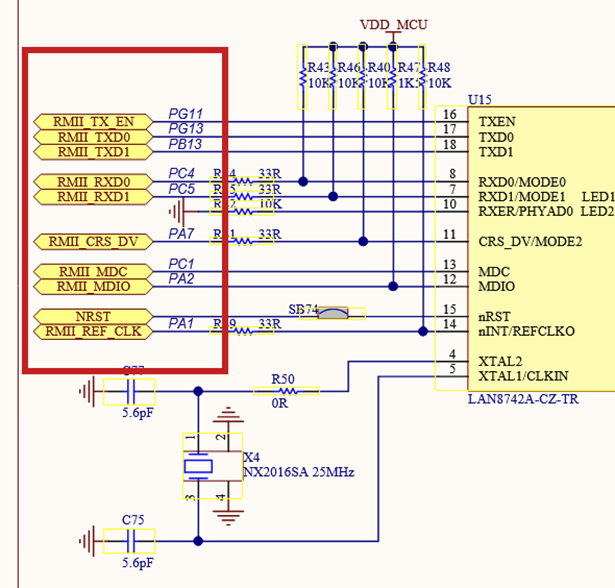
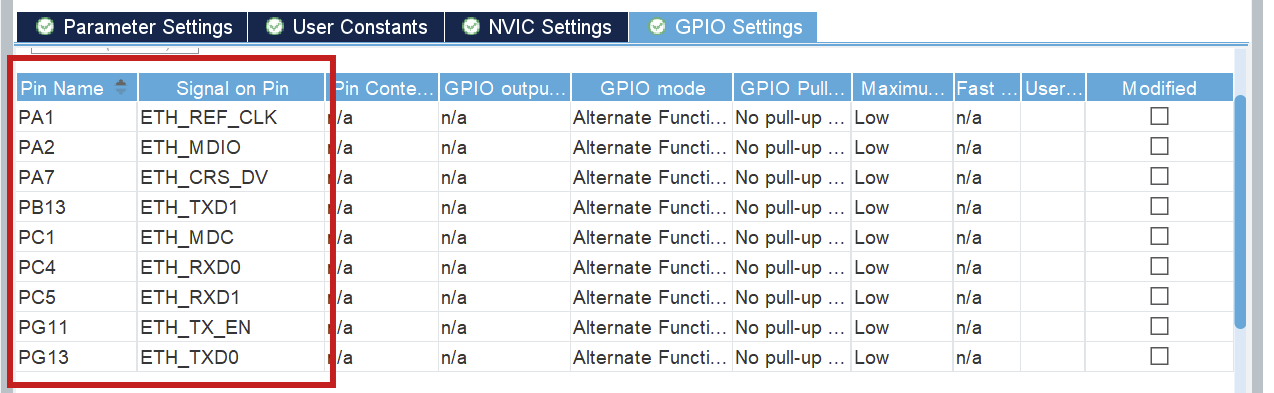
<p class="callout warning"><span style="white-space: pre-wrap;">When Ethernet is enabled, the pins should </span>**automatically** be configured according to the below schematic. This can be wrong, please **confirm it**!</p>

<span style="white-space: pre-wrap;">Setup all the PINS like it is done in the </span>[PIN schematic](https://www.st.com/en/evaluation-tools/nucleo-h753zi.html#cad-resources)<span style="white-space: pre-wrap;"> (Download: </span>[MB1364-H753ZI-C01 Board schematic](https://www.st.com/resource/en/schematic_pack/mb1364-h753zi-c01-schematic.pdf)<span style="white-space: pre-wrap;">, pg. 6) \[2\]. </span>

[![afbeelding.png](https://bookstack.roboteamtwente.nl/uploads/images/gallery/2026-04/scaled-1680-/gxsafbeelding.png)](https://bookstack.roboteamtwente.nl/uploads/images/gallery/2026-04/gxsafbeelding.png)

[![afbeelding.png](https://bookstack.roboteamtwente.nl/uploads/images/gallery/2026-04/scaled-1680-/2G1afbeelding.png)](https://bookstack.roboteamtwente.nl/uploads/images/gallery/2026-04/2G1afbeelding.png)
<details id="bkmrk-troubleshooting%3A-pin"><summary>Troubleshooting: Pins not set as schematic</summary>

<p class="callout danger">If any of the pins are not as in the schematic, refer to the above information. You can click each pin in CubeMX and choose the correct function (e.g. ETH\_RXD0), the other (incorrect) pin will be automatically disabled.</p>

</details>---

### 2) LWIP

LWIP is a middleware generated by cubeMX. You can find it under middleware.

##### **LWIP &gt; Platform Settings**

<span style="white-space: pre-wrap;">Set up LAN8742, to signal that that is the physical Ethernet driver you use. </span>

[![afbeelding.png](https://bookstack.roboteamtwente.nl/uploads/images/gallery/2026-04/scaled-1680-/N9gafbeelding.png)](https://bookstack.roboteamtwente.nl/uploads/images/gallery/2026-04/N9gafbeelding.png)

##### **LWIP &gt; General settings**

[![afbeelding.png](https://bookstack.roboteamtwente.nl/uploads/images/gallery/2026-04/scaled-1680-/zIsafbeelding.png)](https://bookstack.roboteamtwente.nl/uploads/images/gallery/2026-04/zIsafbeelding.png)

The most important configurations here are the DHCP (**DHCP = Disabled**<span style="white-space: pre-wrap;">) and IP address settings. </span>  
<span style="white-space: pre-wrap;">The IP address settings </span>**don't matter**<span style="white-space: pre-wrap;">, they will be </span>**overwritten** <span style="white-space: pre-wrap;">in a configuration file in the code. </span>

##### **LWIP &gt; Key options**

<span style="white-space: pre-wrap;">The most important part of the tab </span>**Key options**<span style="white-space: pre-wrap;"> is to check if </span>`<span class="editor-theme-code">LWIP_ARP = Enabled</span>`<span style="white-space: pre-wrap;">. You also need to keep track of the </span>`<span class="editor-theme-code">MEM_SIZE (Heap Memory Size)</span>`<span style="white-space: pre-wrap;">. Start with a value of </span>`<span class="editor-theme-code">1024*16 bytes</span>`<span style="white-space: pre-wrap;">. </span>`<span class="editor-theme-code">LWIP_RAM_HEAP_POINTER</span>`<span style="white-space: pre-wrap;"> should be </span>`<span class="editor-theme-code">0x30004900</span>`<span style="white-space: pre-wrap;"> such that the heap doesn't overlap different memory. That is the value I use, but it can be changed if need be. </span>  
<span style="white-space: pre-wrap;">Lastly, you need to add </span>`<span class="editor-theme-code">ETHARP_SUPPORT_STATIC_ENTRIES = Enabled</span>`<span style="white-space: pre-wrap;">. This is only shown when you turn on </span>`<span class="editor-theme-code">Show Advanced Parameters</span>`.

[![image.png](https://bookstack.roboteamtwente.nl/uploads/images/gallery/2026-05/scaled-1680-/idcimage.png)](https://bookstack.roboteamtwente.nl/uploads/images/gallery/2026-05/idcimage.png)[![image.png](https://bookstack.roboteamtwente.nl/uploads/images/gallery/2026-05/scaled-1680-/f6Fimage.png)](https://bookstack.roboteamtwente.nl/uploads/images/gallery/2026-05/f6Fimage.png)

---

### 3) CORTEX\_M7

<span style="white-space: pre-wrap;">You can find </span>**CORTEX\_M7**<span style="white-space: pre-wrap;"> under System Core. </span>

##### **CORTEX\_M7 &gt; Parameter Settings**

<span style="white-space: pre-wrap;">Turn on </span>`<span class="editor-theme-code">CPU ICache</span>`<span style="white-space: pre-wrap;"> and </span>`<span class="editor-theme-code">CPU DCache</span>`.

[![image.png](https://bookstack.roboteamtwente.nl/uploads/images/gallery/2026-04/scaled-1680-/tQ9image.png)](https://bookstack.roboteamtwente.nl/uploads/images/gallery/2026-04/tQ9image.png)

Setup memory protection like seen below:

[![afbeelding.png](https://bookstack.roboteamtwente.nl/uploads/images/gallery/2026-05/scaled-1680-/afbeelding.png)](https://bookstack.roboteamtwente.nl/uploads/images/gallery/2026-05/afbeelding.png)<span style="white-space: pre-wrap;">The </span>`<span class="editor-theme-code">MPU Region Base Address</span>`<span style="white-space: pre-wrap;"> is the address of the first Rx descriptor (</span>**ETH &gt; Parameter Settings &gt; General**<span style="white-space: pre-wrap;">). The </span>`<span class="editor-theme-code">MPU region size</span>`<span style="white-space: pre-wrap;"> is calculated using heap memory size and the RX buffers. Watch the </span>[video](https://www.youtube.com/watch?v=8r8w6mgSn1A&t=907s)<span style="white-space: pre-wrap;"> \[1\] mentioned above for more information. </span>

[![afbeelding.png](https://bookstack.roboteamtwente.nl/uploads/images/gallery/2026-04/scaled-1680-/sNFafbeelding.png)](https://bookstack.roboteamtwente.nl/uploads/images/gallery/2026-04/sNFafbeelding.png)---

### 4) FreeRTOS

<span style="white-space: pre-wrap;">Freertos is automatically integrated in LWIP if you turn it on in cubeMX. It does not have to be modified, it just has to be turned on. Make sure you use </span>`<span class="editor-theme-code">CMSIS_V2</span>`<span style="white-space: pre-wrap;">, because V1 did not work well. </span>

[![afbeelding.png](https://bookstack.roboteamtwente.nl/uploads/images/gallery/2026-04/scaled-1680-/PCAafbeelding.png)](https://bookstack.roboteamtwente.nl/uploads/images/gallery/2026-04/PCAafbeelding.png)

<p class="callout danger">**NOTE:**<span style="white-space: pre-wrap;"> when you use FreeRTOS, you will have to select </span>**another SYS Timebase Source**<span style="white-space: pre-wrap;">. Go to </span>**SYS &gt; Timebase Source**<span style="white-space: pre-wrap;"> and select any of the free timers, just make sure it is </span>**NOT**<span style="white-space: pre-wrap;"> SysTick. Make sure you do not use that timer for any other activities.</span></p>

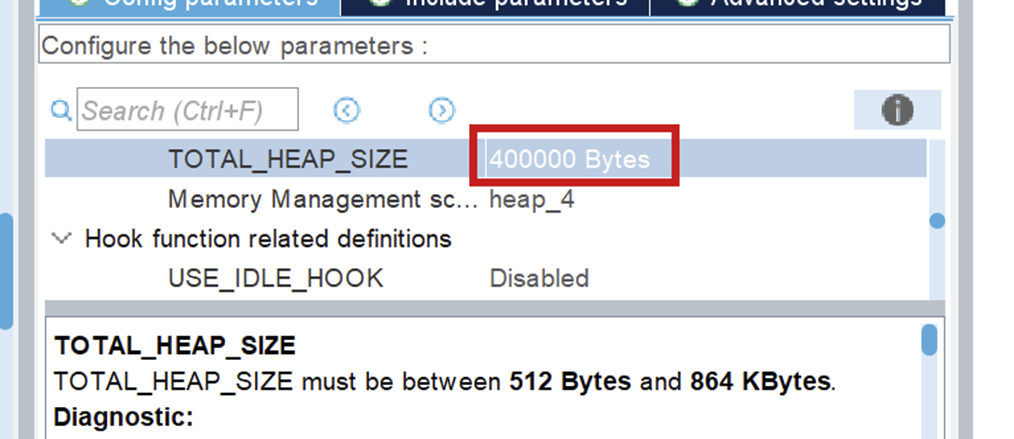
<span style="white-space: pre-wrap;">Make sure you set your </span>`<span class="editor-theme-code">TOTAL_HEAP_SIZE</span>`<span style="white-space: pre-wrap;"> to a sufficient number. When it is not big enough, the threads that you will create using FreeRTOS will suffocate and not work. This will also not give you any errors so watch out for it!</span>

[![afbeelding.png](https://bookstack.roboteamtwente.nl/uploads/images/gallery/2026-06/scaled-1680-/afbeelding.png)](https://bookstack.roboteamtwente.nl/uploads/images/gallery/2026-06/afbeelding.png)

---

## **The Code**

<span style="white-space: pre-wrap;">After you generate the code for your board, you can look through networking component, in the </span>`<span class="editor-theme-code">ethernet.h</span>`<span style="white-space: pre-wrap;"> file, to see all public Ethernet functions. </span>

<p class="callout info"><span style="white-space: pre-wrap;">For a full guide of how to use Ethernet, I refer you to </span>[Driver usage](https://bookstack.roboteamtwente.nl/books/communication-system/page/sending-your-first-message "https://bookstack.roboteamtwente.nl/books/communication-system/page/driver-usage")<span style="white-space: pre-wrap;"> \[3\].</span></p>

---

## **Resources**

1. <span style="white-space: pre-wrap;"> </span>[STM32 Ethernet (Part 1): How to configure Ethernet peripheral and perform successful ping test](https://www.youtube.com/watch?v=8r8w6mgSn1A&t=907s)
2. [PIN schematic](https://www.st.com/en/evaluation-tools/nucleo-h753zi.html#cad-resources)<span style="white-space: pre-wrap;"> (Download: </span>[MB1364-H753ZI-C01 Board schematic](https://www.st.com/resource/en/schematic_pack/mb1364-h753zi-c01-schematic.pdf), pg. 6)
3. <span style="white-space: pre-wrap;"> </span>[Driver usage](https://bookstack.roboteamtwente.nl/books/communication-system/page/sending-your-first-message "https://bookstack.roboteamtwente.nl/books/communication-system/page/driver-usage")<span style="white-space: pre-wrap;"></span>

# Sending your first message

***This page:** *how to initialize your Ethernet driver and send your first message. A lot of constants can be seen in the explanatory code. Those can be found in* `<em class="editor-theme-code editor-theme-italic">components/common/networking_constants</em>`*. They are also added at the end of this file.**

<p class="callout info"><span style="white-space: pre-wrap;">The functions that are used for Ethernet can be found in </span>`<span class="editor-theme-code">components/common/networking/inc/ethernet.h</span>`<span style="white-space: pre-wrap;">. </span></p>

<p class="callout warning"><span style="white-space: pre-wrap;">The headers in the folder </span>`<span class="editor-theme-code">components/common/networking/stm/</span>`<span style="white-space: pre-wrap;"> are only to be used inside the Ethernet driver!</span></p>

<p class="callout danger">**NOTE:** <span style="white-space: pre-wrap;">The implementation only works with FreeRTOS, but it works fine with only 1 thread. </span>**Before you implement anything, do an introductory tutorial on FreeRTOS!**</p>

---

## **Code Usage**

### 1) Linker file updating

In the linker file, you need to say what memory addresses LWIP uses. You set these values in Cubemx and the sections are generated for you, but you have to add it to the linker file yourself.

<p class="callout info">You can find your linker (`<span class="editor-theme-code">.ld</span>`<span style="white-space: pre-wrap;">) file in </span>`<span class="editor-theme-code">components/{env_name}/firmware/</span>`</p>

The codeblock added for the default values is:

```c
.lwip_sec (NOLOAD) :
  {
      . = ABSOLUTE(0x30000000);
      *(.RxDecripSection)

      . = ABSOLUTE(0x30000080);
      *(.TxDecripSection)
      
      . = ABSOLUTE(0x30000100);
      *(.Rx_PoolSection)

  } >RAM_D2
```

<span style="white-space: pre-wrap;"> You can just use the generated linker file and append to it, because it never gets regenerated, but you can also create a new one. If you create a new one, you have to put in the platformio configuration file that you use the new linker file. An example of how to do it is shown below. The path is relative to where the platformio configuration file is located. </span>

```c
board_build.ldscript = components/network_board/firmware/STM32H753XX_FLASH.ld
```

---

### 2) Code initialization

<span style="white-space: pre-wrap;">When you first use the Ethernet driver, you have to initialize a few things. </span>

First make sure that HAL is initialized, the D and I cache are enabled, the system clock and the memory protection unit as well. These auto-generated functions start processes that Ethernet uses.

```c
//Initialize HAL
HAL_Init();

//Enable D&I cache (for ETH)
SCB_EnableICache();
SCB_EnableDCache();

//Start the system clock
SystemClock_config();

//Memory protection unit
MPU_Config_wrapper();
```

<details id="bkmrk-note-for-debugging-w"><summary>Note for debugging with SCB\_EnableDCache()</summary>

<span style="white-space: pre-wrap;">When debugging and trying to step over </span>`<span class="editor-theme-code">SCB_EnableDCache()</span>`<span style="white-space: pre-wrap;">, the program will keep infinitely running </span>**unless** <span style="white-space: pre-wrap;">you place a breakpoint on the next line </span>**while in active debugging mode**.

</details>##### ETH\_Init(...)

```c
result_t ETH_init(linkstatus_callback_t link_state_change_callback,
                  uint8_t ip[4], uint8_t netmask[4],
                  uint8_t gateway[4],
                  uint8_t mac_address[6])
```

<span style="white-space: pre-wrap;">For </span>`<span class="editor-theme-code">ETH_init</span>`<span style="white-space: pre-wrap;">, the </span>`<span class="editor-theme-code">link_status_change_callback</span>`<span style="white-space: pre-wrap;"> can be set to </span>`<span class="editor-theme-code">NULL</span>`<span style="white-space: pre-wrap;">, to use the default function. The others have to be set. For initial testing you can set these to the same values as set in CubeMX. </span>

<details id="bkmrk-example-usage-of-eth"><summary>Example usage of ETH\_init(...)</summary>

```c
//Example values
uint8_t ip[4] = {192, 168, 0, 223};
uint8_t mac[6] = {255, 255, 255, 255, 255, 255};
uint8_t gateway[4] = {192, 168, 0, 1};
uint8_t netmask[4] = {255, 255, 255, 0};

ETH_init(NULL, ip, netmask, gateway, mac);
```

</details><p class="callout info">**NOTE on multithreading:**<span style="white-space: pre-wrap;"> make sure you set the stack size big enough</span><span style="color: rgb(52, 73, 94); white-space: pre-wrap;"> (I use </span>`<span class="editor-theme-code">.stack_size = 1024 * 8</span>`<span style="color: rgb(52, 73, 94);">) when s</span><span style="white-space: pre-wrap;">etting the </span>`<span class="editor-theme-code">task_attributes</span>`<span style="white-space: pre-wrap;"> for the thread Ethernet will be running in!</span></p>

##### ETH\_udp\_init()

```c
void ETH_udp_init(uint8_t sender_prio_buf, 
                  QueueHandle_t *send_queues,
                  receive_callback_t receiver_callback)
```

- `<span class="editor-theme-code">sender_prio_buf</span>`<span style="white-space: pre-wrap;"> </span>  
    <span style="white-space: pre-wrap;">Defines the </span>**number** <span style="white-space: pre-wrap;">of priority queues you use for queuing the send messages. The queues we use are freeRTOS queues. More information can be found </span>[here](https://freertos.org/Documentation/02-Kernel/02-Kernel-features/02-Queues-mutexes-and-semaphores/01-Queues)<span style="white-space: pre-wrap;">. </span>
- `<span class="editor-theme-code">send_queues</span>`<span style="white-space: pre-wrap;"> </span>  
    <span style="white-space: pre-wrap;">You need to pass freeRTOS queues as a pointer to an array. The queues need to be implemented before passing them to </span>`<span class="editor-theme-code">ETH_udp_init(...)</span>`, see below.

<details id="bkmrk-you-need-to-implemen"><summary>Example queue implementation</summary>

```c
int SendQueueSize = 80;

//Create queue 1
static StaticQueue_t xStaticQueue1;
uint8_t ucQueueStorageArea1[SendQueueSize * ETHERNET_SQ_ITEM_SIZE]; //NOTE: constants from <ethernet_constants.h>
QueueHandle_t udp_receiver_queue1 = xQueueCreateStatic(SendQueueSize, ETHERNET_SQ_ITEM_SIZE, ucQueueStorageArea1, &xStaticQueue1);

//Create queue 2
static StaticQueue_t xStaticQueue2;
uint8_t ucQueueStorageArea2[SendQueueSize * ETHERNET_SQ_ITEM_SIZE];
QueueHandle_t udp_receiver_queue2 = xQueueCreateStatic(SendQueueSize, ETHERNET_SQ_ITEM_SIZE, ucQueueStorageArea2, &xStaticQueue2);

//queues object we pass as an argument later
QueueHandle_t queues[2] = {udp_receiver_queue1, udp_receiver_queue2};
```

</details>- `<span class="editor-theme-code">receiver_callback</span>`  
    <span style="white-space: pre-wrap;">This can be any function that takes a </span>`<span class="editor-theme-code">receive_frame_t</span>`<span style="white-space: pre-wrap;">, found in </span>`<span class="editor-theme-code">ethernet_udp.h</span>`<span style="white-space: pre-wrap;">. However, we also implemented a "packet dispatcher", to handle incoming packets. </span>

<p class="callout info"><span style="white-space: pre-wrap;">More information about the packet dispatcher is in the </span>[Packet Dispatcher documentation](https://bookstack.roboteamtwente.nl/books/embedded-infastructure/page/packet-dispatcher "https://bookstack.roboteamtwente.nl/books/embedded-infastructure/page/packet-dispatcher").</p>

<details id="bkmrk-example-implementati"><summary>Example implementation WITHOUT packet dispatcher</summary>

```c
void HandlePacket(receive_frame_t *receive_frame) {
 printf("Wayoo, message received");
}

int main(void) {
  ...
  /*The other code examples above would go HERE */
  ETH_udp_init(2, queues, HandlePacket);
  ...
}
```

</details><span style="white-space: pre-wrap;">Now Ethernet is started and you can </span>**receive packages**!

---

### 3) Sending Packets

##### ETH\_add\_arp(...)

```c
result_t ETH_add_arp(uint8_t ip[4], uint8_t mac[6], int retry_count)
```

**To send to a certain IP, you have to set the ARP table.**<span style="white-space: pre-wrap;"> Otherwise, it will only send ARP resolution messages. You do that by using the </span>`<span class="editor-theme-code">ETH_add_arp(...)</span>`<span style="white-space: pre-wrap;"> function with the IP you want to send to, and any random mac address.</span>

<p class="callout warning">**WARNING:**<span style="white-space: pre-wrap;"> Make sure you have initialized udp </span>**before** using ETH\_add\_arp(...)!</p>

##### <span style="white-space: pre-wrap;">ETH\_udp\_send(...) </span>

```c
void ETH_udp_send(uint8_t ip[4], 
                  uint8_t port, 
                  uint8_t *payload,
                  uint16_t payload_len, 
                  uint8_t prio_num)
```

- `<span class="editor-theme-code">payload</span>`  
    <span style="white-space: pre-wrap;">The payload can be any byte array, where the size of that byte array is the 4th argument: </span>`<span class="editor-theme-code">payload_len</span>`<span style="white-space: pre-wrap;">. </span>
- `<span class="editor-theme-code">prio_num</span>`  
    <span style="white-space: pre-wrap;">Priority level for transmission. Must be less than </span>`<span class="editor-theme-code">sender_prio_buf</span>`<span style="white-space: pre-wrap;"> specified in </span>`<span class="editor-theme-code">ETH_udp_init(...)</span>`.

Now you can send messages!

<details id="bkmrk-example%3A-sending-a-m"><summary>Example: sending a message</summary>

```c
//NOTE: These are the receiving ip/mac, 
//not the sending ones we specified earlier
uint8_t ip[4] = SAMPLE_BOARD_IP;
uint8_t mac[6] = SAMPLE_BOARD_MAC; //constants from <ip_mac_constants.h>

ETH_add_arp(ip, mac, 5);

uint8_t packet1_payload[4] = {14,06,20,04};
ETH_udp_send(ip, 8, packet1_payload, 4, 1); //Send a single packet
```

</details>---

## **Appendix**

### 1) Networking\_constants

```c
#ifndef IP_MAC_CONSTANTS
#define IP_MAC_CONSTANTS

#define SAMPLE_BOARD_IP {192, 168, 0, 111}
#define SAMPEL_BOARD_MAC {0x00, 0x80, 0xe1, 0x00, 0x00, 0x00}

#define NETWORK_IP {192, 168, 0, 223}
#define NETWORK_MAC {0x00, 0x43, 0x23, 0xee, 0x21, 0x64}

#define GATEWAY {192, 168, 0, 1}
#define NETMASK {255, 255, 255, 0}
#endif //! IP_MAC_CONSTANTS
```

### 2) Full Example Code

<p class="callout info"><span style="white-space: pre-wrap;">Import </span>`<span class="editor-theme-code">"networking_constants.h"</span>`<span style="white-space: pre-wrap;"> and </span>`<span class="editor-theme-code">"ip_mac_constants.h"</span>`<span style="white-space: pre-wrap;"> to use the predefined test constants</span></p>

```c
#include "ethernet.h"
#include "networking_constants.h"
#include "ip_mac_constants.h"


/* Callback function that handles a specific packet*/
void HandlePacket(receive_frame_t *receive_frame) {
    printf("Wayoo, message received");
}

int outgoing_counter = 0;
int main(void) {
    /*Inits*/
    HAL_Init();
    SystemClock_Config();

    MPU_Config_wrapper();

    SCB_EnableICache();
    SCB_EnableDCache();

    MX_GPIO_Init();

    /*Config + init sending side*/
    uint8_t mac[6] = NETWORK_MAC;
    uint8_t ip[4] = NETWORK_IP;
    uint8_t netmask[4] = NETMASK;
    uint8_t gateway[4] = GATEWAY;

    ETH_init(NULL, ip, netmask, gateway, mac);

    /*Making queues*/
    int SendQueueSize = 80;

    static StaticQueue_t xStaticQueue1;
    uint8_t ucQueueStorageArea1[SendQueueSize * ETHERNET_SQ_ITEM_SIZE];
    QueueHandle_t udp_receiver_queue1 = xQueueCreateStatic(SendQueueSize, ETHERNET_SQ_ITEM_SIZE, ucQueueStorageArea1, &xStaticQueue1);

    static StaticQueue_t xStaticQueue2;
    uint8_t ucQueueStorageArea2[SendQueueSize * ETHERNET_SQ_ITEM_SIZE];
    QueueHandle_t udp_receiver_queue2 = xQueueCreateStatic(SendQueueSize, ETHERNET_SQ_ITEM_SIZE, ucQueueStorageArea2, &xStaticQueue2);
    
    QueueHandle_t queues[2] = {udp_receiver_queue1, udp_receiver_queue2};

    ETH_udp_init(2, queues, HandlePacket);

    /*Config + add ARP receiving side*/
    uint8_t ip[4] = SAMPLE_BOARD_IP;
    uint8_t mac[6] = SAMPLE_BOARD_MAC;

    ETH_add_arp(ip, mac, 5);

    /*Sending a message*/
    uint8_t packet1_payload[4] = {14,06,20,04};

    /*Test sending*/
    while (outgoing_counter < 100) { //NOTE: after 80 packages the queue will be full!
          ETH_udp_send(ip, 8, packet1_payload, 4, 1);
          osDelay(10);
          outgoing_counter += 1;
          LOGI(TAG, "%d", outgoing_counter);
      }

}
```

# Ethernet Testing

## **Send Testing**

#### Requirements

- STM32
- Ethernet Cable
- Wireshark

#### Testing

Send testing is easy. The only thing you have to do is upload the setup and sending code to your STM32 and connect it to your PC/laptop using an Ethernet cable. Then you can go into Wireshark, look at the activity on you ethernet periphial, to see if it sends something. It also logs to the terminal if you send, if you have turned logging on.

---

## **Receive Testing**

### Requirements

- Linux laptop 🫠
- <span style="white-space: pre-wrap;">STM32 </span>
- <span style="white-space: pre-wrap;">Ethernet Cable </span>  
    Connect the Ethernet cable between the STM and the laptop that is sending you packets.
- Any pcap packet sender  
    We recommend packeth, installation manual will be below.
- Wireshark (optional)

### Installation of Packeth

<p class="callout danger">**NOTE:**<span style="white-space: pre-wrap;"> you need a Linux laptop for this</span></p>

#### Testing

Receive testing is done by sending packets, saved in test/networking, to the STM32 using a pcap packet sender. If you want to use new packets, I advise to send the packet you want from the STM32. Then use wireshark to save the packet such that you can send it back. In wireshark you can see, when you send a package, to which IP and MAC it is being send, and it should match with your IP and MAC.

To see if the messages are received, make sure you print messages in your receive function. Then check the serial

#### <span style="white-space: pre-wrap;"></span>

# Extra Functions

### Introduction

<span style="white-space: pre-wrap;">This documentation is about extra functions, that are not necessary to get it running, but can be used if need be. </span>

### Non-deprecated functions

#### ETH\_setup\_MAC\_address\_filtering

<span style="white-space: pre-wrap;">This function is used for perfect mac address filtering. It is used by giving it MAC-addresses as arguments. If you receive packets with those addresses, they will also be processed. </span>

### Deprecated Functions

There are deprecated functions for raw sending (`<span class="editor-theme-code">ETH_raw_send</span>`) and custom protocol receiving (`<span class="editor-theme-code">ETH_custom_protocol_receiver</span>`). Those can be used if you don't want to use UDP, but I don't know if they still work.

##### <span style="white-space: pre-wrap;"> Raw receiving</span>

<span style="white-space: pre-wrap;"> If you want to receive messages, you need to have </span>`<span class="editor-theme-code">#define LWIP_HOOK_UNKNOWN_ETH_PROTOCOL(pbuf, netif) eth_reader(netif, pbuf)</span>`<span style="white-space: pre-wrap;"> in the </span>`<span class="editor-theme-code">cubemx_main.h</span>`<span style="white-space: pre-wrap;"> file. </span>

###   


###   

# Debugging

### Introduction

This documentation gives some tips on how to debug the Ethernet Driver.

### Debug Flags

<span style="white-space: pre-wrap;">By setting the flag " LWIP\_DEBUG" to 1 in the cubemx main file, you will get extra lwip debug messages in your terminal. </span>

### Hard Faults

<span style="white-space: pre-wrap;">While debugging, it is easy to use a debugger to go step by step through your code. However, the deeper you go into the code, the bigger the chance that your debugging will trigger an hard fault. So when that happens verify if the hard fault is your doing or not, by debugging less deep while you have a debug point set on the hard fault function, to check if it still hard faults. </span>

# Issues

## Introduction

There are some issues with ethernet. Those are described here.

## The Issues

### Arp Table removement

<span style="white-space: pre-wrap;">The ARP function will fail when Ethernet is not started properly yet. Current fix is </span>`<span class="editor-theme-code">retry_count</span>`<span style="white-space: pre-wrap;"> that retries the arp x amount of times. </span>