# Base station

# Overview

# What is the base station?

The Base Station is the ground control application used to monitor and control the rover during operation. It runs on an operator's laptop and provides a unified interface for live video feeds, navigation, task management, rover arm control, and sensor readouts.

<span style="white-space:pre-wrap;">It is built with </span>**Tauri v2**<span style="white-space:pre-wrap;"> (Rust backend) and </span>**SvelteKit**<span style="white-space:pre-wrap;"> (TypeScript frontend), bundled into a native desktop application. Communication with the rover happens over </span>**UDP**<span style="white-space:pre-wrap;"> using </span>**Protocol Buffers (protobuf)**<span style="white-space:pre-wrap;"> for message serialisation.</span>

# Tech Stack

<table id="bkmrk-layertechnologydeskt"><colgroup><col style="width:240px;"></col><col style="width:240px;"></col></colgroup><tbody><tr><td>**Layer**

</td><td>**Technology**

</td></tr><tr><td>Desktop framework

</td><td>Tauri v2

</td></tr><tr style="height:10px;"><td>Frontend

</td><td>SvelteKit + TypeScript

</td></tr><tr><td>Backend

</td><td>Rust

</td></tr><tr><td>Build tool

</td><td>Bun + Vite

</td></tr><tr><td>Video streaming

</td><td>GStreamer (MJPEG)

</td></tr><tr><td>Rover communication

</td><td>UDP on port 9000

</td></tr><tr style="height:10px;"><td>Serialisation

</td><td>Protocol Buffers

</td></tr><tr><td>3D model rendering

</td><td><span style="white-space:pre-wrap;">(see </span>[Model Viewer](https://bookstack.roboteamtwente.nl/link/149#bkmrk-page-title))

</td></tr></tbody></table>

# System Architecture

At a high level, the app has three layers:

[![BasestationArchitacture.png](https://bookstack.roboteamtwente.nl/uploads/images/gallery/2026-04/scaled-1680-/basestationarchitacture.png)](https://bookstack.roboteamtwente.nl/uploads/images/gallery/2026-04/scaled-1680-/basestationarchitacture.png)

<span style="white-space:pre-wrap;">The frontend communicates with the Rust backend exclusively through </span>**Tauri commands**<span style="white-space:pre-wrap;"> (called via </span>`<span class="editor-theme-code">invoke()</span>`). The backend owns the UDP socket and all rover communication — the frontend never talks to the rover directly.

# Project structure

```markdown
ERC-SOFTWARE-BASESTATION/
├── src/                    # SvelteKit frontend
│   ├── lib
│   │   ├── components/     # Reusable UI components
│   │   ├── css/            # css code
│   │   ├── proto/          # Auto generated types from protobuffers
│   │   └── stores/         # Svelte stores for reusable data across components
│   ├── routes/             # Page routes
│   └── state.svelte.js     # Global reactive state
├── src-tauri/              # Tauri + Rust backend
│   ├── src/
│   │   ├── commands/       # Tauri command handlers
│   │   └── network/        # UDP service + listener
│   ├── proto/              # Protobuf definitions
│   ├── models/             # Bundled 3D model files
│   ├── build.rs            # Handling of protobuffers during build
│   ├── Cargo.toml          # Dependencies
│   └── tauri.conf.json     # Settings, configuration and permissions
├── fake_camera_gstreamer/  # GStreamer-based test video source
└── static/                 # Static frontend assets
```

# Getting Started

# Prerequistites

<p class="callout danger">MacOS installation steps were not tested, proceed at your own risk!</p>

### Rust

Install Rust via rustup — the official Rust toolchain installer.

**All platforms:**<span style="white-space: pre-wrap;"> go to </span>[https://rustup.rs](https://rustup.rs)<span style="white-space: pre-wrap;"> and follow the instructions, or run:</span>

```bash
curl --proto '=https' --tlsv1.2 -sSf https://sh.rustup.rs | sh
```

After installation, restart your terminal and verify:

```bash
rustc --version
cargo --version
```

### Bun

<span style="white-space: pre-wrap;">Bun is the JavaScript runtime and package manager used for the frontend. </span>

<p class="callout warning"><span style="white-space: pre-wrap;">Using npm or yarn will </span>**not**<span style="white-space: pre-wrap;"> work with the current setup, there are scripts that specifically call for bun.</span></p>

**Linux / macOS:**

```bash
curl -fsSL https://bun.sh/install | bash
```

**Windows:**<span style="white-space: pre-wrap;"> download the installer from </span>[https://bun.sh](https://bun.sh)

Verify:

```bash
bun --version
```

### Tauri CLI prerequisites

Tauri requires some OS-level dependencies in addition to Rust.

**Linux (Ubuntu/Debian):**

```bash
sudo apt update
sudo apt install libwebkit2gtk-4.1-dev libgtk-3-dev \
  libayatana-appindicator3-dev librsvg2-dev patchelf
```

**Windows:**<span style="white-space: pre-wrap;"> install the </span>[Microsoft C++ Build Tools](https://visualstudio.microsoft.com/visual-cpp-build-tools/)<span style="white-space: pre-wrap;"> and </span>[WebView2](https://developer.microsoft.com/en-us/microsoft-edge/webview2/)<span style="white-space: pre-wrap;"> (usually already present on Windows 10/11).</span>

**macOS:**

```bash
xcode-select --install
```

### GStreamer

<span style="white-space: pre-wrap;">GStreamer handles video decoding and streaming. Version </span>**1.22.x**<span style="white-space: pre-wrap;"> is required to match the Rust crate versions (</span>`<span class="editor-theme-code">gstreamer = "0.22"</span>`<span style="white-space: pre-wrap;"> maps to GStreamer 1.22).</span>

**Linux (Ubuntu/Debian):**

```bash
sudo apt install \
  libgstreamer1.0-dev \
  libgstreamer-plugins-base1.0-dev \
  libgstreamer-plugins-bad1.0-dev \
  gstreamer1.0-plugins-base \
  gstreamer1.0-plugins-good \
  gstreamer1.0-plugins-bad \
  gstreamer1.0-plugins-ugly \
  gstreamer1.0-libav \
  gstreamer1.0-tools
```

Verify:

```bash
gst-launch-1.0 --version
```

**Windows:**

1. <span style="white-space: pre-wrap;">Download the </span>**MSVC 64-bit**<span style="white-space: pre-wrap;"> installer for GStreamer 1.22.x from </span>[https://gstreamer.freedesktop.org/download/](https://gstreamer.freedesktop.org/download/)
2. <span style="white-space: pre-wrap;">Download both the </span>**runtime**<span style="white-space: pre-wrap;"> and </span>**development**<span style="white-space: pre-wrap;"> installers</span>
3. <span style="white-space: pre-wrap;">Install both to the default path: </span>`<span class="editor-theme-code">C:\gstreamer\1.0\msvc_x86_64\</span>`
4. Add the GStreamer bin directory to your system PATH:

```
C:\gstreamer\1.0\msvc_x86_64\bin
```

Verify in a new terminal:

```bash
gst-launch-1.0 --version
```

<p class="callout info"><span style="white-space: pre-wrap;">The </span>`<span class="editor-theme-code">GST_PLUGIN_PATH</span>`<span style="white-space: pre-wrap;"> environment variable is set automatically by the app at runtime (in </span>`<span class="editor-theme-code">lib.rs</span>`), so you do not need to set it manually.</p>

**macOS:**

```bash
brew install gstreamer gst-plugins-base gst-plugins-good \
  gst-plugins-bad gst-plugins-ugly gst-libav
```

---

# Cloning the Repository

<p class="callout warning">**Before**<span style="white-space: pre-wrap;"> cloning the repository, install the following tools on your machine.</span></p>

<span style="white-space: pre-wrap;">The repository contains a Git submodule for the protobuf definitions. You must clone with </span>`<span class="editor-theme-code">--recurse-submodules</span>`<span style="white-space: pre-wrap;"> or the </span>`<span class="editor-theme-code">src-tauri/proto/</span>`<span style="white-space: pre-wrap;"> directory will be empty and the build will fail.</span>

```bash
git clone --recurse-submodules https://github.com/RoboTeamTwente/erc-software-basestation.git
cd erc-software-basestation
```

If you already cloned without the flag, initialise the submodule manually:

```bash
git submodule update --init --recursive
```

### Keeping the submodule up to date

When pulling changes that include submodule updates, always run:

```bash
git pull
git submodule update --recursive
```

If the proto definitions change and your build starts failing with protobuf-related errors, this is almost always the cause.

## Installing Frontend Dependencies

```bash
bun install
```

<span style="white-space: pre-wrap;">This reads </span>`<span class="editor-theme-code">package.json</span>`<span style="white-space: pre-wrap;"> and installs all SvelteKit, Threlte, and other frontend dependencies into </span>`<span class="editor-theme-code">node_modules/</span>`<span style="white-space: pre-wrap;">. Run this once after cloning and again whenever </span>`<span class="editor-theme-code">package.json</span>`<span style="white-space: pre-wrap;"> changes.</span>

# Common Operations

## Running in Development

```bash
bun run tauri dev
```

This command does the following in parallel:

- <span style="white-space: pre-wrap;">Starts the Vite/SvelteKit dev server on </span>`<span class="editor-theme-code">http://localhost:1420</span>`
- Compiles the Rust backend (first run takes several minutes)
- Opens the Tauri application window

<span style="white-space: pre-wrap;">The frontend supports hot module replacement — changes to </span>`<span class="editor-theme-code">.svelte</span>`<span style="white-space: pre-wrap;"> and </span>`<span class="editor-theme-code">.ts</span>`<span style="white-space: pre-wrap;"> files appear immediately without restarting. Rust changes require a recompile, which Tauri handles automatically but takes longer.</span>

<p class="callout info">**First build warning:**<span style="white-space: pre-wrap;"> the initial </span>`<span class="editor-theme-code">cargo build</span>`<span style="white-space: pre-wrap;"> downloads and compiles all Rust dependencies including GStreamer bindings. This can take 5–15 minutes depending on your machine. Subsequent builds are fast due to incremental compilation.</span></p>

### Building for Production

<p class="callout danger">One of Tauri's dependencies, libc (the C standard library), is forward compatible but not backward compatible</p>

The demo laptop has an old verison of linux so you need to use docker to build the app if you want to use it in it.  
The first time you build you have to build docker first:

```bash
sudo docker build -t tauri-ubuntu2204 .
```

For building the app in linux the subsequent times for the demo laptop use the command:

```bash
sudo docker run --rm \
    -v $(pwd):/app \
    -v tauri-cargo-cache:/root/.cargo/registry \
    tauri-ubuntu2204
```

<p class="callout info">You don't have to docker build every time, just the first time and if you change anything in the dockerfile</p>

## Testing Without Rover Hardware

You do not need a physical rover to develop or test the UI. The backend includes a full simulator.

#### Video Feeds

**Fake camera**

`<span class="editor-theme-code">fake_camera_gstreamer/</span>`<span style="white-space: pre-wrap;"> — a GStreamer-based test source that sends H.264 RTP streams on the expected UDP ports (4500, 4501, 4502). It can be run from by running the following command from </span>`<span class="editor-theme-code">erc-software-basestation/fake_camera_gstreamer/</span>`

```bash
cargo run --bin fake_camera_gstreamer
```

**Stream from Webcam**

To test the video feed with your webcam open a terminal and use the following command.

Linux

```bash
gst-launch-1.0 v4l2src ! videoconvert ! x264enc tune=zerolatency bitrate=800 speed-preset=ultrafast ! rtph264pay ! udpsink host=127.0.0.1 port=4500
```

Windows

```bash
gst-launch-1.0 ksvideosrc ! videoconvert ! x264enc tune=zerolatency bitrate=800 speed-preset=ultrafast ! rtph264pay ! udpsink host=127.0.0.1 port=4500
```

#### Dummy data streams (rover telemetry)

<span style="white-space: pre-wrap;">Once the app is running, go to </span>`<span class="editor-theme-code">/settings</span>`<span style="white-space: pre-wrap;"> and use the simulator controls:</span>

- **Start dummy general stream**<span style="white-space: pre-wrap;"> — starts the full multi-stream simulator sending fake IMU, GPS, arm, drive, and sensor data to the app over UDP. Use this to test all telemetry UI at once.</span>
- **Start dummy IMU stream**<span style="white-space: pre-wrap;"> — starts an IMU-only stream with no jitter or packet loss. Use this for isolated IMU component testing.</span>
- **Stop dummy general/IMU stream**<span style="white-space: pre-wrap;"> — stops whichever simulator is running.</span>

The simulator runs inside the Rust backend so it works regardless of whether a rover is connected.

## Connecting to the Rover

<p class="callout danger">**TODO**</p>

The base station listens for incoming UDP packets on the address set on lib.rs, must set static address in laptop settings

# Common Issues

**Build fails with "No valid proto files found under components/"**<span style="white-space: pre-wrap;"> The proto submodule is not initialised. Run </span>`<span class="editor-theme-code">git submodule update --init --recursive</span>`.

**GStreamer errors at startup on Linux**<span style="white-space: pre-wrap;"> Verify the plugin path exists: </span>`<span class="editor-theme-code">/usr/lib/x86_64-linux-gnu/gstreamer-1.0</span>`<span style="white-space: pre-wrap;">. If your system uses a different architecture or distro the path in </span>`<span class="editor-theme-code">lib.rs</span>`<span style="white-space: pre-wrap;"> may need updating.</span>

**GStreamer errors at startup on Windows**<span style="white-space: pre-wrap;"> Verify GStreamer is installed to exactly </span>`<span class="editor-theme-code">C:\gstreamer\1.0\msvc_x86_64\</span>`<span style="white-space: pre-wrap;"> and that the </span>`<span class="editor-theme-code">bin</span>`<span style="white-space: pre-wrap;"> directory is in your PATH.</span>

**Video feeds show "SIGNAL LOST"**<span style="white-space: pre-wrap;"> No camera is sending data on the expected UDP ports. Start </span>`<span class="editor-theme-code">fake_camera_gstreamer</span>`<span style="white-space: pre-wrap;"> or connect the rover to get video.</span>

**White/blank window on launch**<span style="white-space: pre-wrap;"> The SvelteKit dev server may not have started yet. Wait a few seconds and the window should load. If it persists, check the terminal for Vite errors.</span>

**Model shows "Failed to load 3D model"**<span style="white-space: pre-wrap;"> In development, models are loaded from </span>`<span class="editor-theme-code">src-tauri/models/</span>`<span style="white-space: pre-wrap;">. Verify that </span>`<span class="editor-theme-code">chibiRover.glb</span>`<span style="white-space: pre-wrap;"> (or your model file) exists there. In production builds, run </span>`<span class="editor-theme-code">debug_resource_dir</span>`<span style="white-space: pre-wrap;"> from the Settings page to check where Tauri is looking.</span>

**"\[Error\] Unhandled Promise Rejection: ReferenceError: Cannot access uninitialized variable."** <span style="white-space: pre-wrap;">Seems like a circular import error, check the name of the files, some require odd names such as </span>`<span class="editor-theme-code">detected_objects.svelte.ts</span>`. If you remove the .svelte it will error out oddly.

# Backend —  Application Entry Point & Build System

Location: src-tauri/src/ and src/

# main.rs — Binary Entry Point

<span style="white-space: pre-wrap;">The binary entry point is intentionally minimal. It simply calls </span>`<span class="editor-theme-code">base_station_lib::run()</span>`<span style="white-space: pre-wrap;">, which lives in </span>`<span class="editor-theme-code">lib.rs</span>`<span style="white-space: pre-wrap;">. The only thing of note is the </span>`<span class="editor-theme-code">windows_subsystem = "windows"</span>`<span style="white-space: pre-wrap;"> attribute on the first line — this suppresses the extra console window that would otherwise appear when launching the app on Windows in release builds. Do not remove it.</span>

# lib.rs — Application Bootstrap

`<span class="editor-theme-code">lib.rs</span>`<span style="white-space: pre-wrap;"> is where the entire Tauri application is configured and started. It does the following in order:</span>

### Managed state registration

<span style="white-space: pre-wrap;">Three pieces of state are registered with Tauri's state manager so they can be injected into any command via </span>`<span class="editor-theme-code">State<'_></span>`:

- `<span class="editor-theme-code">RoverState</span>`<span style="white-space: pre-wrap;"> — the three rover mode booleans (</span>`<span class="editor-theme-code">drive_manual_mode</span>`<span style="white-space: pre-wrap;">, </span>`<span class="editor-theme-code">arm_manual_mode</span>`<span style="white-space: pre-wrap;">, </span>`<span class="editor-theme-code">pickup_mode</span>`<span style="white-space: pre-wrap;">), all wrapped in </span>`<span class="editor-theme-code">Mutex</span>`<span style="white-space: pre-wrap;"> so they are safe to read and write from async commands</span>
- `<span class="editor-theme-code">DummyStreamHandle</span>`<span style="white-space: pre-wrap;"> — holds an optional cancellation flag for the dummy simulator</span>
- `<span class="editor-theme-code">RoverAddress</span>`<span style="white-space: pre-wrap;"> — holds the port the Rover is sending to</span>

<p class="callout warning">`<span class="editor-theme-code">RoverState</span>`<span style="white-space: pre-wrap;"> is subject to change, because the rover might become able to drive and move the arm at the same time</span></p>

### Plugin registration

Three official Tauri plugins are loaded:

<table id="bkmrk-pluginpurposetauri-p"><colgroup><col></col><col></col></colgroup><tbody><tr><th>**Plugin**

</th><th>**Purpose**

</th></tr><tr><td>`<span class="editor-theme-code">tauri-plugin-fs</span>`

</td><td>File system access from the frontend

</td></tr><tr><td>`<span class="editor-theme-code">tauri-plugin-opener</span>`

</td><td>Open files/URLs in the OS default application

</td></tr><tr><td>`<span class="editor-theme-code">tauri-plugin-dialog</span>`

</td><td>Native file picker and dialog boxes

</td></tr></tbody></table>

<span style="white-space: pre-wrap;">All plugins must be registered in </span>`<span class="editor-theme-code">lib.rs</span>`<span style="white-space: pre-wrap;">, </span>`<span class="editor-theme-code">Cargo.toml</span>`<span style="white-space: pre-wrap;"> and if they require access to anything in </span>`<span class="editor-theme-code">src-tauri/capabilities/default.json</span>`

<p class="callout warning"><span style="white-space: pre-wrap;">AI will often try to get you to add them to </span>`<span class="editor-theme-code">tauri.conf.json</span>`<span style="white-space: pre-wrap;"> but that is, as far as I have encountered if, incorrect</span></p>

### Command registration

<span style="white-space: pre-wrap;">All Tauri commands are registered here via </span>`<span class="editor-theme-code">tauri::generate_handler!</span>`<span style="white-space: pre-wrap;">. This is the complete list of commands callable from the frontend via </span>`<span class="editor-theme-code">invoke()</span>`<span style="white-space: pre-wrap;">. If you add a new command in any </span>`<span class="editor-theme-code">commands/</span>`<span style="white-space: pre-wrap;"> file, it must also be added here or it will not be accessible from the frontend.</span>

### Setup (startup sequence)

<span style="white-space: pre-wrap;">The </span>`<span class="editor-theme-code">.setup()</span>`<span style="white-space: pre-wrap;"> closure runs once at launch, before any window is shown. It performs these steps in order:</span>

**a) GStreamer plugin path**<span style="white-space: pre-wrap;"> Sets the </span>`<span class="editor-theme-code">GST_PLUGIN_PATH</span>`<span style="white-space: pre-wrap;"> environment variable so GStreamer can find its plugins on Windows. It will look for them at </span>`<span class="editor-theme-code">C:\gstreamer\1.0\msvc_x86_64\bin</span>`. On Linux it can find the plugins automatically.

**b) Storage directory creation**<span style="white-space: pre-wrap;"> Calls </span>`<span class="editor-theme-code">ensure_storage_dirs_internal()</span>`<span style="white-space: pre-wrap;"> to create the </span>`<span class="editor-theme-code">tasks/</span>`<span style="white-space: pre-wrap;">, </span>`<span class="editor-theme-code">images/</span>`<span style="white-space: pre-wrap;">, and </span>`<span class="editor-theme-code">maps/</span>`<span style="white-space: pre-wrap;"> subdirectories under the app data directory if they don't already exist.</span>

**c) Cache clearing**<span style="white-space: pre-wrap;"> Calls </span>`<span class="editor-theme-code">clear_cache_on_startup()</span>`<span style="white-space: pre-wrap;"> to wipe any stale cached files from the previous session.</span>

**d) GStreamer streaming server**<span style="white-space: pre-wrap;"> Spawns an async task that runs </span>`<span class="editor-theme-code">commands::gstreamer::stream()</span>`<span style="white-space: pre-wrap;"> for the lifetime of the app. This starts the three GStreamer pipelines and their corresponding MJPEG HTTP servers.</span>

**e) UDP service**<span style="white-space: pre-wrap;"> Creates </span>`<span class="editor-theme-code">UdpService</span>`<span style="white-space: pre-wrap;"> (binding </span>`<span class="editor-theme-code">0.0.0.0:9000</span>`<span style="white-space: pre-wrap;">) synchronously using </span>`<span class="editor-theme-code">block_on</span>`. The socket is extracted before the service is moved into Tauri's state manager, so it can be passed to the listener independently.

**f) UDP listener**<span style="white-space: pre-wrap;"> Spawns an async task running </span>`<span class="editor-theme-code">network::listener::run_listener()</span>`<span style="white-space: pre-wrap;"> with the shared socket. This is the loop that receives, decodes, and forwards all incoming rover packets to the frontend.</span>

**g) Controller listener**<span style="white-space: pre-wrap;"> Calls </span>`<span class="editor-theme-code">commands::controller::start_controller_listener()</span>`, which spawns an OS thread to poll for gamepad events.

# proto.rs — Protobuf Module

<span style="white-space: pre-wrap;">This file simply includes the generated Rust code for the </span>`<span class="editor-theme-code">packets</span>`<span style="white-space: pre-wrap;"> protobuf module:</span>

rust

```rust
pub mod packets {
    include!(concat!(env!("OUT_DIR"), "/packets.rs"));
}
```

<span style="white-space: pre-wrap;">The actual </span>`<span class="editor-theme-code">.proto</span>`<span style="white-space: pre-wrap;"> source files live in </span>`<span class="editor-theme-code">src-tauri/proto/</span>`<span style="white-space: pre-wrap;">. They are compiled at build time by </span>`<span class="editor-theme-code">build.rs</span>`<span style="white-space: pre-wrap;"> into </span>`<span class="editor-theme-code">packets.rs</span>`<span style="white-space: pre-wrap;"> in the Cargo </span>`<span class="editor-theme-code">OUT_DIR</span>`<span style="white-space: pre-wrap;">. Importing </span>`<span class="editor-theme-code">crate::proto::packets::*</span>`<span style="white-space: pre-wrap;"> in any Rust file gives access to all the generated message structs.</span>

# build.rs — Protobuf Compilation

<span style="white-space: pre-wrap;">The build script runs before the Rust compiler and is responsible for compiling all </span>`<span class="editor-theme-code">.proto</span>`<span style="white-space: pre-wrap;"> files into Rust code. It does this in several steps:</span>

**1. Collect proto files**<span style="white-space: pre-wrap;"> Recursively scans the </span>`<span class="editor-theme-code">src-tauri/proto/</span>`<span style="white-space: pre-wrap;"> directory for </span>`<span class="editor-theme-code">.proto</span>`<span style="white-space: pre-wrap;"> files. Only files that are inside a </span>`<span class="editor-theme-code">components/</span>`<span style="white-space: pre-wrap;"> subdirectory are included — this is a deliberate filter to exclude top-level or organisational proto files.</span>

**2. Patch proto files**<span style="white-space: pre-wrap;"> Each </span>`<span class="editor-theme-code">.proto</span>`<span style="white-space: pre-wrap;"> file is copied to inside </span>`<span class="editor-theme-code">src-tauri/generated_proto</span>`<span style="white-space: pre-wrap;"> and patched to inject </span>`<span class="editor-theme-code">package packets;</span>`<span style="white-space: pre-wrap;"> after the line </span>`<span class="editor-theme-code">syntax = "proto3"</span>`<span style="color: rgb(204, 204, 204);">;</span><span style="white-space: pre-wrap;">. This ensures all generated types end up in a single </span>`<span class="editor-theme-code">packets</span>`<span style="white-space: pre-wrap;"> Rust module, regardless of how the source </span>`<span class="editor-theme-code">.proto</span>`<span style="white-space: pre-wrap;"> files are organised. The patching is idempotent — it won't inject the package line twice if it is already present.</span>

<p class="callout danger">This means that the basestation **protobufers are**<span style="white-space: pre-wrap;"> slightly </span>**different**<span style="white-space: pre-wrap;"> from the ones embeded and jonny boi (the jestson) uses. Keep this in mind for debugging</span></p>

**3. Compile**

- <span style="white-space: pre-wrap;">Using </span>**prost**<span style="white-space: pre-wrap;"> for backend. The patched files are compiled for backend (stored in </span>`<span class="editor-theme-code">src-tauri/target/debug/build/base_station-0f99f7e026ffb091/out/packets.rs</span>`<span style="white-space: pre-wrap;">) using </span>`<span class="editor-theme-code">prost_build</span>`. A type attribute is applied globally:

```rust
config.type_attribute(".", "#[derive(serde::Serialize)]");
```

- <span style="white-space: pre-wrap;">Using the plugin </span>**protoc-gen-ts**<span style="white-space: pre-wrap;"> for frontend. The patched files are compiled for frontend (stored in </span>`<span class="editor-theme-code">src/lib/proto</span>`)

<span style="white-space: pre-wrap;">This means every generated message struct and enum automatically derives </span>`<span class="editor-theme-code">serde::Serialize</span>`, so they can be passed directly as Tauri event payloads without any manual wrapper types.

**4. protoc**<span style="white-space: pre-wrap;"> The </span>`<span class="editor-theme-code">protoc</span>`<span style="white-space: pre-wrap;"> compiler binary is sourced from </span>`<span class="editor-theme-code">protoc-bin-vendored</span>`<span style="white-space: pre-wrap;">, so no system installation of </span>`<span class="editor-theme-code">protoc</span>`<span style="white-space: pre-wrap;"> is required.</span>

<p class="callout info"><span style="white-space: pre-wrap;">If you add new </span>`<span class="editor-theme-code">.proto</span>`<span style="white-space: pre-wrap;"> files, place them inside a </span>`<span class="editor-theme-code">components/</span>`<span style="white-space: pre-wrap;"> subdirectory under </span>`<span class="editor-theme-code">src-tauri/proto/</span>`<span style="white-space: pre-wrap;"> and they will be picked up automatically on the next build.</span></p>

<p class="callout warning"><span style="white-space: pre-wrap;">If you add new protobufers you must explicitly commit and push them into the github submodule, they will </span>**NOT** sync automatically when you sync the repo.</p>

# tauri.conf.json — Application & Security Configuration

### Window

<span style="white-space: pre-wrap;">The app opens a single window titled </span>`<span class="editor-theme-code">base_station</span>`<span style="white-space: pre-wrap;"> at 800×600. </span>`<span class="editor-theme-code">devtools</span>`<span style="white-space: pre-wrap;"> is enabled, meaning the browser DevTools can be opened in development builds.</span>

### Content Security Policy

The CSP is configured to be strict by default while allowing the specific localhost ports needed for video:

<table id="bkmrk-directivewhat-it-all"><colgroup><col></col><col></col></colgroup><tbody><tr><th>Directive

</th><th>What it allows

</th></tr><tr><td>`<span class="editor-theme-code">default-src</span>`

</td><td>Only the app itself and Tauri's custom protocol

</td></tr><tr><td>`<span class="editor-theme-code">script-src</span>`

</td><td>Self + inline scripts (required by SvelteKit)

</td></tr><tr><td>`<span class="editor-theme-code">img-src</span>`

</td><td>App assets + the three MJPEG stream ports (5000, 5001, 5002)

</td></tr><tr><td>`<span class="editor-theme-code">media-src</span>`

</td><td>The three MJPEG stream ports

</td></tr><tr><td>`<span class="editor-theme-code">connect-src</span>`

</td><td><span style="white-space: pre-wrap;">All localhost ports (for dev server, WebSockets) + </span>

`<span class="editor-theme-code">api.ipify.org</span>`

</td></tr></tbody></table>

<span style="white-space: pre-wrap;">The asset protocol is enabled with scope </span>`<span class="editor-theme-code">$APPDATA/**</span>`<span style="white-space: pre-wrap;">, which allows the frontend to read files from the app data directory (e.g. saved maps and images) using the </span>`<span class="editor-theme-code">asset://</span>`<span style="white-space: pre-wrap;"> protocol.</span>

<p class="callout warning">**For future developers:**<span style="white-space: pre-wrap;"> Security gives a lot of problems (and they vary between devices and platforms), if something isn't loading always check if it is because of permissions. Thus far setting security to unrestricted does not fix those issues.</span></p>

### Bundled resources

<span style="white-space: pre-wrap;">The </span>`<span class="editor-theme-code">models/*</span>`<span style="white-space: pre-wrap;"> glob in </span>`<span class="editor-theme-code">bundle.resources</span>`<span style="white-space: pre-wrap;"> ensures all 3D model files in </span>`<span class="editor-theme-code">src-tauri/models/</span>`<span style="white-space: pre-wrap;"> are included in the packaged application. This is what </span>`<span class="editor-theme-code">load_model.rs</span>`<span style="white-space: pre-wrap;"> reads from in release builds.</span>

# Cargo.toml — Key Dependencies

<table id="bkmrk-cratepurposetaurides"><colgroup><col></col><col></col></colgroup><tbody><tr><th>**Crate**

</th><th>**Purpose**

</th></tr><tr><td>`<span class="editor-theme-code">tauri</span>`

</td><td><span style="white-space: pre-wrap;">Desktop app framework, with </span>`<span class="editor-theme-code">protocol-asset</span>`<span style="white-space: pre-wrap;"> and </span>`<span class="editor-theme-code">devtools</span>`<span style="white-space: pre-wrap;"> features</span>

</td></tr><tr><td>`<span class="editor-theme-code">tokio</span>`<span style="white-space: pre-wrap;"> (full)</span>

</td><td>Async runtime for all network and I/O tasks

</td></tr><tr><td>`<span class="editor-theme-code">prost</span>`

</td><td>Protobuf encode/decode

</td></tr><tr><td>`<span class="editor-theme-code">gstreamer</span>`<span style="white-space: pre-wrap;"> / </span>`<span class="editor-theme-code">gstreamer-app</span>`

</td><td>Video pipeline

</td></tr><tr><td>`<span class="editor-theme-code">warp</span>`

</td><td>MJPEG HTTP server

</td></tr><tr><td>`<span class="editor-theme-code">gilrs</span>`

</td><td>Gamepad/controller input

</td></tr><tr><td>`<span class="editor-theme-code">reqwest</span>`<span style="white-space: pre-wrap;"> (blocking)</span>

</td><td>HTTP client used to capture video snapshots

</td></tr><tr><td>`<span class="editor-theme-code">serde</span>`<span style="white-space: pre-wrap;"> / </span>`<span class="editor-theme-code"> serde_json</span>`

</td><td>Serialisation for Tauri events and commands

</td></tr><tr><td>`<span class="editor-theme-code">anyhow</span>`

</td><td>Ergonomic error handling across async code

</td></tr><tr><td>`<span class="editor-theme-code">dirs</span>`

</td><td>Cross-platform system directory paths (cache dir)

</td></tr><tr><td>`<span class="editor-theme-code">chrono</span>`

</td><td>Date/time (available for timestamps)

</td></tr><tr><td>`<span class="editor-theme-code">bytes</span>`

</td><td>Zero-copy byte buffer for GStreamer frame sharing

</td></tr><tr><td>`<span class="editor-theme-code">once_cell</span>`

</td><td>Handling threads of dummy data

</td></tr><tr><td>`<span class="editor-theme-code">rand</span>`

</td><td>For generating random numbers (for dummy data)

</td></tr><tr><td>`<span class="editor-theme-code">socket2</span>`

</td><td>For creating a socket with custom options

</td></tr><tr><td>`<span class="editor-theme-code">tobj</span>`

</td><td>For handling maps with .obj format

</td></tr><tr><td>`<span class="editor-theme-code">las</span>`

</td><td>For handling maps with .las format

</td></tr><tr><td>`<span class="editor-theme-code">nalgebra</span>`

</td><td>For handling the computing the height map

</td></tr></tbody></table>

# Backend — Commands

**Location:** src-tauri/src/commands/

<span>Tauri commands are Rust functions exposed to the frontend via </span>**invoke**. All commands are registered in and live in the module. Each page below covers one file.

# rover_state.rs — Rover Mode State

<p class="callout warning">The state described here MIGHT be subject to change</p>

<span style="white-space: pre-wrap;">Manages the three global boolean flags that track the rover's current operating mode. The state is held in a </span>`<span class="editor-theme-code">RoverState</span>`<span style="white-space: pre-wrap;"> struct registered as Tauri managed state (initialised in </span>`<span class="editor-theme-code">lib.rs</span>`), so it persists for the lifetime of the application.

### State fields

<table id="bkmrk-statedefaultdescript"><colgroup><col></col><col></col><col></col></colgroup><tbody><tr><td>**State**

</td><td>**Default**

</td><td>**Description**

</td></tr><tr><td>`<span class="editor-theme-code">drive_manual_mode</span>`

</td><td>`<span class="editor-theme-code">true</span>`

</td><td>Whether the rover driving is in manual control

</td></tr><tr><td>`<span class="editor-theme-code">arm_manual_mode</span>`

</td><td>`<span class="editor-theme-code">true</span>`

</td><td>Whether the arm is in manual control

</td></tr><tr><td>`<span class="editor-theme-code">pickup_mode</span>`

</td><td>`<span class="editor-theme-code">false</span>`

</td><td>Whether the rover is in driving or pickup mode

</td></tr></tbody></table>

### Commands

**`<strong class="editor-theme-bold editor-theme-code">get_state(state_type: StateType) → bool</strong>`**<span style="white-space: pre-wrap;"> Returns the current value of the requested state flag. Called on page mount to sync the UI with the actual rover state.</span>

**`<strong class="editor-theme-bold editor-theme-code">set_state(state_type: StateType, value: bool)</strong>`**<span style="white-space: pre-wrap;"> Sets a state flag. Called by the frontend when the operator switches modes (e.g. toggling pick-up mode on the dashboard).</span>

`<span class="editor-theme-code">StateType</span>`<span style="white-space: pre-wrap;"> is an enum with variants: </span>`<span class="editor-theme-code">DriveManual</span>`<span style="white-space: pre-wrap;">, </span>`<span class="editor-theme-code">ArmManual</span>`<span style="white-space: pre-wrap;">, </span>`<span class="editor-theme-code">Pickup</span>`.

# file_management.rs — Persistent File Storage

<span style="white-space: pre-wrap;">Handles all file I/O for the application. Files are stored inside Tauri's </span>`<span class="editor-theme-code">app_data_dir</span>`<span style="white-space: pre-wrap;">, which is platform-specific (e.g. </span>`<span class="editor-theme-code">%APPDATA%\base_station</span>`<span style="white-space: pre-wrap;"> on Windows). Three subdirectories are used:</span>

<table id="bkmrk-directorypurposetask"><colgroup><col style="width: 240px;"></col><col style="width: 240px;"></col></colgroup><tbody><tr style="height: 11px;"><td>**Directory**

</td><td>**Purpose**

</td></tr><tr><td>`<span class="editor-theme-code">tasks/</span>`

</td><td>Saved task plan files

</td></tr><tr><td>`<span class="editor-theme-code">images/</span>`

</td><td>Snapshots captured from video feeds

</td></tr><tr><td>`<span class="editor-theme-code">maps/</span>`

</td><td>Imported map files

</td></tr></tbody></table>

<span style="white-space: pre-wrap;">These directories are created automatically on startup by </span>`<span class="editor-theme-code">ensure_storage_dirs_internal()</span>`.

### Commands

**`<strong class="editor-theme-bold editor-theme-code">save_task_file(file_name, data, directory)</strong>`**<span style="white-space: pre-wrap;"> Writes raw bytes to a file in the given subdirectory. Used to persist task plans.</span>

**`<strong class="editor-theme-bold editor-theme-code">list_task_files(directory) → Vec<String></strong>`**<span style="white-space: pre-wrap;"> Returns a list of filenames in the given subdirectory. Returns an empty list if the directory doesn't exist yet.</span>

**`<strong class="editor-theme-bold editor-theme-code">read_task_file(file_name) → Vec<u8></strong>`**<span style="white-space: pre-wrap;"> Reads a file from the </span>`<span class="editor-theme-code">tasks/</span>`<span style="white-space: pre-wrap;"> directory and returns its raw bytes.</span>

**`<strong class="editor-theme-bold editor-theme-code">delete_one_file(directory, file_name)</strong>`**<span style="white-space: pre-wrap;"> Deletes a single named file from the given subdirectory. Does nothing if the file doesn't exist.</span>

**`<strong class="editor-theme-bold editor-theme-code">delete_all_task_files(directory)</strong>`**<span style="white-space: pre-wrap;"> Removes all files in a subdirectory by deleting and recreating it.</span>

**`<strong class="editor-theme-bold editor-theme-code">import_map_file(directory)</strong>`**<span style="white-space: pre-wrap;"> Copies a file from an arbitrary path on the filesystem into the </span>`<span class="editor-theme-code">maps/</span>`<span style="white-space: pre-wrap;"> subdirectory. Used when the operator imports a new map via the file picker. The original filename is preserved.</span>

**`<strong class="editor-theme-bold editor-theme-code">save_snapshot(port, file_name)</strong>`**<span style="white-space: pre-wrap;"> Captures a single JPEG frame from an MJPEG stream (given by its localhost URL/port) and saves it to the </span>`<span class="editor-theme-code">images/</span>`<span style="white-space: pre-wrap;"> directory as </span>`<span class="editor-theme-code">{file_name}.jpg</span>`. Used in the Science task to photograph samples. It scans the raw HTTP stream for the JPEG start marker (`<span class="editor-theme-code">0xFF 0xD8</span>`) and end marker (`<span class="editor-theme-code">0xFF 0xD9</span>`), extracting the first complete frame. Has a 5 MB safety limit per frame.

# gstreamer.rs — Video Streaming

<span style="white-space: pre-wrap;">Receives H.264 video from the rover over UDP, decodes it, and serves it as MJPEG over HTTP so the frontend can display it in </span>`<span class="editor-theme-code"><img></span>`<span style="white-space: pre-wrap;"> tags.</span>

### Pipeline per camera

```
udpsrc (UDP port) → rtpjitterbuffer → rtph264depay → avdec_h264 → videoconvert → jpegenc → appsink
```

<span style="white-space: pre-wrap;">Each decoded JPEG frame is placed into a shared </span>`<span class="editor-theme-code">FrameBuffer</span>`<span style="white-space: pre-wrap;"> (</span>`<span class="editor-theme-code">Arc<Mutex<Option<Bytes>>></span>`<span style="white-space: pre-wrap;">). A separate async HTTP server (using </span>`<span class="editor-theme-code">warp</span>`<span style="white-space: pre-wrap;">) reads from that buffer and streams it as </span>`<span class="editor-theme-code">multipart/x-mixed-replace</span>`<span style="white-space: pre-wrap;"> — the standard MJPEG format.</span>

### Port mapping

<table id="bkmrk-udp-input-porthttp-o"><colgroup><col style="width: 240px;"></col><col style="width: 240px;"></col><col style="width: 240px;"></col></colgroup><tbody><tr><td>**UDP input port**

</td><td>**HTTP output port**

</td><td>**Camera**

</td></tr><tr style="height: 10px;"><td>4500

</td><td>5000

</td><td>Depth / front camera

</td></tr><tr><td>4501

</td><td>5001

</td><td>Secondary camera

</td></tr><tr><td>4502

</td><td>5002

</td><td>Arm camera

</td></tr></tbody></table>

### Feed health monitoring

A background task (`<span class="editor-theme-code">watch_feed_health</span>`<span style="white-space: pre-wrap;">) polls each stream every 500ms. If no frame has been received within 2 seconds, the stream is considered stale. The backend emits a </span>`<span class="editor-theme-code">camera-feed-status</span>`<span style="white-space: pre-wrap;"> Tauri event to the frontend with the payload:</span>

```json
{ "port": 5000, "stale": true }
```

The frontend listens for this event to show feed status indicators.

<p class="callout info">**For development without rover hardware**<span style="white-space: pre-wrap;">, run the </span>`<span class="editor-theme-code">fake_camera_gstreamer</span>`<span style="white-space: pre-wrap;">. For instructions see </span>[Common Operations](https://bookstack.roboteamtwente.nl/link/159#bkmrk-video-feeds).</p>

# network.rs — UDP & Dummy Simulator

<p class="callout warning">This file is work in progress</p>

Exposes commands related to the UDP connection and the development simulator.

### Commands

**`<strong class="editor-theme-bold editor-theme-code">send_ping_cmd(packet_type)</strong>`**<span style="white-space: pre-wrap;"> Intended to send a ping packet to the rover over UDP. Currently logs to console — full implementation pending.</span>

**`<strong class="editor-theme-bold editor-theme-code">start_dummy_streams()</strong>`**<span style="white-space: pre-wrap;"> Starts the full multi-stream simulator. Sends fake protobuf packets to </span>`<span class="editor-theme-code">127.0.0.1:9000</span>`<span style="white-space: pre-wrap;"> mimicking live rover data. Useful for UI development without hardware. Simulator config:</span>

- Jitter: 30ms
- Simulated packet loss: 2%

**`<strong class="editor-theme-bold editor-theme-code">start_detection_sim()</strong>` Starts a single stream for the detection object stream dummy data.

**`<strong class="editor-theme-bold editor-theme-code">stop_dummy_streams()</strong>`**<span style="white-space: pre-wrap;"> Signals the running simulator to stop by setting a shared cancellation flag.</span>

<span style="white-space: pre-wrap;">The </span>`<span class="editor-theme-code">DummyStreamHandle</span>`<span style="white-space: pre-wrap;"> struct (managed Tauri state) holds the cancellation handle so any command can stop the simulator.</span>

# controller.rs — Gamepad Input

<span style="white-space: pre-wrap;">Runs a background listener for gamepad input using the </span>`<span class="editor-theme-code">gilrs</span>`<span style="white-space: pre-wrap;"> library, translating button and axis events into UDP packets sent to the rover. All dispatching is gated on the current mode (drive vs. pickup) and whether the relevant manual mode is active.</span>

### Modes

<span style="white-space: pre-wrap;">The controller operates in one of two top-level modes, toggled with the </span>**Start**<span style="white-space: pre-wrap;"> button:</span>

<table id="bkmrk-modeactive-whencontr"><colgroup><col></col><col></col><col></col></colgroup><tbody><tr><th>Mode

</th><th>Active when

</th><th>Controls

</th></tr><tr><td>Drive

</td><td>`<span class="editor-theme-code">pickup_mode = false</span>`

</td><td>Left stick (forward/turn), triggers (brake)

</td></tr><tr><td>Pickup

</td><td>`<span class="editor-theme-code">pickup_mode = true</span>`

</td><td>Both sticks (X/Y/rotate/flick), D-pad (Z), triggers (gripper)

</td></tr></tbody></table>

<span style="white-space: pre-wrap;">Within each mode, the </span>**Select**<span style="white-space: pre-wrap;"> button toggles the relevant manual mode (</span>`<span class="editor-theme-code">drive_manual_mode</span>`<span style="white-space: pre-wrap;"> or </span>`<span class="editor-theme-code">arm_manual_mode</span>`). Commands are silently suppressed when the associated manual mode is inactive.

### Threads

Three concurrent threads are spawned on startup:

`<span class="editor-theme-code">start_controller_listener()</span>`<span style="white-space: pre-wrap;"> — Entry point. Spawns all threads and owns the shared </span>`<span class="editor-theme-code">CommandState</span>`.

**Event thread**<span style="white-space: pre-wrap;"> — Polls </span>`<span class="editor-theme-code">gilrs</span>`<span style="white-space: pre-wrap;"> at ~125 Hz (8 ms sleep) and routes each </span>`<span class="editor-theme-code">Event</span>`<span style="white-space: pre-wrap;"> to the appropriate handler. Holds the </span>`<span class="editor-theme-code">shared</span>`<span style="white-space: pre-wrap;"> mutex only for the duration of each state update.</span>

**Heartbeat thread**<span style="white-space: pre-wrap;"> — Wakes every 2 seconds and re-sends the current state (drive axes + brake, or arm + brake). Ensures the rover never silently drifts from its commanded state if packets are dropped.</span>

**Ramp threads**<span style="white-space: pre-wrap;"> — Spawned on demand when a ramped button (D-pad up/down, left/right trigger in pickup mode) is pressed. Ticks at ~60 Hz and increments the axis value from </span>`<span class="editor-theme-code">0.0</span>`<span style="white-space: pre-wrap;"> toward </span>`<span class="editor-theme-code">±1.0</span>`<span style="white-space: pre-wrap;"> over </span>`<span class="editor-theme-code">RAMP_DURATION_SECS</span>`<span style="white-space: pre-wrap;"> (1.0 s). The thread exits when the direction is set back to </span>`<span class="editor-theme-code">0.0</span>`<span style="white-space: pre-wrap;"> on button release.</span>

### Button mapping

<table id="bkmrk-buttondrive-modepick"><colgroup><col style="width: 160px;"></col><col style="width: 286px;"></col><col style="width: 356px;"></col></colgroup><tbody><tr><th>Button

</th><th>Drive mode

</th><th>Pickup mode

</th></tr><tr><td>Start

</td><td>Toggle pickup mode

</td><td>Toggle pickup mode

</td></tr><tr><td>Select

</td><td><span style="white-space: pre-wrap;">Toggle </span>`<span class="editor-theme-code">drive_manual_mode</span>`

</td><td><span style="white-space: pre-wrap;">Toggle </span>`<span class="editor-theme-code">arm_manual_mode</span>`

</td></tr><tr><td>Left trigger (LB)

</td><td>Toggle latching brake

</td><td>Ramp gripper speed → close (−1.0)

</td></tr><tr><td>Right trigger (RB)

</td><td>—

</td><td>Ramp gripper speed → open (+1.0)

</td></tr><tr><td>Left trigger 2 (LT)

</td><td>Toggle latching brake

</td><td>—

</td></tr><tr><td>Right trigger 2 (RT)

</td><td>Momentary brake (hold)

</td><td>—

</td></tr><tr><td>D-pad up

</td><td>—

</td><td>Ramp Z → up (+1.0)

</td></tr><tr><td>D-pad down

</td><td>—

</td><td>Ramp Z → down (−1.0)

</td></tr></tbody></table>

### Axis mapping

<table id="bkmrk-axisdrive-modepickup"><colgroup><col style="width: 117px;"></col><col style="width: 184px;"></col><col></col></colgroup><tbody><tr><th>Axis

</th><th>Drive mode

</th><th>Pickup mode

</th></tr><tr><td>Left stick Y

</td><td>Forward / backward

</td><td>Flick

</td></tr><tr><td>Left stick X

</td><td>Turn

</td><td>Rotate

</td></tr><tr><td>Right stick X

</td><td>—

</td><td>End effector X (left/right)

</td></tr><tr><td>Right stick Y

</td><td>—

</td><td>End effector Y (forward/backward)

</td></tr></tbody></table>

All analog axes pass through a deadzone (`<span class="editor-theme-code">±0.05</span>`<span style="white-space: pre-wrap;">) and are only dispatched when the change from the last-sent value exceeds </span>`<span class="editor-theme-code">AXIS_CHANGE_THRESHOLD</span>`<span style="white-space: pre-wrap;"> (0.05). Z and gripper speed are not axis-driven — they are ramped from button presses.</span>

### Packets sent

<table id="bkmrk-packetwhenbasestatio"><colgroup><col></col><col></col></colgroup><tbody><tr><th>Packet

</th><th>When

</th></tr><tr><td>`<span class="editor-theme-code">BasestationManualDrive</span>`

</td><td>Drive mode, on axis change or heartbeat

</td></tr><tr><td>`<span class="editor-theme-code">BasestationManualBrake</span>`

</td><td>Drive mode, on brake toggle/press/release or heartbeat; also sent continuously (engaged) during pickup heartbeat

</td></tr><tr><td>`<span class="editor-theme-code">BasestationManualArmMovement</span>`

</td><td>Pickup mode, on any arm state change or heartbeat

</td></tr></tbody></table>

<span style="white-space: pre-wrap;">All values are scaled from </span>`<span class="editor-theme-code">[−1.0, 1.0]</span>`<span style="white-space: pre-wrap;"> to the full </span>`<span class="editor-theme-code">sint32</span>`<span style="white-space: pre-wrap;"> range before transmission.</span>

### Constants

<table id="bkmrk-constantvaluepurpose"><colgroup><col></col><col></col><col></col></colgroup><tbody><tr><th>Constant

</th><th>Value

</th><th>Purpose

</th></tr><tr><td>`<span class="editor-theme-code">AXIS_CHANGE_THRESHOLD</span>`

</td><td>`<span class="editor-theme-code">0.05</span>`

</td><td>Deadzone boundary and minimum delta before a packet is sent

</td></tr><tr><td>`<span class="editor-theme-code">HEARTBEAT_INTERVAL</span>`

</td><td>`<span class="editor-theme-code">2 s</span>`

</td><td>How often state is re-sent without an input event

</td></tr><tr><td>`<span class="editor-theme-code">RAMP_DURATION_SECS</span>`

</td><td>`<span class="editor-theme-code">1.0 s</span>`

</td><td><span style="white-space: pre-wrap;">Time for a ramped axis to travel from </span>`<span class="editor-theme-code">0.0</span>`<span style="white-space: pre-wrap;"> to </span>`<span class="editor-theme-code">±1.0</span>`

</td></tr><tr><td>`<span class="editor-theme-code">RAMP_TICK_MS</span>`

</td><td>`<span class="editor-theme-code">16 ms</span>`

</td><td>Ramp thread tick interval (~60 Hz)

</td></tr><tr><td>`<span class="editor-theme-code">MOMENTARY_BRAKE_DURATION</span>`

</td><td>`<span class="editor-theme-code">500 ms</span>`

</td><td>Defined but unused — auto-release was commented out

</td></tr></tbody></table>

# checks.rs — Diagnostics

Two utility commands for diagnostics and maintenance.

**`<strong class="editor-theme-bold editor-theme-code">ping()</strong>`**<span style="white-space: pre-wrap;"> Prints </span>`<span class="editor-theme-code">"PING FROM RUST"</span>`<span style="white-space: pre-wrap;"> to the console. Used to verify the Tauri bridge is working.</span>

**`<strong class="editor-theme-bold editor-theme-code">clear_cache()</strong>`**<span style="white-space: pre-wrap;"> Deletes all contents of the </span>`<span class="editor-theme-code">base_station/</span>`<span style="white-space: pre-wrap;"> folder inside the system cache directory. Exposed as a callable command so the frontend can trigger a manual cache wipe.</span>

`<span class="editor-theme-code">clear_cache_on_startup()</span>`<span style="white-space: pre-wrap;"> is the internal (non-command) version called automatically every time the app launches.</span>

<p class="callout danger">**Note for future developers:**<span style="white-space: pre-wrap;"> Clearing the cache on startup is necessary, without doing so the video feed and other assets will not load in some devices.</span></p>

# load_model.rs — 3D Model Loading

Handles loading of 3D model files bundled with the application.

**`<strong class="editor-theme-bold editor-theme-code">load_model(path) → Vec<u8></strong>`**<span style="white-space: pre-wrap;"> Reads a model file by filename and returns its raw bytes to the frontend. In debug builds, models are loaded from </span>`<span class="editor-theme-code">src-tauri/models/</span>`<span style="white-space: pre-wrap;">. In release builds, they are loaded from Tauri's resource directory (where they are bundled via </span>`<span class="editor-theme-code">tauri.conf.json</span>`).

**`<strong class="editor-theme-bold editor-theme-code">debug_resource_dir()</strong>`**<span style="white-space: pre-wrap;"> Returns the resource directory path and its contents as a string. Used during development to verify that model files are bundled correctly.</span>

<p class="callout info">**Note for future developers:** Webview technically do this automatically from the frontend but it errors out so the custom function is necessary.</p>

# rover_commands.rs — Rover Science Commands

<p class="callout warning">This file is work in progress</p>

These commands are called by the frontend to request measurements or send data to the rover. All four are currently partially stubbed — they simulate a 1-second rover response delay and return dummy values, but the actual UDP dispatch logic is ready to be wired in.

**`<strong class="editor-theme-bold editor-theme-code">request_coordinates() → (i16, i16)</strong>`**<span style="white-space: pre-wrap;"> Requests the rover's current GPS coordinates. Returns a </span>`<span class="editor-theme-code">(latitude, longitude)</span>`<span style="white-space: pre-wrap;"> tuple.</span>

**`<strong class="editor-theme-bold editor-theme-code">request_weight() → i16</strong>`**<span style="white-space: pre-wrap;"> Requests the weight of a collected rock sample from the rover's load cell. Returns a weight value in grams.</span>

**`<strong class="editor-theme-bold editor-theme-code">request_measurement(camera1, x1, y1, camera2, x2, y2) → i16</strong>`**<span style="white-space: pre-wrap;"> Requests a stereo distance measurement. The frontend passes two pixel coordinates (one per camera) and the rover computes the real-world distance to that point. Returns the distance in a unit TBD.</span>

**`<strong class="editor-theme-bold editor-theme-code">send_pixel(camera, x, y)</strong>`**<span style="white-space: pre-wrap;"> Sends a single pixel coordinate from the frontend to the rover (e.g. operator clicking on an object in the video feed). Used to direct the rover's attention or arm toward a specific point in the image.</span>

# map_commands.rs and map_processor.rs — 3D Map Rendering & Coordinate Transforms

**`<strong class="editor-theme-bold editor-theme-code">map_processor.rs</strong>` + `<strong class="editor-theme-bold editor-theme-code">map_commands.rs</strong>` — 3D Map Rendering &amp; Coordinate Transforms**

Converts 3D map files into top-down orthographic PNG images coloured by height (Z), and exposes coordinate transforms so the frontend can convert pixel clicks back to real-world metres. The pipeline runs on a blocking thread to avoid stalling the async runtime.

### Supported formats

<table id="bkmrk-extensionlibrarynote"><colgroup><col></col><col></col><col></col></colgroup><tbody><tr><th>Extension

</th><th>Library

</th><th>Notes

</th></tr><tr><td>`<span class="editor-theme-code">.obj</span>`

</td><td>`<span class="editor-theme-code">tobj</span>`

</td><td>OBJ Y-up convention remapped: world X = OBJ X, world Y = OBJ Z, height = OBJ Y

</td></tr><tr><td>`<span class="editor-theme-code">.las</span>`

</td><td>`<span class="editor-theme-code">las</span>`

</td><td>X/Y/Z read directly from point records

</td></tr><tr><td>`<span class="editor-theme-code">.laz</span>`

</td><td>`<span class="editor-theme-code">las</span>`

</td><td>Same as LAS (compressed)

</td></tr></tbody></table>

### Commands

**`<strong class="editor-theme-bold editor-theme-code">render_map(filename)</strong>`**<span style="white-space: pre-wrap;"> → </span>`<span class="editor-theme-code">MapMeta</span>`<span style="white-space: pre-wrap;"> Renders a 3D map file to a top-down PNG. The source file must already exist in </span>`<span class="editor-theme-code"><appDataDir>/maps/</span>`<span style="white-space: pre-wrap;">. The output is written to the same directory as </span>`<span class="editor-theme-code"><stem>_preview.png</span>`<span style="white-space: pre-wrap;">. The image is sized to a 2048 px longest edge, aspect ratio preserved. Heavy work is offloaded via </span>`<span class="editor-theme-code">spawn_blocking</span>`<span style="white-space: pre-wrap;"> so the async runtime is never blocked. Returns a </span>`<span class="editor-theme-code">MapMeta</span>`<span style="white-space: pre-wrap;"> struct the frontend uses for pixel→world transforms.</span>

**`<strong class="editor-theme-bold editor-theme-code">pixel_to_world(px, py, meta)</strong>`**<span style="white-space: pre-wrap;"> → </span>`<span class="editor-theme-code">(f64, f64)</span>`<span style="white-space: pre-wrap;"> Converts a 2D pixel coordinate (origin bottom-left, X right, Y up) to real-world metres. Expects coordinates in the displayed image's frame — rotation, if any, must be accounted for by the frontend before calling this. The formula is simply </span>`<span class="editor-theme-code">world = pixel × metres_per_pixel</span>`, with the world origin anchored to the bottom-left corner of the image.

### `<span class="editor-theme-code">MapMeta</span>`<span style="white-space: pre-wrap;"> fields</span>

`<span class="editor-theme-code">MapMeta</span>`<span style="white-space: pre-wrap;"> is serialised and returned to the frontend after every </span>`<span class="editor-theme-code">render_map</span>`<span style="white-space: pre-wrap;"> call.</span>

<table id="bkmrk-fieldtypedescription"><colgroup><col></col><col></col><col></col></colgroup><tbody><tr><th>Field

</th><th>Type

</th><th>Description

</th></tr><tr><td>`<span class="editor-theme-code">img_width</span>`

</td><td>`<span class="editor-theme-code">u32</span>`

</td><td>PNG width in pixels (post-rotation)

</td></tr><tr><td>`<span class="editor-theme-code">img_height</span>`

</td><td>`<span class="editor-theme-code">u32</span>`

</td><td>PNG height in pixels (post-rotation)

</td></tr><tr><td>`<span class="editor-theme-code">world_x_min</span>`

</td><td>`<span class="editor-theme-code">f64</span>`

</td><td><span style="white-space: pre-wrap;">Real-world X at the left edge (currently always </span>

`<span class="editor-theme-code">0.0</span>`

)

</td></tr><tr><td>`<span class="editor-theme-code">world_y_min</span>`

</td><td>`<span class="editor-theme-code">f64</span>`

</td><td><span style="white-space: pre-wrap;">Real-world Y at the bottom edge (currently always </span>

`<span class="editor-theme-code">0.0</span>`

)

</td></tr><tr><td>`<span class="editor-theme-code">metres_per_pixel</span>`

</td><td>`<span class="editor-theme-code">f64</span>`

</td><td>Scale factor for pixel→world conversion

</td></tr><tr><td>`<span class="editor-theme-code">format</span>`

</td><td>`<span class="editor-theme-code">String</span>`

</td><td>Source format detected (

`<span class="editor-theme-code">"obj"</span>`

<span style="white-space: pre-wrap;">, </span>

`<span class="editor-theme-code">"las"</span>`

<span style="white-space: pre-wrap;">, </span>

`<span class="editor-theme-code">"laz"</span>`

)

</td></tr><tr><td>`<span class="editor-theme-code">rotated</span>`

</td><td>`<span class="editor-theme-code">bool</span>`

</td><td>`<span class="editor-theme-code">true</span>`

<span style="white-space: pre-wrap;"> if the image was rotated 90° to landscape</span>

</td></tr></tbody></table>

### Rendering pipeline

`<span class="editor-theme-code">process_map()</span>`<span style="white-space: pre-wrap;"> runs the full pipeline in five stages:</span>

1. **Load**<span style="white-space: pre-wrap;"> — Parse the source file into a flat list of </span>`<span class="editor-theme-code">Point3D</span>`<span style="white-space: pre-wrap;"> structs (</span>`<span class="editor-theme-code">x</span>`<span style="white-space: pre-wrap;">, </span>`<span class="editor-theme-code">y</span>`<span style="white-space: pre-wrap;">, </span>`<span class="editor-theme-code">z</span>`<span style="white-space: pre-wrap;"> in world space).</span>
2. **Bounding box**<span style="white-space: pre-wrap;"> — Compute </span>`<span class="editor-theme-code">x_min/max</span>`<span style="white-space: pre-wrap;">, </span>`<span class="editor-theme-code">y_min/max</span>`<span style="white-space: pre-wrap;">, </span>`<span class="editor-theme-code">z_min/max</span>`<span style="white-space: pre-wrap;"> over all points. World width and height must be non-zero or an error is returned.</span>
3. **Rasterise**<span style="white-space: pre-wrap;"> — Map each point to a pixel coordinate. Where multiple points land on the same pixel, keep the highest Z (i.e. the sky-facing surface wins). Pixel dimensions are derived from </span>`<span class="editor-theme-code">img_size</span>`<span style="white-space: pre-wrap;"> (2048) with the aspect ratio preserved.</span>
4. **Gap fill**<span style="white-space: pre-wrap;"> — Run a two-pass nearest-neighbour distance transform (</span>`<span class="editor-theme-code">fill_gaps</span>`) to fill pixels that received no points. The forward pass sweeps top-left → bottom-right (checking left and top neighbours); the backward pass sweeps bottom-right → top-left (checking right and bottom neighbours). Each unfilled pixel inherits the Z of its closest filled neighbour, eliminating stripe artifacts.
5. **Colour + save**<span style="white-space: pre-wrap;"> — Each pixel's Z is normalised to </span>`<span class="editor-theme-code">[0.0, 1.0]</span>`<span style="white-space: pre-wrap;"> and passed through a five-stop colour ramp (</span>`<span class="editor-theme-code">height_color</span>`): deep blue → cyan → green → yellow → red. If all points share the same Z (flat terrain), mid-green is used. The image is rotated 90° if height exceeds width (to keep the longest edge horizontal), then saved as PNG.

### Height colour ramp

<table id="bkmrk-normalised-zcolour0."><colgroup><col></col><col></col></colgroup><tbody><tr><th>Normalised Z

</th><th>Colour

</th></tr><tr><td>0.0

</td><td>Deep blue

</td></tr><tr><td>0.25

</td><td>Cyan

</td></tr><tr><td>0.5

</td><td>Green

</td></tr><tr><td>0.75

</td><td>Yellow

</td></tr><tr><td>1.0

</td><td>Red

</td></tr></tbody></table>

### Error conditions

<table id="bkmrk-conditionerror-retur"><colgroup><col></col><col></col></colgroup><tbody><tr><th>Condition

</th><th>Error returned

</th></tr><tr><td>Unsupported file extension

</td><td>`<span class="editor-theme-code">"Unsupported format: .{ext}"</span>`

</td></tr><tr><td>File parsed but empty

</td><td>`<span class="editor-theme-code">"File parsed but contained no points."</span>`

</td></tr><tr><td>All points collinear in X or Y

</td><td>`<span class="editor-theme-code">"All points are collinear — cannot build a 2D map."</span>`

</td></tr><tr><td>Source file missing at invoke time

</td><td>`<span class="editor-theme-code">"File not found: {path}"</span>`

</td></tr><tr><td>PNG write failure

</td><td>`<span class="editor-theme-code">"Failed to save PNG: {e}"</span>`

</td></tr></tbody></table>

# Backend — Networking & Protocol

**Location:** src-tauri/src/network/

This module owns the UDP socket and all communication between the base station and the rover. It is split into four files: service, listener, sender and dummy.

# Overview

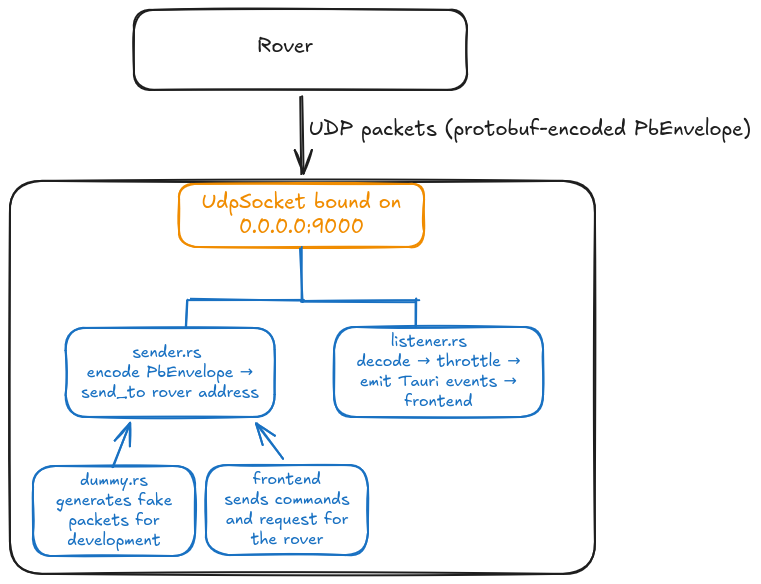
<span style="white-space: pre-wrap;">The socket is created once in </span>`<span class="editor-theme-code">service.rs</span>`<span style="white-space: pre-wrap;">, wrapped in an </span>`<span class="editor-theme-code">Arc</span>`, and shared between the listener and the sender/dummy so they all use the same bound port.

<p class="callout warning">Graph subject to change as communication gets finalized</p>

[![basestationComs.png](https://bookstack.roboteamtwente.nl/uploads/images/gallery/2026-04/scaled-1680-/basestationcoms.png)](https://bookstack.roboteamtwente.nl/uploads/images/gallery/2026-04/scaled-1680-/basestationcoms.png)

# service.rs — UDP Socket

`<span class="editor-theme-code">UdpService</span>`<span style="white-space: pre-wrap;"> is a thin wrapper that binds a UDP socket and holds it in an </span>`<span class="editor-theme-code">Arc<UdpSocket></span>`<span style="white-space: pre-wrap;"> so it can be shared across async tasks. It is registered as Tauri managed state at startup so any command can access the socket via </span>`<span class="editor-theme-code">State<'_, UdpService></span>`.

- Binds to address passed from lib.rs — listens on all interfaces on the chosen port
- `<span class="editor-theme-code">socket()</span>`<span style="white-space: pre-wrap;"> returns a cloned </span>`<span class="editor-theme-code">Arc</span>`<span style="white-space: pre-wrap;"> to the socket for use in other tasks</span>

<p class="callout info">`<span class="editor-theme-code">socket2</span>`<span style="white-space: pre-wrap;"> allows to customize the socket, otherwise the buffer size will be set by the system and be too small</span></p>

# listener.rs — Incoming Packet Handler

`<span class="editor-theme-code">run_listener()</span>`<span style="white-space: pre-wrap;"> is the main receive loop. It runs for the lifetime of the app as a spawned async task. On every received UDP datagram it:</span>

1. <span style="white-space: pre-wrap;">Decodes the raw bytes as a </span>`<span class="editor-theme-code">PbEnvelope</span>`<span style="white-space: pre-wrap;"> using prost</span>
2. Extracts the inner payload variant
3. <span style="white-space: pre-wrap;">Checks a per-payload </span>**throttle**<span style="white-space: pre-wrap;"> — events are forwarded to the frontend at most once every </span>**100ms**<span style="white-space: pre-wrap;"> per payload type, regardless of how fast the rover sends</span>
4. Emits a Tauri event to the frontend with the decoded message as the payload

### Throttling

<span style="white-space: pre-wrap;">Each payload type has its own independent </span>`<span class="editor-theme-code">Throttle</span>`<span style="white-space: pre-wrap;"> instance. This prevents high-frequency streams (e.g. IMU at 50Hz) from flooding the frontend with more updates than it can usefully render.</span>

### Tauri events emitted

<span style="white-space: pre-wrap;">These are the event names the frontend can listen to with </span>`<span class="editor-theme-code">listen()</span>`:

<p class="callout danger">**Note for future developers:** If you add new protobufers you must add them here or you want be able to listen to them</p>

# sender.rs — Outgoing Packet Sender

<p class="callout warning">This file is work in progress</p>

`<span class="editor-theme-code">send_envelope()</span>`<span style="white-space: pre-wrap;"> is the single outgoing send function. It takes a </span>`<span class="editor-theme-code">PbEnvelope</span>`<span style="white-space: pre-wrap;">, encodes it to bytes using prost, and sends it to the target address over UDP. A </span>`<span class="editor-theme-code">hex_dump()</span>`<span style="white-space: pre-wrap;"> helper (currently commented out) can be re-enabled to log outgoing packet bytes for debugging.</span>

Usage pattern in any command:

```rust
sender::send_envelope(&socket, "192.168.1.x:9000", envelope).await?;
```

# dummy.rs — Development Simulator

<span style="white-space: pre-wrap;">The simulator generates realistic fake rover data so the UI can be developed and tested without physical hardware. It is started via the </span>`<span class="editor-theme-code">start_dummy_streams</span>`<span style="white-space: pre-wrap;"> or </span>`<span class="editor-theme-code">start_detection_sim</span>`<span style="white-space: pre-wrap;"> commands from </span>`<span class="editor-theme-code">network.rs</span>`<span style="white-space: pre-wrap;"> and stopped with </span>`<span class="editor-theme-code">stop_dummy_streams</span>`.

### Stream table

Each stream has an independent send interval and a generator function that produces time-varying data:

<table id="bkmrk-streamintervalnotesi"><colgroup><col></col><col></col><col></col></colgroup><tbody><tr><th>**Stream**

</th><th>**Interval**

</th><th>**Notes**

</th></tr><tr><td>IMU

</td><td>20ms (50Hz)

</td><td>Sinusoidal accelerometer, gyro, magnetometer

</td></tr><tr><td>GPS

</td><td>200ms

</td><td>Slow position drift around a fixed coordinate (52.2297°N, 6.8978°E)

</td></tr><tr><td>pH

</td><td>500ms

</td><td>pH value oscillating around 7.0

</td></tr><tr><td>Arm control signals

</td><td>50ms

</td><td>Simulated joint control inputs

</td></tr><tr><td>Arm diagnostics

</td><td>500ms

</td><td>6 motors with dummy RPM/voltage

</td></tr><tr><td>Arm feedback

</td><td>100ms

</td><td>Occasionally simulates an obstruction error

</td></tr><tr><td>Arm positions

</td><td>50ms

</td><td>All joint angles oscillating

</td></tr><tr><td>Arm target

</td><td>200ms

</td><td>Target XYZ + jaw state

</td></tr><tr><td>Arm obstructions

</td><td>300ms

</td><td></td></tr><tr><td>Drive diagnostics

</td><td>500ms

</td><td>6 drive + 4 steering motors

</td></tr><tr><td>Drive motor

</td><td>50ms

</td><td>Distance to go, turning radius

</td></tr><tr><td>Drive progress

</td><td>100ms

</td><td>Countdown from 10m

</td></tr><tr><td>Sensor board diagnostics

</td><td>500ms

</td><td>Composite board health snapshot

</td></tr><tr><td>Detected objects

</td><td>50ms

</td><td>Generates up to 12 bounding boxes for objects

</td></tr></tbody></table>

### Network simulation

<span style="white-space: pre-wrap;">The simulator can optionally apply </span>**jitter**<span style="white-space: pre-wrap;"> (random delay up to </span>`<span class="editor-theme-code">jitter_ms</span>`<span style="white-space: pre-wrap;">) and </span>**packet loss**<span style="white-space: pre-wrap;"> (random drop with probability </span>`<span class="editor-theme-code">packet_loss</span>`) to simulate real wireless conditions. The full simulator uses 30ms jitter and 2% packet loss; the IMU-only simulator uses no jitter or loss.

###

# Frontend — Basics

**Location: src/ and src/routes/**

The frontend is a SvelteKit TypeScript application. It uses Svelte 5's runes-based reactivity (**$effect, $props, $state**<span>) throughout. All communication with the Rust backend goes through Tauri's </span>**invoke()**<span> function. Incoming rover data arrives as Tauri events listened to with </span>**listen().**

# routes/+layout.svelte — Navigation Bar

<span style="white-space: pre-wrap;">The layout wraps every page in the application. It renders the persistent navigation bar at the top and then the current page's content via </span>`<span class="editor-theme-code">{@render children()}</span>`.

### Navigation bar

The navbar contains the following controls, always visible regardless of which route is active:

**Task dropdown**<span style="white-space: pre-wrap;"> — lists the four task routes (Science, Navigation, Maintenance, Probing). Selecting one navigates to that route and updates the displayed task name.</span>

**Drive Control Mode dropdown**<span style="white-space: pre-wrap;"> — toggles between Manual and Automatic drive. Calls </span>`<span class="editor-theme-code">set_state</span>`<span style="white-space: pre-wrap;"> with </span>`<span class="editor-theme-code">DriveManual</span>`<span style="white-space: pre-wrap;"> to sync the mode to the backend.</span>

**Arm Control Mode dropdown**<span style="white-space: pre-wrap;"> — toggles between Manual and Automatic arm control. Calls </span>`<span class="editor-theme-code">set_state</span>`<span style="white-space: pre-wrap;"> with </span>`<span class="editor-theme-code">ArmManual</span>`<span style="white-space: pre-wrap;"> to sync the mode to the backend.</span>

**Start / Pause / Resume Task button**<span style="white-space: pre-wrap;"> — controls a task timer. Displays the elapsed time next to the label. The button label cycles through </span>`<span class="editor-theme-code">▶︎ Start Task</span>`<span style="white-space: pre-wrap;"> → </span>`<span class="editor-theme-code">❚❚ Pause <task></span>`<span style="white-space: pre-wrap;"> → </span>`<span class="editor-theme-code">▶︎ Resume <task></span>`<span style="white-space: pre-wrap;"> depending on state.</span>

**Mode icon**<span style="white-space: pre-wrap;"> — a centred icon that shows either a driving icon or an arm icon depending on the current </span>`<span class="editor-theme-code">pickup_mode</span>`<span style="white-space: pre-wrap;"> state. Polled from the backend every 250ms.</span>

**END TASK button**<span style="white-space: pre-wrap;"> — stops the timer and saves a task result file. Prompts the operator for confirmation before ending. The saved JSON file includes the task name, completion time, finish timestamp, and all attached samples. The filename is auto-generated as </span>`<span class="editor-theme-code">{NNNN}_{task_name}.json</span>`<span style="white-space: pre-wrap;"> where </span>`<span class="editor-theme-code">NNNN</span>`<span style="white-space: pre-wrap;"> is an incrementing zero-padded number.</span>

**Settings / Home icons**<span style="white-space: pre-wrap;"> — navigation shortcuts in the top right.</span>

### Task file naming

<span style="white-space: pre-wrap;">When a task ends, the layout reads the existing task files and finds the highest existing prefix number for that task type, then increments it. This ensures task files are always uniquely numbered in order (e.g. </span>`<span class="editor-theme-code">0000_science.json</span>`<span style="white-space: pre-wrap;">, </span>`<span class="editor-theme-code">0001_science.json</span>`).

### Camera health

`<span class="editor-theme-code">initCameraHealthListener()</span>`<span style="white-space: pre-wrap;"> from </span>`<span class="editor-theme-code">state.svelte.js</span>`<span style="white-space: pre-wrap;"> is called directly in the layout's </span>`<span class="editor-theme-code"><script></span>`<span style="white-space: pre-wrap;"> (outside </span>`<span class="editor-theme-code">onMount</span>`) so it is initialised as early as possible.

# routes/  — Pages

### / — Dashboard (Home)

**File:* `<em class="editor-theme-code editor-theme-italic">routes/+page.svelte</em>`*

The main operator screen. A CSS grid layout combining six components into a single view.

<span style="white-space: pre-wrap;">Components: </span>`<span class="editor-theme-code">Double_Video</span>`<span style="white-space: pre-wrap;">, </span>`<span class="editor-theme-code">Map</span>`<span style="white-space: pre-wrap;">, </span>`<span class="editor-theme-code">NavigationPlan</span>`<span style="white-space: pre-wrap;">, </span>`<span class="editor-theme-code">TaskCompletion</span>`<span style="white-space: pre-wrap;">, </span>`<span class="editor-theme-code">IMU</span>`<span style="white-space: pre-wrap;">, </span>`<span class="editor-theme-code">Model</span>`<span style="white-space: pre-wrap;"> (3D scene).</span>

---

### /navigation — Navigation

**File:* `<em class="editor-theme-code editor-theme-italic">routes/navigation/+page.svelte</em>`*

The navigation task screen. Focuses on map-based rover guidance.

Layout: a 2×2 grid with the map top-left, navigation plan and IMU bottom-left, double video feed top-right, and costmap bottom-right.

<span style="white-space: pre-wrap;">Components: </span>`<span class="editor-theme-code">Map</span>`<span style="white-space: pre-wrap;">, </span>`<span class="editor-theme-code">NavigationPlan</span>`<span style="white-space: pre-wrap;">, </span>`<span class="editor-theme-code">IMU</span>`<span style="white-space: pre-wrap;">, </span>`<span class="editor-theme-code">DoubleVideo</span>`<span style="white-space: pre-wrap;"> (depth + front cameras), </span>`<span class="editor-theme-code">Costmap</span>`.

---

### /maintenance — Maintenance

**File:* `<em class="editor-theme-code editor-theme-italic">routes/maintenance/+page.svelte</em>`*

The maintenance task screen. Focuses on the rover arm and diagnostics.

Layout: left side has two video feeds (arm camera and depth camera) each with a side panel for arm feedback and arm position data. Right side shows the maintenance task list.

<span style="white-space: pre-wrap;">Components: </span>`<span class="editor-theme-code">Video</span>`<span style="white-space: pre-wrap;"> (arm camera), </span>`<span class="editor-theme-code">Video</span>`<span style="white-space: pre-wrap;"> (depth camera), </span>`<span class="editor-theme-code">MaintenanceTasks</span>`.

---

### /probing — Probing

**File:* `<em class="editor-theme-code editor-theme-italic">routes/probing/+page.svelte</em>`*

The probing task screen. Used when the rover is searching for and picking up probes.

Layout: map top-left, interest locations and probes list top-right, double video bottom-left, pickup mode toggle and IMU bottom-right.

<span style="white-space: pre-wrap;">The page reads and syncs </span>`<span class="editor-theme-code">pickup_mode</span>`<span style="white-space: pre-wrap;"> from the backend on mount, and toggles it via the Drive/Pick-up Mode button, which also switches camera 1 between the depth camera and arm camera.</span>

<span style="white-space: pre-wrap;">Components: </span>`<span class="editor-theme-code">Map</span>`<span style="white-space: pre-wrap;">, </span>`<span class="editor-theme-code">InterestLocations</span>`<span style="white-space: pre-wrap;">, </span>`<span class="editor-theme-code">Probes</span>`<span style="white-space: pre-wrap;">, </span>`<span class="editor-theme-code">DoubleVideo</span>`<span style="white-space: pre-wrap;">, </span>`<span class="editor-theme-code">IMU</span>`.

---

### /science — Science

**File:* `<em class="editor-theme-code editor-theme-italic">routes/science/+page.svelte</em>`*

The science task screen. Used when the rover is collecting and analysing rock or soil samples.

<span style="white-space: pre-wrap;">Layout: left side has a map and double video feed with small side panels for locations of interest and the pickup mode toggle. Right side is fully occupied by the </span>`<span class="editor-theme-code">SamplingLocations</span>`<span style="white-space: pre-wrap;"> component.</span>

<span style="white-space: pre-wrap;">Like the probing route, it syncs </span>`<span class="editor-theme-code">pickup_mode</span>`<span style="white-space: pre-wrap;"> on mount and switches camera 1 between depth and arm camera accordingly.</span>

<span style="white-space: pre-wrap;">Components: </span>`<span class="editor-theme-code">Map</span>`<span style="white-space: pre-wrap;">, </span>`<span class="editor-theme-code">DoubleVideo</span>`<span style="white-space: pre-wrap;">, </span>`<span class="editor-theme-code">SamplingLocations</span>`.

---

### /settings — Settings

**File:* `<em class="editor-theme-code editor-theme-italic">routes/settings/+page.svelte</em>`*

The settings page. Contains developer and diagnostic utilities, not used during rover operation.

**Diagnostic controls:**<span style="white-space: pre-wrap;"> Ping Rust, Clear Cache, Ping UDP, Ping GPS, Ping pH — these call the corresponding backend commands and are used to verify the Tauri bridge and UDP connection are working.</span>

**Dummy stream controls:**<span style="white-space: pre-wrap;"> Start/Stop dummy IMU stream, Start/Stop full dummy stream — start or stop the backend simulator for development without hardware.</span>

**File management:**<span style="white-space: pre-wrap;"> List, view, and delete files from the </span>`<span class="editor-theme-code">tasks/</span>`<span style="white-space: pre-wrap;">, </span>`<span class="editor-theme-code">images/</span>`<span style="white-space: pre-wrap;">, and </span>`<span class="editor-theme-code">maps/</span>`<span style="white-space: pre-wrap;"> storage directories. Files can be clicked to view their contents inline.</span>

**Snapshot:**<span style="white-space: pre-wrap;"> Saves a single JPEG frame from port 5000 as a test image.</span>

**Model debug:**<span style="white-space: pre-wrap;"> Calls </span>`<span class="editor-theme-code">debug_resource_dir</span>`<span style="white-space: pre-wrap;"> and prints the result to the console — useful for verifying model bundling in a production build.</span>

**IP check:**<span style="white-space: pre-wrap;"> Fetches the operator laptop's public IP from </span>`<span class="editor-theme-code">api.ipify.org</span>`<span style="white-space: pre-wrap;"> and displays it. Useful for network configuration when connecting to the rover.</span>

# types.ts — Types

Shared TypeScript types used across the frontend.

**`<strong class="editor-theme-bold editor-theme-code">Sample</strong>`**<span style="white-space: pre-wrap;"> — represents a single science sample collected by the rover. Contains location name, coordinates, before/after image paths, measurement, weight, and a set of boolean </span>`<span class="editor-theme-code">_check</span>`<span style="white-space: pre-wrap;"> flags tracking which fields have been filled in. The </span>`<span class="editor-theme-code">all_check</span>`<span style="white-space: pre-wrap;"> flag is true when all required fields are complete.</span>

**`<strong class="editor-theme-bold editor-theme-code">Waypoint</strong>`**<span style="white-space: pre-wrap;"> — a map waypoint with an </span>`<span class="editor-theme-code">id</span>`<span style="white-space: pre-wrap;">, </span>`<span class="editor-theme-code">lat</span>`<span style="white-space: pre-wrap;">, and </span>`<span class="editor-theme-code">lng</span>`. Used for start point, end point, and the waypoints list in the map store.

**`<strong class="editor-theme-bold editor-theme-code">Probe</strong>`**<span style="white-space: pre-wrap;"> — a probe location with an </span>`<span class="editor-theme-code">id</span>`<span style="white-space: pre-wrap;">, </span>`<span class="editor-theme-code">lat</span>`<span style="white-space: pre-wrap;">, </span>`<span class="editor-theme-code">lng</span>`<span style="white-space: pre-wrap;">, and </span>`<span class="editor-theme-code">timestamp</span>`. Used in the probing task to record where soil probes were taken.

# state.svelte.js — Global State

`<span class="editor-theme-code">state.svelte.js</span>`<span style="white-space: pre-wrap;"> is the single source of truth for shared reactive state that needs to be accessible across multiple components and routes. Currently it manages the three camera objects.</span>

### Camera objects

<span style="white-space: pre-wrap;">Three camera state objects are exported as Svelte 5 </span>`<span class="editor-theme-code">$state</span>`<span style="white-space: pre-wrap;"> runes:</span>

<table id="bkmrk-exportportcameradept"><colgroup><col></col><col></col><col></col></colgroup><tbody><tr><th>**Export**

</th><th>**Port**

</th><th>**Camera**

</th></tr><tr><td>`<span class="editor-theme-code">depthCamera</span>`

</td><td>5000

</td><td>Depth / front-facing camera

</td></tr><tr><td>`<span class="editor-theme-code">frontCamera</span>`

</td><td>5001

</td><td>Secondary front camera

</td></tr><tr><td>`<span class="editor-theme-code">armCamera</span>`

</td><td>5002

</td><td>Arm-mounted camera

</td></tr></tbody></table>

<span style="white-space: pre-wrap;">Each object has three fields: </span>`<span class="editor-theme-code">name</span>`<span style="white-space: pre-wrap;"> (display string), </span>`<span class="editor-theme-code">port</span>`<span style="white-space: pre-wrap;"> (full </span>`<span class="editor-theme-code">http://localhost:PORT</span>`<span style="white-space: pre-wrap;"> URL used as the </span>`<span class="editor-theme-code"><img></span>`<span style="white-space: pre-wrap;"> src), and </span>`<span class="editor-theme-code">stale</span>`<span style="white-space: pre-wrap;"> (boolean set to </span>`<span class="editor-theme-code">true</span>`<span style="white-space: pre-wrap;"> when the backend reports no frames for 2+ seconds).</span>

### Camera health listener — initCameraHealthListener()

<span style="white-space: pre-wrap;">This function is called once from </span>`<span class="editor-theme-code">+layout.svelte</span>`<span style="white-space: pre-wrap;"> on app startup. It listens for the </span>`<span class="editor-theme-code">camera-feed-status</span>`<span style="white-space: pre-wrap;"> Tauri event emitted by the GStreamer health watcher in the backend, and updates the </span>`<span class="editor-theme-code">stale</span>`<span style="white-space: pre-wrap;"> flag on the matching camera object. A 500ms startup delay is included to ensure the Tauri bridge is ready before the listener is attached.</span>

<span style="white-space: pre-wrap;">Components that display video can read the </span>`<span class="editor-theme-code">stale</span>`<span style="white-space: pre-wrap;"> flag to show a warning overlay when a feed is lost.</span>

# Frontend — lib Structure

**Location: src/lib/**

# components/ — Components

<span style="white-space: pre-wrap;">A component is a reusable self-contained block of code that encapsulates HTML, CSS and JavaScript that belong together, written into a .svelte file. The documentation for them is </span>[here](https://bookstack.roboteamtwente.nl/books/base-station/chapter/frontend-components).

# stores/ — Stores

Svelte writable stores used for state that needs to be shared and persisted across route navigations within the same session.

**`<strong class="editor-theme-bold editor-theme-code">stores/samples.ts</strong>`**<span style="white-space: pre-wrap;"> — </span>`<span class="editor-theme-code">samples: Writable<Sample[]></span>`<span style="white-space: pre-wrap;"> Holds the list of science samples collected during the current task. Persists across navigation so samples are not lost when the operator moves between routes. Cleared when a task ends (or optionally kept when starting a new task — the layout prompts the operator to choose).</span>

**`<strong class="editor-theme-bold editor-theme-code">stores/map.ts</strong>`**<span style="white-space: pre-wrap;"> — </span>`<span class="editor-theme-code">displayedMap</span>`<span style="white-space: pre-wrap;">, </span>`<span class="editor-theme-code">startPoint</span>`<span style="white-space: pre-wrap;">, </span>`<span class="editor-theme-code">endPoint</span>`<span style="white-space: pre-wrap;">, </span>`<span class="editor-theme-code">waypoints</span>`<span style="white-space: pre-wrap;"> Holds the state of the navigation map: the currently loaded map image, start and end waypoints, and the list of intermediate waypoints. All are writable stores so any component can update them and the map will react.</span>

**`<strong class="editor-theme-bold editor-theme-code">stores/probes.ts</strong>`**<span style="white-space: pre-wrap;"> — </span>`<span class="editor-theme-code">probes: Writable<Probe[]></span>`<span style="white-space: pre-wrap;"> Holds the list of probe locations recorded during the Probing task.</span>

<p class="callout danger">**TODO** Add the rest of stores</p>

# css/ — Style


# proto/ — Protobufers Interface

# Frontend — Components

**Location:** src/lib/components/

Components are reusable UI building blocks used across multiple routes. Each is a self-contained Svelte file. They communicate with the backend via Tauri invoke() and receive live rover data via Tauri events listened to with listener().

# video.svelte + double_video.svelte — Video Components

### video.svelte

<p class="callout danger">**TODO:** still being developed, going to change</p>

<span style="white-space: pre-wrap;">The basic single-camera display component. Accepts a camera object from </span>`<span class="editor-theme-code">state.svelte.js</span>`<span style="white-space: pre-wrap;"> and renders it as an </span>`<span class="editor-theme-code"><img></span>`<span style="white-space: pre-wrap;"> tag pointing at the MJPEG stream URL. Supports two optional modes passed as the </span>`<span class="editor-theme-code">mode</span>`<span style="white-space: pre-wrap;"> prop:</span>

- **`<strong class="editor-theme-bold editor-theme-code">measure</strong>` mode**<span style="white-space: pre-wrap;"> — enables pixel-clicking for stereo measurement. The operator clicks two points across two camera feeds; the component calls </span>`<span class="editor-theme-code">invoke("request_measurement")</span>`<span style="white-space: pre-wrap;"> with the pixel coordinates from both cameras and returns the result via an </span>`<span class="editor-theme-code">onmeasurement</span>`<span style="white-space: pre-wrap;"> callback.</span>
- **`<strong class="editor-theme-bold editor-theme-code">pick</strong>` mode**<span style="white-space: pre-wrap;"> — enables a pick-up interaction for probe/rock collection. The </span>`<span class="editor-theme-code">pick()</span>`<span style="white-space: pre-wrap;"> function is a stub ready for the actual rover arm command to be wired in.</span>

When no mode is set the component is a plain passive video display.

### double\_video.svelte

Displays two camera feeds simultaneously with a picture-in-picture layout. The primary feed fills the frame; the secondary feed appears as a smaller overlay in the bottom-right corner. Clicking the overlay swaps the two feeds, making the secondary feed the primary and vice versa.

<span style="white-space: pre-wrap;">Both feeds show a </span>`<span class="editor-theme-code">⚠ SIGNAL LOST</span>`<span style="white-space: pre-wrap;"> overlay banner when their </span>`<span class="editor-theme-code">stale</span>`<span style="white-space: pre-wrap;"> flag is </span>`<span class="editor-theme-code">true</span>`<span style="white-space: pre-wrap;"> (set by the camera health listener in </span>`<span class="editor-theme-code">state.svelte.js</span>`). The secondary feed shows a smaller version of the same warning.

<span style="white-space: pre-wrap;">Props: </span>`<span class="editor-theme-code">camera1</span>`<span style="white-space: pre-wrap;">, </span>`<span class="editor-theme-code">camera2</span>`<span style="white-space: pre-wrap;"> — camera objects from </span>`<span class="editor-theme-code">state.svelte.js</span>`.

# model_scene.svelte + model_viewer.svelte + model_debug.ts — 3D Model Viewer

These three files together form the 3D model display system used on the dashboard.

### model\_scene.svelte

The outer container and lifecycle manager. Handles: delayed initialisation (100ms timer to ensure the DOM is ready before the WebGL canvas is created), WebGL context loss detection, error state with a retry button, and a resize nudge that forces the canvas to reflow correctly after mount.

<span style="white-space: pre-wrap;">Uses </span>`<span class="editor-theme-code">model_debug.ts</span>`<span style="white-space: pre-wrap;"> to persist error state across the component lifecycle using </span>`<span class="editor-theme-code">localStorage</span>`<span style="white-space: pre-wrap;"> — if the model failed to load in the previous render, the error state is restored immediately on mount to avoid a flash of broken content.</span>

### model\_viewer.svelte

<span style="white-space: pre-wrap;">The inner Three.js / Threlte scene. Loads the GLB model file by calling </span>`<span class="editor-theme-code">invoke("load_model")</span>`<span style="white-space: pre-wrap;">, which returns the raw bytes of the file. The bytes are parsed directly in the browser using </span>`<span class="editor-theme-code">GLTFLoader.parse()</span>`<span style="white-space: pre-wrap;"> — no HTTP request is made.</span>

<span style="white-space: pre-wrap;">After loading, all mesh materials are replaced with a uniform </span>`<span class="editor-theme-code">MeshStandardMaterial</span>`<span style="white-space: pre-wrap;"> in the Roboteam's purple brand colour (</span>`<span class="editor-theme-code">#5A1C74</span>`). The camera is automatically fitted to the model's bounding box so any model file will be centred and fill the view regardless of its original scale.

<span style="white-space: pre-wrap;">The model auto-rotates slowly using </span>`<span class="editor-theme-code">OrbitControls</span>`<span style="white-space: pre-wrap;"> with </span>`<span class="editor-theme-code">autoRotate</span>`<span style="white-space: pre-wrap;">. User rotation, zoom, and pan are disabled — the view is fixed. A scale animation eases the model from 0 to 1 on load using Threlte's </span>`<span class="editor-theme-code">useTask</span>`.

### model\_debug.ts

<span style="white-space: pre-wrap;">A small utility module with two functions: </span>`<span class="editor-theme-code">setLoadFailed(bool)</span>`<span style="white-space: pre-wrap;"> and </span>`<span class="editor-theme-code">wasLoadFailed(): bool</span>`<span style="white-space: pre-wrap;">. These read and write a </span>`<span class="editor-theme-code">localStorage</span>`<span style="white-space: pre-wrap;"> key to persist the model error state across component re-renders.</span>

# task_completion.svelte —  Task Completion

<span style="white-space: pre-wrap;">Displays the history of completed tasks read from the </span>`<span class="editor-theme-code">tasks/</span>`<span style="white-space: pre-wrap;"> app data directory. On mount it lists all task files and deserialises each JSON file into a </span>`<span class="editor-theme-code">Task</span>`<span style="white-space: pre-wrap;"> object.</span>

### Task list

Each task is shown as a card with its name, number, completion time, and finish timestamp. Clicking a card opens a detail modal. A delete button removes the task file and all associated sample images.

### Task detail modal

<span style="white-space: pre-wrap;">Shows full task metadata and a list of all attached </span>`<span class="editor-theme-code">Sample</span>`<span style="white-space: pre-wrap;"> objects with their location, coordinates, measurement, weight, and image paths. Image paths are clickable links that open the image viewer modal.</span>

### Image viewer modal

<span style="white-space: pre-wrap;">Loads the before and after sample images using </span>`<span class="editor-theme-code">appDataDir()</span>`<span style="white-space: pre-wrap;"> + </span>`<span class="editor-theme-code">convertFileSrc()</span>`<span style="white-space: pre-wrap;"> and displays them side by side.</span>

# map.svelte — Map

<p class="callout danger">**TODO:** We still don't have the map format, function is subject to change</p>

<span style="white-space: pre-wrap;">Displays a static map that the operator imports. The map is stored in the </span>`<span class="editor-theme-code">maps/</span>`<span style="white-space: pre-wrap;"> app data directory and loaded using Tauri's asset protocol (</span>`<span class="editor-theme-code">convertFileSrc</span>`).

### Map selection flow

<span style="white-space: pre-wrap;">On mount, the component checks the </span>`<span class="editor-theme-code">displayedMap</span>`<span style="white-space: pre-wrap;"> store. If a map is already selected (from a previous navigation within the session) it loads it directly. If not, it lists available map files and presents a selection UI. If exactly one map file exists it is auto-selected and confirmed without operator interaction.</span>

<span style="white-space: pre-wrap;">Once a map is confirmed, the full path is constructed using </span>`<span class="editor-theme-code">appDataDir()</span>`<span style="white-space: pre-wrap;"> and converted to a Tauri asset URL for display. The selected map is written to the </span>`<span class="editor-theme-code">displayedMap</span>`<span style="white-space: pre-wrap;"> store so other components (and other routes) can access it.</span>

A reload button (⟳) resets the selection and re-lists available files. Mouse coordinates over the map are tracked and displayed, laying the groundwork for click-based waypoint placement.

# costmap.svelte — Costmap

<p class="callout danger">**TODO:** A placeholder component that renders a "Costmap" heading. Intended to display the rover's navigation cost map (obstacle/traversability grid) received from the rover. Not yet implemented.</p>

# imu.svelte — IMU

<span style="white-space: pre-wrap;">Displays live inertial measurement unit data received from the </span>`<span class="editor-theme-code">imu-update</span>`<span style="white-space: pre-wrap;"> Tauri event.</span>

### Data displayed

**Accelerometer**<span style="white-space: pre-wrap;"> — X/Y/Z values in m/s² with a live scrolling sparkline chart showing the last 60 samples per axis. Each axis has a distinct colour (red, purple, green).</span>

**Gyroscope**<span style="white-space: pre-wrap;"> — X/Y/Z values in °/s with the same sparkline treatment.</span>

**Orientation cube**<span style="white-space: pre-wrap;"> — a CSS 3D cube whose </span>`<span class="editor-theme-code">rotateX/Y/Z</span>`<span style="white-space: pre-wrap;"> transform is driven by integrating the gyroscope values over time, giving a visual indication of the rover's pitch, roll, and yaw. Euler angles are displayed numerically next to the cube.</span>

**Compass**<span style="white-space: pre-wrap;"> — a Canvas-drawn compass rose with tick marks, cardinal labels, and a red needle pointing in the direction derived from the magnetometer X/Y values. The needle and labels adapt to light/dark colour scheme.</span>

**Status bar**<span style="white-space: pre-wrap;"> — shows calibration status (✓ Cal / ! Uncal), sensor state (Idle / Operating / Calibrating / Error), any active error code, and the current update rate in Hz.</span>

### Performance

<span style="white-space: pre-wrap;">Incoming events are batched using </span>`<span class="editor-theme-code">requestAnimationFrame</span>`<span style="white-space: pre-wrap;"> — a </span>`<span class="editor-theme-code">pending</span>`<span style="white-space: pre-wrap;"> buffer holds the latest payload and the render only runs on the next animation frame, so high-frequency updates (up to 50Hz) never block the UI thread. The Hz counter counts packets per second independently of renders.</span>

# sampling_locations.svelte + SampleField.svelte — Sampling Locations

<span style="white-space: pre-wrap;">The main data collection interface for the Science task. Manages a list of </span>`<span class="editor-theme-code">Sample</span>`<span style="white-space: pre-wrap;"> objects stored in the </span>`<span class="editor-theme-code">samples</span>`<span style="white-space: pre-wrap;"> Svelte store.</span>

### Sample card

<span style="white-space: pre-wrap;">Each sample in the list is rendered as a card with an editable location name field and a set of </span>`<span class="editor-theme-code">SampleField</span>`<span style="white-space: pre-wrap;"> sub-components. The location name field updates </span>`<span class="editor-theme-code">location_name_check</span>`<span style="white-space: pre-wrap;"> automatically as the operator types.</span>

### SampleField.svelte

<span style="white-space: pre-wrap;">A reusable row sub-component used inside each sample card. Renders a checkbox (bound to a </span>`<span class="editor-theme-code">checked</span>`<span style="white-space: pre-wrap;"> prop), a label, the current value, and a </span>`<span class="editor-theme-code">+</span>`<span style="white-space: pre-wrap;"> button that opens the relevant modal. Used for: Coordinates, Size, Weight, Image Before, Image After.</span>

### Modals

<span style="white-space: pre-wrap;">Clicking a </span>`<span class="editor-theme-code">+</span>`<span style="white-space: pre-wrap;"> button opens a modal specific to that field type:</span>

**Coordinates**<span style="white-space: pre-wrap;"> — a single button that calls </span>`<span class="editor-theme-code">invoke("request_coordinates")</span>`<span style="white-space: pre-wrap;">, receives a </span>`<span class="editor-theme-code">[lat, lon]</span>`<span style="white-space: pre-wrap;"> tuple from the rover, formats it as a string, and saves it to the sample.</span>

**Measurement**<span style="white-space: pre-wrap;"> — shows two camera feeds (arm + front) in </span>`<span class="editor-theme-code">measure</span>`<span style="white-space: pre-wrap;"> mode. The operator clicks two corresponding points on the two feeds to trigger a stereo measurement via </span>`<span class="editor-theme-code">invoke("request_measurement")</span>`. The returned value is saved to the sample.

**Weight**<span style="white-space: pre-wrap;"> — a single button that calls </span>`<span class="editor-theme-code">invoke("request_weight")</span>`<span style="white-space: pre-wrap;"> and saves the returned gram value to the sample.</span>

**Image Before / Image After**<span style="white-space: pre-wrap;"> — shows all three camera feeds. Clicking any feed calls </span>`<span class="editor-theme-code">invoke("save_snapshot")</span>`<span style="white-space: pre-wrap;"> which captures a JPEG frame from that stream and saves it to the </span>`<span class="editor-theme-code">images/</span>`<span style="white-space: pre-wrap;"> directory. The filename is </span>`<span class="editor-theme-code">{sample.label}_{before|after}</span>`.

### Pick up Rock

<p class="callout warning">This section is work in progress</p>

<span style="white-space: pre-wrap;">A separate overlay accessible from a button at the bottom of the component. Shows all three camera feeds in </span>`<span class="editor-theme-code">pick</span>`<span style="white-space: pre-wrap;"> mode. The </span>`<span class="editor-theme-code">pick()</span>`<span style="white-space: pre-wrap;"> function is currently a stub for the rover arm pick-up command.</span>

# interest_locations.svelte — Interest Locations

<p class="callout danger">**TODO:** A placeholder component that renders a "Locations of Interest" heading. Intended to display GPS-tagged points of interest identified during the probing task. Not yet implemented.</p>

# navigation_plan.svelte — Navigation Plan

<span style="white-space: pre-wrap;">A drag-and-drop ordered list of navigation waypoints using </span>`<span class="editor-theme-code">svelte-dnd-action</span>`<span style="white-space: pre-wrap;">. Reads from and writes to the </span>`<span class="editor-theme-code">waypoints</span>`<span style="white-space: pre-wrap;">, </span>`<span class="editor-theme-code">startPoint</span>`<span style="white-space: pre-wrap;">, and </span>`<span class="editor-theme-code">endPoint</span>`<span style="white-space: pre-wrap;"> stores in </span>`<span class="editor-theme-code">stores/map.ts</span>`.

<span style="white-space: pre-wrap;">The list always starts with a fixed </span>**Starting Point**<span style="white-space: pre-wrap;"> card and ends with a fixed </span>**End Point**<span style="white-space: pre-wrap;"> card. Between them the operator can add intermediate waypoints and reorder them by dragging. Each waypoint has a delete button.</span>

<span style="white-space: pre-wrap;">The </span>**Add Map File**<span style="white-space: pre-wrap;"> button opens a native file picker (filtered to JSON, GeoJSON, TXT, JPEG) and calls </span>`<span class="editor-theme-code">invoke("import_map_file")</span>`<span style="white-space: pre-wrap;"> to copy the selected file into the app's </span>`<span class="editor-theme-code">maps/</span>`<span style="white-space: pre-wrap;"> directory, where the map component can then find it.</span>

<p class="callout danger"><span style="white-space: pre-wrap;">The </span>**Plan Route**<span style="white-space: pre-wrap;"> button is a stub ready to be connected to actual route planning logic.</span></p>

# probes.svelte — Probes

<span style="white-space: pre-wrap;">Displays the list of probes from the </span>`<span class="editor-theme-code">probes</span>`<span style="white-space: pre-wrap;"> store. Currently each probe renders as a basic card. A "Pick up probe" button opens an overlay showing all three camera feeds in </span>`<span class="editor-theme-code">pick</span>`<span style="white-space: pre-wrap;"> mode, using the same pattern as the pick-up overlay in </span>`<span class="editor-theme-code">sampling_locations.svelte</span>`<span style="white-space: pre-wrap;">. </span>

<p class="callout danger">**TODO:** <span style="white-space: pre-wrap;">The </span>`<span class="editor-theme-code">pick()</span>`<span style="white-space: pre-wrap;"> function is a stub.</span></p>

# maintenance_tasks.svelte — Maintenance Panel

<p class="callout danger">**TODO:** WIP</p>

# map.svelte + navigation_plan.svelte + interest_locations.svelte — Map & Navigation Components

### map.svelte

<span style="white-space: pre-wrap;">The core map display component. Loads a map file from </span>`<span class="editor-theme-code"><appDataDir>/maps/</span>`<span style="white-space: pre-wrap;">, renders it in a letterboxed </span>`<span class="editor-theme-code"><img></span>`<span style="white-space: pre-wrap;"> element, and overlays interactive pins on top. Accepts a </span>`<span class="editor-theme-code">mode</span>`<span style="white-space: pre-wrap;"> prop that controls what happens when the operator clicks the map.</span>

<table id="bkmrk-modeclick-behaviourp"><colgroup><col></col><col style="width: 223px;"></col><col></col></colgroup><tbody><tr><th>Mode

</th><th>Click behaviour

</th><th>Pins shown

</th></tr><tr><td>`<span class="editor-theme-code">navigation</span>`

</td><td><span style="white-space: pre-wrap;">Adds a </span>`<span class="editor-theme-code">PinnedCoord</span>`<span style="white-space: pre-wrap;"> to the </span>

`<span class="editor-theme-code">pinnedCoords</span>`<span style="white-space: pre-wrap;"> store</span>

</td><td>Unassigned pins + start/waypoint/end markers

</td></tr><tr><td>`<span class="editor-theme-code">science</span>`

</td><td><span style="white-space: pre-wrap;">Adds an </span>`<span class="editor-theme-code">InterestLocation</span>`<span style="white-space: pre-wrap;"> to </span>`<span class="editor-theme-code">scienceLocations</span>`

</td><td>Science location pins

</td></tr><tr><td>`<span class="editor-theme-code">probing</span>`

</td><td><span style="white-space: pre-wrap;">Adds an </span>`<span class="editor-theme-code">InterestLocation</span>`<span style="white-space: pre-wrap;"> to </span>`<span class="editor-theme-code">probingLocations</span>`

</td><td>Probing location pins

</td></tr></tbody></table>

***Map loading***<span style="white-space: pre-wrap;"> — On mount, if </span>`<span class="editor-theme-code">displayedMap</span>`<span style="white-space: pre-wrap;"> store already holds a filename it is opened immediately; otherwise the component calls </span>`<span class="editor-theme-code">list_task_files("maps")</span>`<span style="white-space: pre-wrap;"> and shows a selection modal. If only one map file exists it is auto-selected. The reload button (⟳) clears all state and returns to the selection modal.</span>

3D formats (`<span class="editor-theme-code">.obj</span>`<span style="white-space: pre-wrap;">, </span>`<span class="editor-theme-code">.las</span>`<span style="white-space: pre-wrap;">, </span>`<span class="editor-theme-code">.laz</span>`<span style="white-space: pre-wrap;">, </span>`<span class="editor-theme-code">.e57</span>`<span style="white-space: pre-wrap;">) trigger a </span>`<span class="editor-theme-code">render_map</span>`<span style="white-space: pre-wrap;"> invoke before display, showing a spinner while the backend works. Plain image formats are loaded directly via </span>`<span class="editor-theme-code">convertFileSrc</span>`<span style="white-space: pre-wrap;">. After rendering, the </span>`<span class="editor-theme-code">_preview.png</span>`<span style="white-space: pre-wrap;"> path is used for all subsequent display.</span>

***Coordinate geometry*** <span style="white-space: pre-wrap;">— </span>`<span class="editor-theme-code">getRenderedRect()</span>`<span style="white-space: pre-wrap;"> computes the actual rendered rectangle of the image inside its element (accounting for letterboxing / </span>`<span class="editor-theme-code">object-fit</span>`<span style="white-space: pre-wrap;"> behaviour). </span>`<span class="editor-theme-code">eventToImgPixel()</span>`<span style="white-space: pre-wrap;"> converts a raw </span>`<span class="editor-theme-code">MouseEvent</span>`<span style="white-space: pre-wrap;"> into a pixel coordinate within the PNG, with Y flipped so the origin is bottom-left. </span>`<span class="editor-theme-code">worldToCSSPos()</span>`<span style="white-space: pre-wrap;"> is the inverse — takes a world-space </span>`<span class="editor-theme-code">(x, y)</span>`<span style="white-space: pre-wrap;"> in metres and returns a </span>`<span class="editor-theme-code">left/top</span>`<span style="white-space: pre-wrap;"> percentage suitable for absolute positioning an overlay element on top of the image. Both functions short-circuit to </span>`<span class="editor-theme-code">null</span>`<span style="white-space: pre-wrap;"> when </span>`<span class="editor-theme-code">mapMeta</span>`<span style="white-space: pre-wrap;"> is unavailable.</span>

***Mouse interaction***<span style="white-space: pre-wrap;"> — </span>`<span class="editor-theme-code">onMouseMove</span>`<span style="white-space: pre-wrap;"> calls </span>`<span class="editor-theme-code">eventToImgPixel</span>`<span style="white-space: pre-wrap;"> and then invokes </span>`<span class="editor-theme-code">pixel_to_world</span>`<span style="white-space: pre-wrap;"> to display a live coordinate overlay in the bottom-left corner (pixel position + world metres + "Click to pin" hint). The overlay disappears when the cursor leaves the image.</span>

***GPS marker***<span style="white-space: pre-wrap;"> — Listens for </span>`<span class="editor-theme-code">gps-update</span>`<span style="white-space: pre-wrap;"> Tauri events on mount. The payload's </span>`<span class="editor-theme-code">longitude</span>`/`<span class="editor-theme-code">latitude</span>`<span style="white-space: pre-wrap;"> fields are reused directly as map-space X/Y metres. When a valid GPS position is in the store, a directional arrow marker (</span>`<span class="editor-theme-code">▶</span>`<span style="white-space: pre-wrap;">) is rendered at the corresponding map position, rotated by </span>`<span class="editor-theme-code">heading</span>`<span style="white-space: pre-wrap;"> via a CSS custom property </span>`<span class="editor-theme-code">--heading</span>`.

***Pinned coordinate list*** <span style="white-space: pre-wrap;">— In </span>`<span class="editor-theme-code">navigation</span>`<span style="white-space: pre-wrap;"> mode, a sidebar panel lists all </span>`<span class="editor-theme-code">pinnedCoords</span>`<span style="white-space: pre-wrap;"> with copy-to-clipboard (📋) and remove (✕) buttons. Hovering a row highlights the corresponding pin on the map, and vice versa, via </span>`<span class="editor-theme-code">hoveredPinId</span>`.

### navigation\_plan.svelte

<span style="white-space: pre-wrap;">A sidebar panel for building a navigation route from map-pinned coordinates. Displays a structured plan of start point → ordered waypoints → end point, and surfaces any </span>`<span class="editor-theme-code">pinnedCoords</span>`<span style="white-space: pre-wrap;"> that haven't yet been assigned a role.</span>

***Route structure***<span style="white-space: pre-wrap;"> — The plan always shows three sections in order: a Start card, a draggable Waypoints list, and an End card. Unset slots show "Not set". Hovering any card cross-highlights its corresponding pin on the map via the </span>`<span class="editor-theme-code">hoveredNavId</span>`<span style="white-space: pre-wrap;"> store (shared with </span>`<span class="editor-theme-code">map.svelte</span>`).

***Waypoint reordering*** <span style="white-space: pre-wrap;">— The waypoint list uses </span>`<span class="editor-theme-code">svelte-dnd-action</span>`<span style="white-space: pre-wrap;"> (</span>`<span class="editor-theme-code">dndzone</span>`<span style="white-space: pre-wrap;">) for drag-and-drop reordering. Both </span>`<span class="editor-theme-code">consider</span>`<span style="white-space: pre-wrap;"> and </span>`<span class="editor-theme-code">finalize</span>`<span style="white-space: pre-wrap;"> events write the new order directly to the </span>`<span class="editor-theme-code">waypoints</span>`<span style="white-space: pre-wrap;"> store.</span>

***Promoting pinned coords*** <span style="white-space: pre-wrap;">— Each </span>`<span class="editor-theme-code">PinnedCoord</span>`<span style="white-space: pre-wrap;"> from the map appears in a "Pinned from map" section at the bottom of the list. Three buttons let the operator promote a pin to Start, add it as a new Waypoint, or set it as End. In all cases the pin is removed from </span>`<span class="editor-theme-code">pinnedCoords</span>`<span style="white-space: pre-wrap;"> after promotion.</span>

***Destructive actions***<span style="white-space: pre-wrap;"> — Removing a waypoint and clearing the entire plan both trigger a native </span>`<span class="editor-theme-code">confirm()</span>`<span style="white-space: pre-wrap;"> dialog before proceeding.</span>

***Map import***<span style="white-space: pre-wrap;"> — The "+ Add Map File" button opens a file picker (via </span>`<span class="editor-theme-code">@tauri-apps/plugin-dialog</span>`<span style="white-space: pre-wrap;">) filtered to </span>`<span class="editor-theme-code">.json</span>`<span style="white-space: pre-wrap;">, </span>`<span class="editor-theme-code">.geojson</span>`<span style="white-space: pre-wrap;">, </span>`<span class="editor-theme-code">.txt</span>`<span style="white-space: pre-wrap;">, </span>`<span class="editor-theme-code">.jpeg</span>`<span style="white-space: pre-wrap;">, </span>`<span class="editor-theme-code">.obj</span>`<span style="white-space: pre-wrap;">, </span>`<span class="editor-theme-code">.las</span>`<span style="white-space: pre-wrap;">, </span>`<span class="editor-theme-code">.laz</span>`<span style="white-space: pre-wrap;">, </span>`<span class="editor-theme-code">.e57</span>`<span style="white-space: pre-wrap;">, then calls </span>`<span class="editor-theme-code">invoke("import_map_file")</span>`<span style="white-space: pre-wrap;"> to copy the chosen file into the app's maps directory. The "▶︎ Plan Route" button is present but not yet wired to a backend command.</span>

### interest\_locations.svelte

A generic, reusable sidebar list for named locations of interest. Used by both the Science and Probing task panels, which pass in their respective stores (`<span class="editor-theme-code">scienceLocations</span>`<span style="white-space: pre-wrap;"> / </span>`<span class="editor-theme-code">probingLocations</span>`<span style="white-space: pre-wrap;"> and the matching hovered-id store) as props.</span>

<span style="white-space: pre-wrap;">Props: </span>`<span class="editor-theme-code">locations</span>`<span style="white-space: pre-wrap;"> — a </span>`<span class="editor-theme-code">Writable<InterestLocation[]></span>`<span style="white-space: pre-wrap;"> store; </span>`<span class="editor-theme-code">hoveredId</span>`<span style="white-space: pre-wrap;"> — a </span>`<span class="editor-theme-code">Writable<string | null></span>`<span style="white-space: pre-wrap;"> store shared with </span>`<span class="editor-theme-code">map.svelte</span>`<span style="white-space: pre-wrap;"> for cross-highlighting.</span>

<span style="white-space: pre-wrap;">Each location row shows its auto-generated name and its </span>`<span class="editor-theme-code">(x, y)</span>`<span style="white-space: pre-wrap;"> coordinates in metres. Hovering a row sets </span>`<span class="editor-theme-code">hoveredId</span>`, which causes the corresponding pin on the map to highlight. Two actions are available per row:

- **Rename (✏️)**<span style="white-space: pre-wrap;"> — Switches the name label to an inline </span>`<span class="editor-theme-code"><input></span>`. The edit is committed on blur or Enter; if the input is left empty the original name is kept. Only one location can be in edit mode at a time (`<span class="editor-theme-code">editingId</span>`<span style="white-space: pre-wrap;"> state).</span>
- **Remove (✕)**<span style="white-space: pre-wrap;"> — Removes the location from the store immediately with no confirmation.</span>

When the list is empty a hint instructs the operator to click the map to add a location.