# Backend — Networking & Protocol

**Location:** src-tauri/src/network/

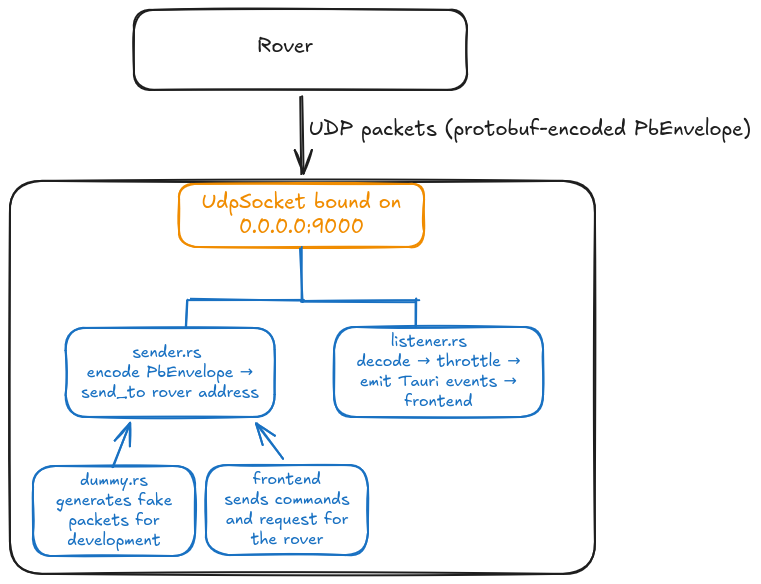
This module owns the UDP socket and all communication between the base station and the rover. It is split into four files: service, listener, sender and dummy.

# Overview

<span style="white-space: pre-wrap;">The socket is created once in </span>`<span class="editor-theme-code">service.rs</span>`<span style="white-space: pre-wrap;">, wrapped in an </span>`<span class="editor-theme-code">Arc</span>`, and shared between the listener and the sender/dummy so they all use the same bound port.

<p class="callout warning">Graph subject to change as communication gets finalized</p>

[![basestationComs.png](https://bookstack.roboteamtwente.nl/uploads/images/gallery/2026-04/scaled-1680-/basestationcoms.png)](https://bookstack.roboteamtwente.nl/uploads/images/gallery/2026-04/scaled-1680-/basestationcoms.png)

# service.rs — UDP Socket

`<span class="editor-theme-code">UdpService</span>`<span style="white-space: pre-wrap;"> is a thin wrapper that binds a UDP socket and holds it in an </span>`<span class="editor-theme-code">Arc<UdpSocket></span>`<span style="white-space: pre-wrap;"> so it can be shared across async tasks. It is registered as Tauri managed state at startup so any command can access the socket via </span>`<span class="editor-theme-code">State<'_, UdpService></span>`.

- Binds to address passed from lib.rs — listens on all interfaces on the chosen port
- `<span class="editor-theme-code">socket()</span>`<span style="white-space: pre-wrap;"> returns a cloned </span>`<span class="editor-theme-code">Arc</span>`<span style="white-space: pre-wrap;"> to the socket for use in other tasks</span>

<p class="callout info">`<span class="editor-theme-code">socket2</span>`<span style="white-space: pre-wrap;"> allows to customize the socket, otherwise the buffer size will be set by the system and be too small</span></p>

# listener.rs — Incoming Packet Handler

`<span class="editor-theme-code">run_listener()</span>`<span style="white-space: pre-wrap;"> is the main receive loop. It runs for the lifetime of the app as a spawned async task. On every received UDP datagram it:</span>

1. <span style="white-space: pre-wrap;">Decodes the raw bytes as a </span>`<span class="editor-theme-code">PbEnvelope</span>`<span style="white-space: pre-wrap;"> using prost</span>
2. Extracts the inner payload variant
3. <span style="white-space: pre-wrap;">Checks a per-payload </span>**throttle**<span style="white-space: pre-wrap;"> — events are forwarded to the frontend at most once every </span>**100ms**<span style="white-space: pre-wrap;"> per payload type, regardless of how fast the rover sends</span>
4. Emits a Tauri event to the frontend with the decoded message as the payload

### Throttling

<span style="white-space: pre-wrap;">Each payload type has its own independent </span>`<span class="editor-theme-code">Throttle</span>`<span style="white-space: pre-wrap;"> instance. This prevents high-frequency streams (e.g. IMU at 50Hz) from flooding the frontend with more updates than it can usefully render.</span>

### Tauri events emitted

<span style="white-space: pre-wrap;">These are the event names the frontend can listen to with </span>`<span class="editor-theme-code">listen()</span>`:

<p class="callout danger">**Note for future developers:** If you add new protobufers you must add them here or you want be able to listen to them</p>

# sender.rs — Outgoing Packet Sender

<p class="callout warning">This file is work in progress</p>

`<span class="editor-theme-code">send_envelope()</span>`<span style="white-space: pre-wrap;"> is the single outgoing send function. It takes a </span>`<span class="editor-theme-code">PbEnvelope</span>`<span style="white-space: pre-wrap;">, encodes it to bytes using prost, and sends it to the target address over UDP. A </span>`<span class="editor-theme-code">hex_dump()</span>`<span style="white-space: pre-wrap;"> helper (currently commented out) can be re-enabled to log outgoing packet bytes for debugging.</span>

Usage pattern in any command:

```rust
sender::send_envelope(&socket, "192.168.1.x:9000", envelope).await?;
```

# dummy.rs — Development Simulator

<span style="white-space: pre-wrap;">The simulator generates realistic fake rover data so the UI can be developed and tested without physical hardware. It is started via the </span>`<span class="editor-theme-code">start_dummy_streams</span>`<span style="white-space: pre-wrap;"> or </span>`<span class="editor-theme-code">start_detection_sim</span>`<span style="white-space: pre-wrap;"> commands from </span>`<span class="editor-theme-code">network.rs</span>`<span style="white-space: pre-wrap;"> and stopped with </span>`<span class="editor-theme-code">stop_dummy_streams</span>`.

### Stream table

Each stream has an independent send interval and a generator function that produces time-varying data:

<table id="bkmrk-streamintervalnotesi"><colgroup><col></col><col></col><col></col></colgroup><tbody><tr><th>**Stream**

</th><th>**Interval**

</th><th>**Notes**

</th></tr><tr><td>IMU

</td><td>20ms (50Hz)

</td><td>Sinusoidal accelerometer, gyro, magnetometer

</td></tr><tr><td>GPS

</td><td>200ms

</td><td>Slow position drift around a fixed coordinate (52.2297°N, 6.8978°E)

</td></tr><tr><td>pH

</td><td>500ms

</td><td>pH value oscillating around 7.0

</td></tr><tr><td>Arm control signals

</td><td>50ms

</td><td>Simulated joint control inputs

</td></tr><tr><td>Arm diagnostics

</td><td>500ms

</td><td>6 motors with dummy RPM/voltage

</td></tr><tr><td>Arm feedback

</td><td>100ms

</td><td>Occasionally simulates an obstruction error

</td></tr><tr><td>Arm positions

</td><td>50ms

</td><td>All joint angles oscillating

</td></tr><tr><td>Arm target

</td><td>200ms

</td><td>Target XYZ + jaw state

</td></tr><tr><td>Arm obstructions

</td><td>300ms

</td><td></td></tr><tr><td>Drive diagnostics

</td><td>500ms

</td><td>6 drive + 4 steering motors

</td></tr><tr><td>Drive motor

</td><td>50ms

</td><td>Distance to go, turning radius

</td></tr><tr><td>Drive progress

</td><td>100ms

</td><td>Countdown from 10m

</td></tr><tr><td>Sensor board diagnostics

</td><td>500ms

</td><td>Composite board health snapshot

</td></tr><tr><td>Detected objects

</td><td>50ms

</td><td>Generates up to 12 bounding boxes for objects

</td></tr></tbody></table>

### Network simulation

<span style="white-space: pre-wrap;">The simulator can optionally apply </span>**jitter**<span style="white-space: pre-wrap;"> (random delay up to </span>`<span class="editor-theme-code">jitter_ms</span>`<span style="white-space: pre-wrap;">) and </span>**packet loss**<span style="white-space: pre-wrap;"> (random drop with probability </span>`<span class="editor-theme-code">packet_loss</span>`) to simulate real wireless conditions. The full simulator uses 30ms jitter and 2% packet loss; the IMU-only simulator uses no jitter or loss.

###